
Text drop shadow inside a custom paint function of QStyledItemDelegate
-
Hi all,
this has probably been asked hundreds of times, but I still couldn't find an answer for my use case.
I want to draw some text with a drop shadow inside my custom override of
QStyledItemDelegate::paintfunction. From searching other answers, I have found that I can applyQGraphicsDropShadowEffectto widgets withQWidget::setGraphicsEffect, but I don't know how I'd be doing something similar using just the painter API. Looking at the source forQGraphicsDropShadowEffect, it seems to delegate all its work toQPixmapDropShadowFilter, which is not part of the public API.My paint function draws a pixmap graphic and overlays it with some text, which is why a drop shadow would be good for legibility. Currently, I'm using a trivial implementation by just offsetting the text by 1 pixel and calling
QStyle::drawItemText, i.e.:def paint(self, painter, opt, modelIdx): # ... textRect = self.style.subElementRect(QtWidgets.QStyle.SE_ItemViewItemText, opt, opt.widget); align = QtCore.Qt.AlignLeft | QtCore.Qt.AlignVCenter dsRect = QtCore.QRect(textRect) dsRect.translate(1, 1) # shadow painter.setPen(QtGui.QPen(QtGui.QColor("black"))) self.style.drawItemText(painter, dsRect, align, opt.palette, bool(opt.state & QtWidgets.QStyle.State_Enabled), opt.text) # text painter.setPen(QtGui.QPen(QtGui.QColor("white"))) self.style.drawItemText(painter, textRect, align, opt.palette, bool(opt.state & QtWidgets.QStyle.State_Enabled), opt.text)This looks okay at best for normal text, and pretty bad for text including emoji characters.
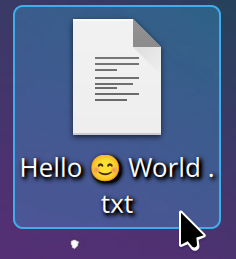
My KDE Plasma desktop has a much nicer drop shadow for file names. Not sure if that's based on QML or Qt Widgets, but I'd like to get something similar:
-
Hi!
I don't think it is a common question at all, actually.
Drop shadow is basically "just" a combination of blur and offset effects, right? Or as the closest AI to me says:
- Copy the Object: Create a duplicate of the object for which the shadow is being generated.
- Color Adjustment: Change the color of the duplicate to a darker shade, typically black or gray.
- Offset Positioning: Move the shadow copy slightly down and to the side of the original object to simulate the light source's angle.
- Blur Effect: Apply a blur effect to soften the edges of the shadow, making it appear more realistic.
- Alpha Blending: Blend the shadow with the background to enhance realism, adjusting the opacity as needed.
While
QPixmapDropShadowFilteris indeed private API,QPixmapDropShadowFilter::drawis pretty straightforward in following the above steps. No reason why you can't take a similar approach in your own code. Basically, draw the the text into a off-screenQImagewith a suitable pixel format instead of the delegate's painter directly, and process that. There is no public API for blurring an image that I'm aware of but the algorithm for Guassian blur is well known, and in Python you should have easy access to other libraries specializing in that (PIL maybe? not an expert here).If you want to the drop shadow letter by letter (not sure it is needed, but just for completeness) - you'll need to go two levels deeper in the public API and use
QTextLayoutdirectly, which after layouting gives you the glyph runs - from which you can draw the individual glyphs.Regarding KDE, Plasma Desktop is all QML. You can perhaps start sniffing in the Plasma Desktop Containment code for the implementation details, or just ask in the KDE chat room I guess.
-
Thanks for the link!
If I traced it down correctly, it appears KDE uses org.kde.plasma.extras.ShadowedLabel, which in turn uses the DropShadow QML Type, which is only available with the OpenGL backend. In Qt6, this was replaced by the newer MultiEffect QML Type, but similar caveats apply.So there's apparently no public API for CPU / painter-based equivalent.
-
I've found an answer using
QGraphicsDropShadowEffecton Stack Overflow:
You can useQGraphicsPixmapItemto apply the effect purely on a pixmap instead of a widget, and useQGraphicsSceneto render back to a pixmap. Not sure how expensive that is, might make sense to also throwQPixmapCacheinto the mix.I wanted to post the Python code for the solution translated to my use case, but the forum thinks that's spam, so 🤷♂️.