
Skip to content
  • Categories
  • Recent
  • Tags
  • Popular
  • Users
  • Groups
  • Search
  • Get Qt Extensions
  • Unsolved
Collapse
Brand Logo
  1. Home
  2. Qt Development
  3. Qt for Python
  4. Qt3d - camera transforms not working

Qt3d - camera transforms not working

Scheduled Pinned Locked Moved Unsolved Qt for Python
2 Posts 2 Posters 122 Views 2 Watching
  • Oldest to Newest
  • Newest to Oldest
  • Most Votes
Reply
  • Reply as topic
Log in to reply
This topic has been deleted. Only users with topic management privileges can see it.
  • J Offline
    J Offline
    Juliusz_K
    wrote last edited by Juliusz_K
    #1

    I have upgraded PySide version for my project from 6.6.1 to 6.10.1 and noticed, that my cameras no longer work. I had a mouse + keyboard controls for all kind of camera rotations and moves, but now none of that is working. I can set the camera position via code and read back - the values change, but the render does not reflect any change in camera position.

    Also, all ortographic views - top, front and left - look top-down, with the right view being turned by 90 degrees, but front is identical to the top. See below.

    Looks like a serious regression to me. Are there any chances for this to be fixed?
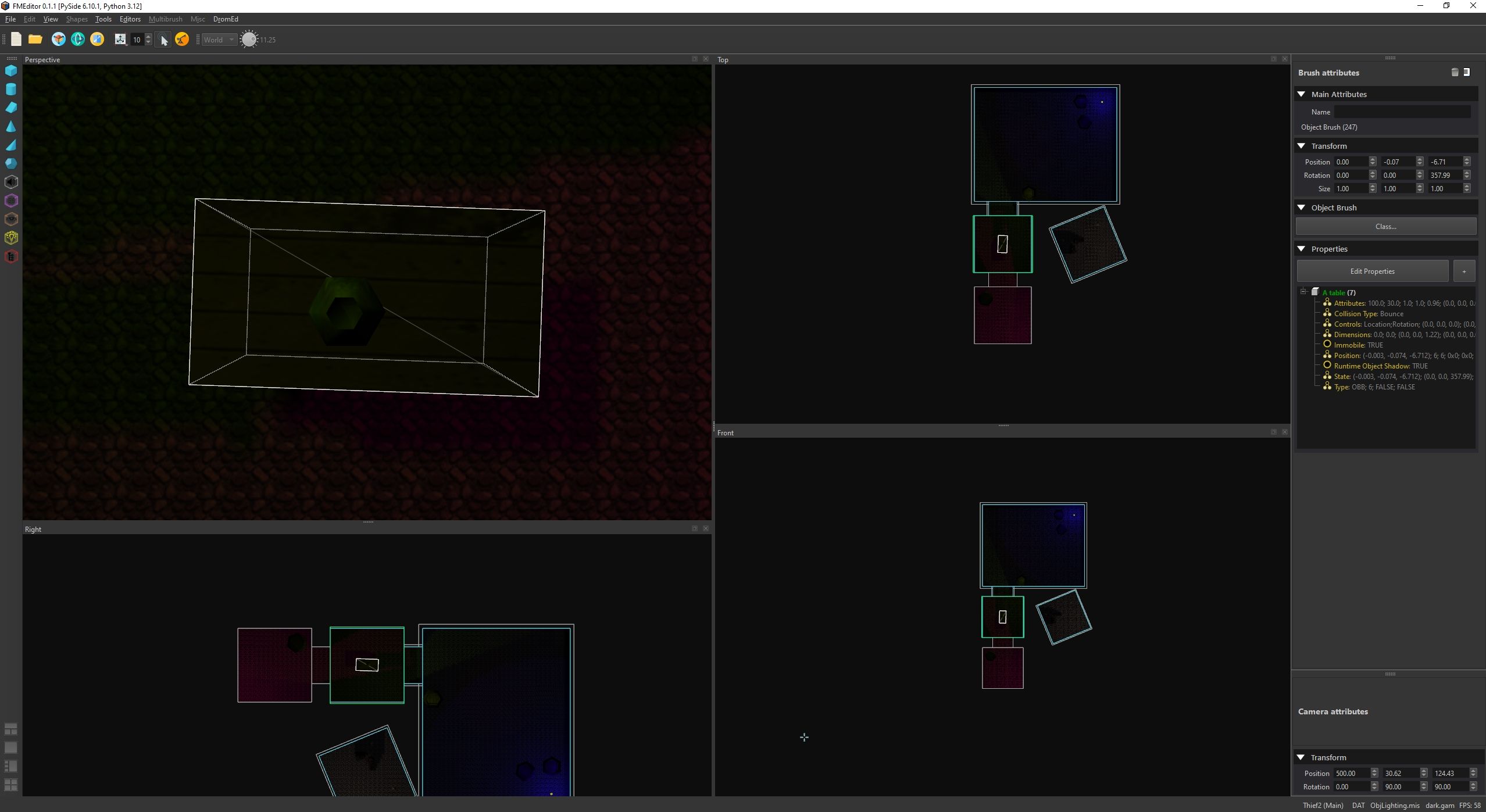
    FMEditor_broken_cameras.jpg

    1 Reply Last reply
    0
    • SGaistS Offline
      SGaistS Offline
      SGaist
      Lifetime Qt Champion
      wrote last edited by
      #2

      Hi,

      There might be chances but you need to provide a minimal reproducer script for people to get started to debug things.

      Interested in AI ? www.idiap.ch
      Please read the Qt Code of Conduct - https://forum.qt.io/topic/113070/qt-code-of-conduct

      1 Reply Last reply
      0

      • Login

      • Login or register to search.
      • First post
        Last post
      0
      • Categories
      • Recent
      • Tags
      • Popular
      • Users
      • Groups
      • Search
      • Get Qt Extensions
      • Unsolved