Trouble trying to use ASAN
-
Hi
I would like debug using ASAN (address sanitizer)I have installed lastest msvc and llvm
added the clang-cl compiler to qt creator and building with it
but seems I cannot compile and run a simple programI tried different qmake parameter
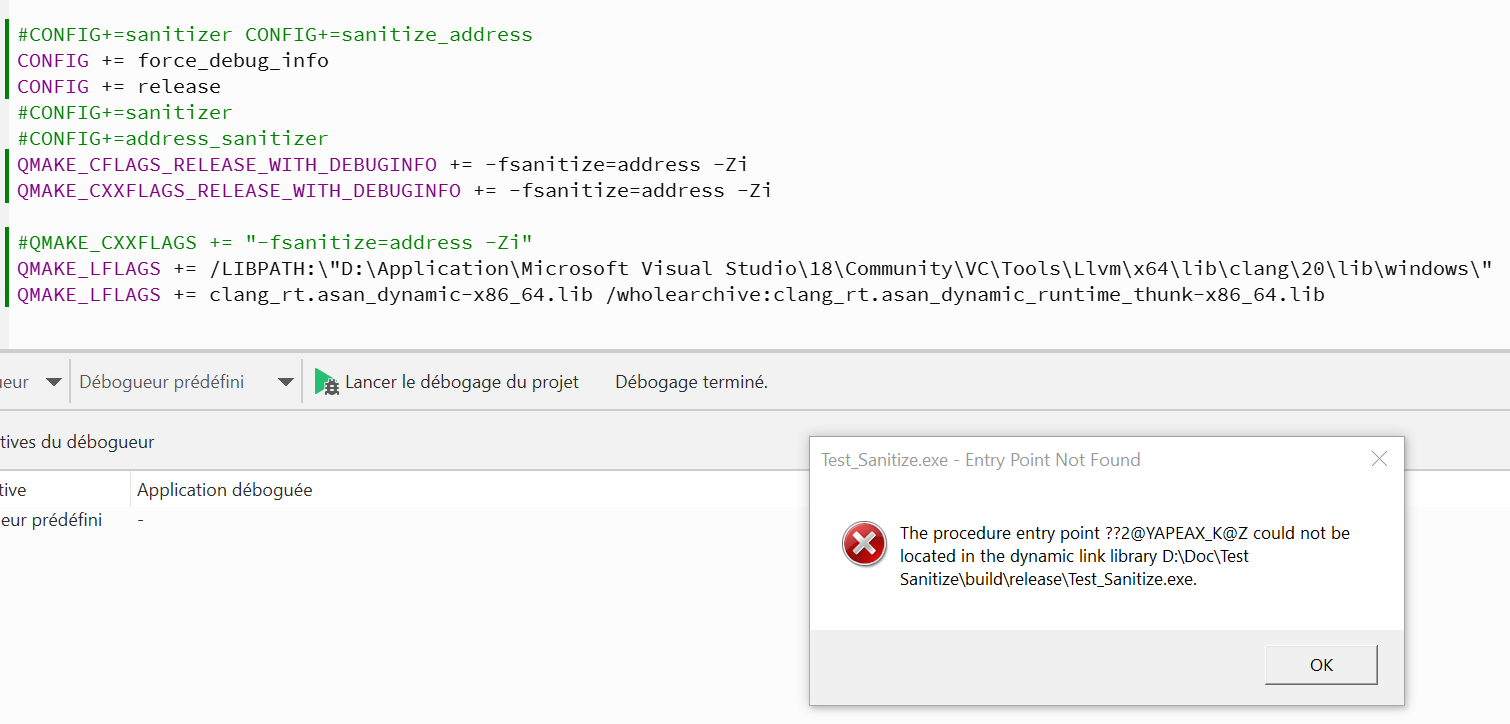
currently I can build using
CONFIG += force_debug_info
QMAKE_CFLAGS += -fsanitize=address
QMAKE_CXXFLAGS += -fsanitize=address
QMAKE_LFLAGS += /LIBPATH:"C:\LLVM\lib\clang\22\lib\windows"
QMAKE_LFLAGS += clang_rt.asan_dynamic-x86_64.lib /wholearchive:clang_rt.asan_dynamic_runtime_thunk-x86_64.libbut when running in release mode I get an entry point error
and in debug it tells me asan cannot be use in debugI also built llvm and qt from scratch to the same result
anyone has an idea on how to make that work?
thanks -
For both of the errors you encounter, please post the full verbatim error output. 📝👍️
I use ASan on Linux, and (so far) have not tried to use it on windows (not with msvc nor any other compiler chain on windows).
Sorry I cannot be of more comprehensive help, but I can comment on this:
and in debug it tells me asan cannot be use in debug
I believe that is inaccurate, however you might be running into a limitation of running the debug+ASan executable in a debugger.
For example, on Linux it is not possible to run the debug+ASan executable in a debugger if
ASAN_OPTIONS=detect_leaks=1is enabled.On Linux, leaksan and gdb "compete" for ptrace, so when we want gdb we have to disable leaksan:
ASAN_OPTIONS=detect_leaks=0There may be other such restrictions in the msvc context. You could try running the debug+ASan executable outside of the IDE and/or outside of the debugger.
Again, if you post the full errors it will likely help other people be of service (hopefully people more versed in ASan+msvc than I.)
-
im using qt creator
and its not essential it work in debug could be in release but at least I want to use it
@JulsPower Asan has to be selected when MSVC is installed. Make sure Asan is installed. Try to run a small case in MSVC and turn Asan on to see if Asan works.
-
Hi
I have changed the lib directory in the pro file to
D:\Application\Microsoft Visual Studio\18\Community\VC\Tools\Llvm\x64\lib\clang\20\lib\windows
still the same errorthen I delete a couple of path from the runtime path
then I had error about the asan lib not being found
I copied it to the running directory
now the program start normally if I press run (not debug)
but
its not catching error it should as my main look like this:`int main(int argc, char *argv[]) { QApplication a(argc, argv); MainWindow w; w.show(); QTimer t; t.setInterval(0); t.setSingleShot(true); { QByteArray ba = QByteArrayLiteral("Test byte array literal"); t.connect(&t, &QTimer::timeout, &t, [d=ba.data()](){ qDebug() << d; }); } t.start(); int *p = new int[2]; p[5] = 42; // ASan doit détecter ça delete[] p; return a.exec(); }and the output of the application is: Test byte array literal
and the QMainwindow openany idea?
-
Interesting progress!
What if (in the case where ASan lib is side-by-side in directory and you press "run") you replace this:
    int *p = new int[2];
    p[5] = 42; // ASan doit détecter ça
    delete[] p;
with this (a little more like in the Visual Studio case):
    int *p = new int[2];
    p[100] = 42; // ASan doit détecter ça
    delete[] p;
Sometimes there are "slightly less egregious" violations that ASan can miss.
You could also try:
int i = 23; i <<= 32; (void) i; int ii = INT_MIN; int j = -ii; (void) j; std::vector<bool> bla; bla.push_back( false ); // just using a "barely wrong" index isn't always enough. use a flagrant one: fprintf( stderr, "%d\n", static_cast<int>( bla[ 64 ] ) ); std::unique_ptr<int> test = std::make_unique<int>( 1 ); auto newtest = std::move( test ); fprintf( stderr, "%d\n", *test ); -
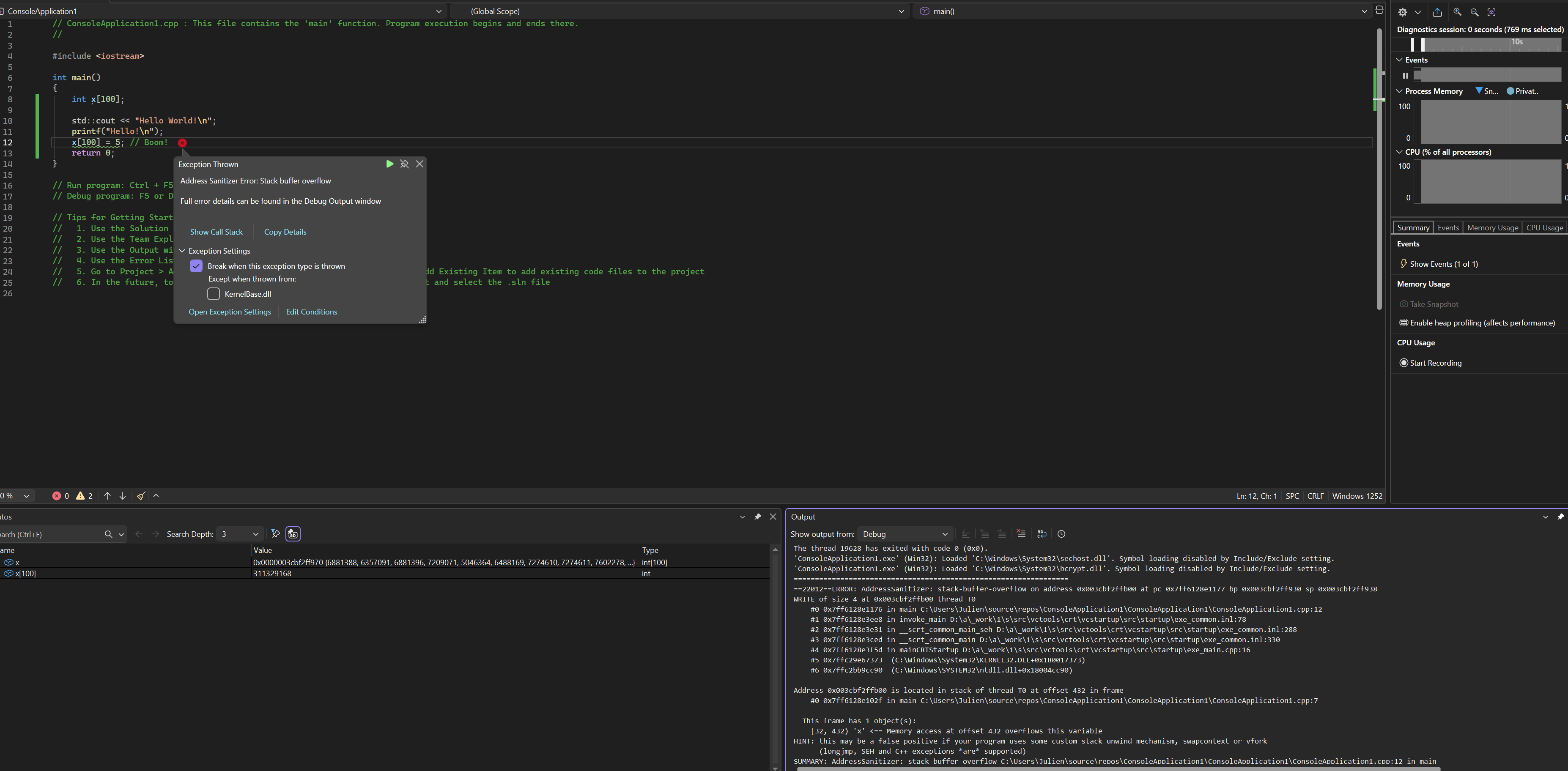
I'm not sure if asan on windows should catch this - it's limited to the linux version: https://learn.microsoft.com/en-us/cpp/sanitizers/asan
-
changing 5 to 100 hasn't change anything
then I tried the other example you gave I had got a asan crash
=================================================================
==2212==ERROR: AddressSanitizer: heap-buffer-overflow on address 0x12058cfa3f78 at pc 0x7ff69c1b24b7 bp 0x00449ed1f4a0 sp 0x00449ed1f4e8
READ of size 4 at 0x12058cfa3f78 thread T0
    #0 0x7ff69c1b24b6  (D:\Doc\Test Sanitize\build\release\Test_Sanitize.exe+0x1400024b6)
    #1 0x7ff69c1b57bf  (D:\Doc\Test Sanitize\build\release\Test_Sanitize.exe+0x1400057bf)
    #2 0x7ff69c1b5649  (D:\Doc\Test Sanitize\build\release\Test_Sanitize.exe+0x140005649)
    #3 0x7ffc29e67373  (C:\Windows\System32\KERNEL32.DLL+0x180017373)
    #4 0x7ffc2bb9cc90  (C:\Windows\SYSTEM32\ntdll.dll+0x18004cc90)

0x12058cfa3f78 is located 4 bytes after 4-byte region [0x12058cfa3f70,0x12058cfa3f74)
allocated by thread T0 here:
    #0 0x7ffb900ba60d  (D:\Doc\Test Sanitize\clang_rt.asan_dynamic-x86_64.dll+0x18005a60d)
    #1 0x7ff69c1b36c0  (D:\Doc\Test Sanitize\build\release\Test_Sanitize.exe+0x1400036c0)
    #2 0x7ff69c1b3011  (D:\Doc\Test Sanitize\build\release\Test_Sanitize.exe+0x140003011)
    #3 0x7ff69c1b23c4  (D:\Doc\Test Sanitize\build\release\Test_Sanitize.exe+0x1400023c4)
    #4 0x7ff69c1b57bf  (D:\Doc\Test Sanitize\build\release\Test_Sanitize.exe+0x1400057bf)
    #5 0x7ff69c1b5649  (D:\Doc\Test Sanitize\build\release\Test_Sanitize.exe+0x140005649)
    #6 0x7ffc29e67373  (C:\Windows\System32\KERNEL32.DLL+0x180017373)
    #7 0x7ffc2bb9cc90  (C:\Windows\SYSTEM32\ntdll.dll+0x18004cc90)

SUMMARY: AddressSanitizer: heap-buffer-overflow (D:\Doc\Test Sanitize\build\release\Test_Sanitize.exe+0x1400024b6)
Shadow bytes around the buggy address:
  0x12058cfa3c80: fa fa fd fa fa fa 00 00 fa fa 00 fa fa fa 00 00
  0x12058cfa3d00: fa fa 00 00 fa fa 00 00 fa fa 00 00 fa fa 00 00
  0x12058cfa3d80: fa fa fd fd fa fa 00 00 fa fa fd fd fa fa 00 fa
  0x12058cfa3e00: fa fa 00 00 fa fa 00 00 fa fa 00 00 fa fa 00 00
  0x12058cfa3e80: fa fa 00 00 fa fa 00 fa fa fa 00 00 fa fa 00 00
=>0x12058cfa3f00: fa fa fd fa fa fa fd fa fa fa 00 00 fa fa 04[fa]
  0x12058cfa3f80: fa fa fa fa fa fa fa fa fa fa fa fa fa fa fa fa
  0x12058cfa4000: fa fa fa fa fa fa fa fa fa fa fa fa fa fa fa fa
  0x12058cfa4080: fa fa fa fa fa fa fa fa fa fa fa fa fa fa fa fa
  0x12058cfa4100: fa fa fa fa fa fa fa fa fa fa fa fa fa fa fa fa
  0x12058cfa4180: fa fa fa fa fa fa fa fa fa fa fa fa fa fa fa fa
Shadow byte legend (one shadow byte represents 8 application bytes):
  Addressable:           00
  Partially addressable: 01 02 03 04 05 06 07
  Heap left redzone:       fa
  Freed heap region:       fd
  Stack left redzone:      f1
  Stack mid redzone:       f2
  Stack right redzone:     f3
  Stack after return:      f5
  Stack use after scope:   f8
  Global redzone:          f9
  Global init order:       f6
  Poisoned by user:        f7
  Container overflow:      fc
  Array cookie:            ac
  Intra object redzone:    bb
  ASan internal:           fe
  Left alloca redzone:     ca
  Right alloca redzone:    cb
==2212==ABORTING
Not super helpfull asan on windows...
I have to try under linux
guys got any good guide on how to setup it? -
Not super helpful
The crash stacks that you shared look essentially identical to what I expect ASan to do (based on my having used it many times on Linux).
This asan crash output is what ASan does. It is the mechanism by which ASan alerts you to the issues.
Maybe you were expecting a different "front end" (GUI perhaps)? Something more like popups or like breaking in the debugger? (If you overcome whatever is preventing the run-it-inside-the-debugger option, that might help.)
Actually, looking at your output again, I see that symbols seem to be missing.
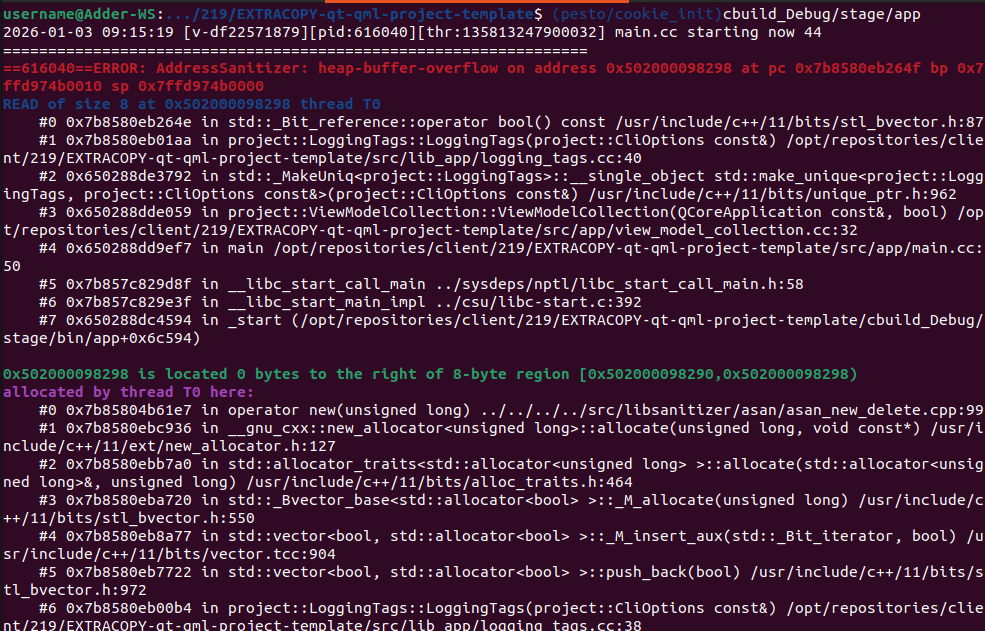
I would expect to see a more human readable crash stack (though still a "wall of text"). I would expect to see function names (and possibly source file and line number) in the crash output. But I don't think that is automatically an msvc versus Linux thing. On either OS it is possible to end up without debug symbols.
This is what I see (on Linux) when debug symbols are present:
Even better (for some workflows), if I run it in the debugger, I can break at the crash and I can examine the stack in the debugger. There is an environment variable we need, though:
(gdb) set env ASAN_OPTIONS=abort_on_error=1
(gdb) run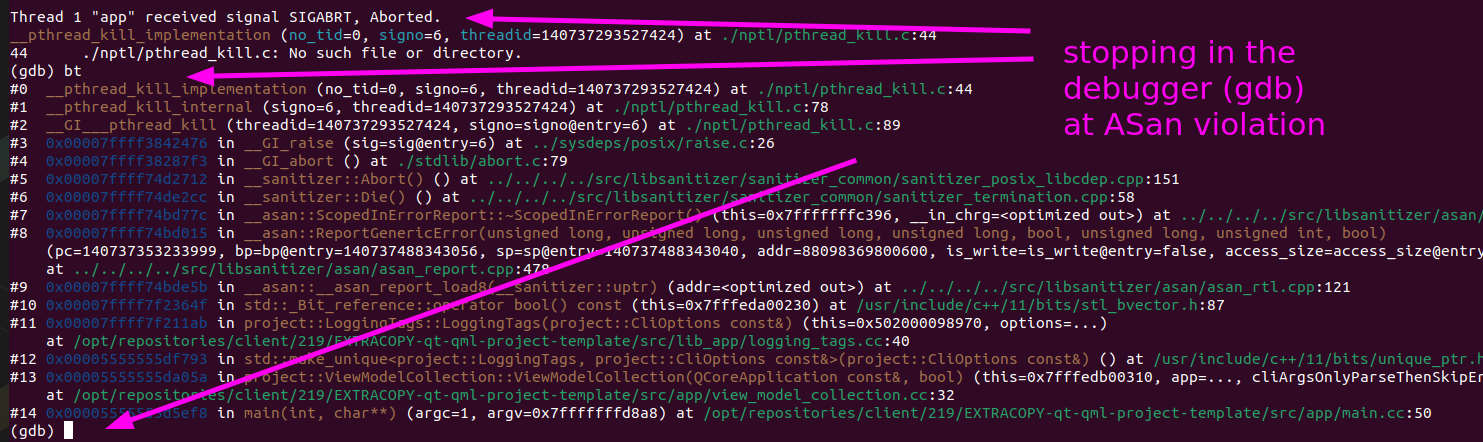
As much as I heavily prefer working on Linux most days, I still don't think that anything discussed so far is necessarily OS specific.
-
I have added: CONFIG += force_debug_info
to my pro file now the output is:================================================================= ==25448==ERROR: AddressSanitizer: heap-buffer-overflow on address 0x1201ed2a3f78 at pc 0x7ff6022e24b7 bp 0x0087e878f4e0 sp 0x0087e878f528 READ of size 4 at 0x1201ed2a3f78 thread T0 #0 0x7ff6022e24b6 in std::_Vb_reference<std::_Wrap_alloc<std::allocator<unsigned int> > >::operator bool d:\Application\Microsoft Visual Studio\18\Community\VC\Tools\MSVC\14.50.35717\include\vector:2499 #1 0x7ff6022e24b6 in main D:\Doc\Test Sanitize\Test_Sanitize\main.cpp:38 #2 0x7ff6022e57bf in qtEntryPoint C:\Users\qt\work\qt\qtbase\src\entrypoint\qtentrypoint_win.cpp:45 #3 0x7ff6022e5649 in invoke_main D:\a\_work\1\s\src\vctools\crt\vcstartup\src\startup\exe_common.inl:102 #4 0x7ff6022e5649 in __scrt_common_main_seh D:\a\_work\1\s\src\vctools\crt\vcstartup\src\startup\exe_common.inl:288 #5 0x7ffc29e67373 (C:\Windows\System32\KERNEL32.DLL+0x180017373) #6 0x7ffc2bb9cc90 (C:\Windows\SYSTEM32\ntdll.dll+0x18004cc90) 0x1201ed2a3f78 is located 4 bytes after 4-byte region [0x1201ed2a3f70,0x1201ed2a3f74) allocated by thread T0 here: #0 0x7ffb7d5da60d (D:\Doc\Test Sanitize\clang_rt.asan_dynamic-x86_64.dll+0x18005a60d) #1 0x7ff6022e36c0 in std::_Default_allocate_traits::_Allocate d:\Application\Microsoft Visual Studio\18\Community\VC\Tools\MSVC\14.50.35717\include\xmemory:140 #2 0x7ff6022e36c0 in std::_Allocate d:\Application\Microsoft Visual Studio\18\Community\VC\Tools\MSVC\14.50.35717\include\xmemory:260 #3 0x7ff6022e36c0 in std::allocator<unsigned int>::allocate d:\Application\Microsoft Visual Studio\18\Community\VC\Tools\MSVC\14.50.35717\include\xmemory:994 #4 0x7ff6022e36c0 in std::_Allocate_at_least_helper d:\Application\Microsoft Visual Studio\18\Community\VC\Tools\MSVC\14.50.35717\include\xmemory:2323 #5 0x7ff6022e36c0 in std::vector<unsigned int, class std::allocator<unsigned int>>::_Resize_reallocate<unsigned int>(unsigned __int64, unsigned int const &) d:\Application\Microsoft Visual Studio\18\Community\VC\Tools\MSVC\14.50.35717\include\vector:1565 #6 0x7ff6022e3011 in std::vector<unsigned int,std::allocator<unsigned int> >::_Resize d:\Application\Microsoft Visual Studio\18\Community\VC\Tools\MSVC\14.50.35717\include\vector:1608 #7 0x7ff6022e3011 in std::vector<unsigned int,std::allocator<unsigned int> >::resize d:\Application\Microsoft Visual Studio\18\Community\VC\Tools\MSVC\14.50.35717\include\vector:1635 #8 0x7ff6022e3011 in std::vector<bool, class std::allocator<bool>>::_Insert_x(class std::_Vb_const_iterator<struct std::_Wrap_alloc<class std::allocator<unsigned int>>>, unsigned __int64) d:\Application\Microsoft Visual Studio\18\Community\VC\Tools\MSVC\14.50.35717\include\vector:3539 #9 0x7ff6022e23c4 in std::vector<bool,std::allocator<bool> >::_Insert_n d:\Application\Microsoft Visual Studio\18\Community\VC\Tools\MSVC\14.50.35717\include\vector:3517 #10 0x7ff6022e23c4 in std::vector<bool,std::allocator<bool> >::insert d:\Application\Microsoft Visual Studio\18\Community\VC\Tools\MSVC\14.50.35717\include\vector:3378 #11 0x7ff6022e23c4 in std::vector<bool,std::allocator<bool> >::push_back d:\Application\Microsoft Visual Studio\18\Community\VC\Tools\MSVC\14.50.35717\include\vector:3286 #12 0x7ff6022e23c4 in main D:\Doc\Test Sanitize\Test_Sanitize\main.cpp:36 #13 0x7ff6022e57bf in qtEntryPoint C:\Users\qt\work\qt\qtbase\src\entrypoint\qtentrypoint_win.cpp:45 #14 0x7ff6022e5649 in invoke_main D:\a\_work\1\s\src\vctools\crt\vcstartup\src\startup\exe_common.inl:102 #15 0x7ff6022e5649 in __scrt_common_main_seh D:\a\_work\1\s\src\vctools\crt\vcstartup\src\startup\exe_common.inl:288 #16 0x7ffc29e67373 (C:\Windows\System32\KERNEL32.DLL+0x180017373) #17 0x7ffc2bb9cc90 (C:\Windows\SYSTEM32\ntdll.dll+0x18004cc90) SUMMARY: AddressSanitizer: heap-buffer-overflow d:\Application\Microsoft Visual Studio\18\Community\VC\Tools\MSVC\14.50.35717\include\vector:2499 in std::_Vb_reference<std::_Wrap_alloc<std::allocator<unsigned int> > >::operator bool Shadow bytes around the buggy address: 0x1201ed2a3c80: fa fa fd fa fa fa 00 00 fa fa 00 fa fa fa 00 00 0x1201ed2a3d00: fa fa 00 00 fa fa 00 00 fa fa 00 00 fa fa 00 00 0x1201ed2a3d80: fa fa fd fd fa fa 00 00 fa fa fd fd fa fa 00 fa 0x1201ed2a3e00: fa fa 00 00 fa fa 00 00 fa fa 00 00 fa fa 00 00 0x1201ed2a3e80: fa fa 00 00 fa fa 00 fa fa fa 00 00 fa fa 00 00 =>0x1201ed2a3f00: fa fa fd fa fa fa fd fa fa fa 00 00 fa fa 04[fa] 0x1201ed2a3f80: fa fa fa fa fa fa fa fa fa fa fa fa fa fa fa fa 0x1201ed2a4000: fa fa fa fa fa fa fa fa fa fa fa fa fa fa fa fa 0x1201ed2a4080: fa fa fa fa fa fa fa fa fa fa fa fa fa fa fa fa 0x1201ed2a4100: fa fa fa fa fa fa fa fa fa fa fa fa fa fa fa fa 0x1201ed2a4180: fa fa fa fa fa fa fa fa fa fa fa fa fa fa fa fa Shadow byte legend (one shadow byte represents 8 application bytes): Addressable: 00 Partially addressable: 01 02 03 04 05 06 07 Heap left redzone: fa Freed heap region: fd Stack left redzone: f1 Stack mid redzone: f2 Stack right redzone: f3 Stack after return: f5 Stack use after scope: f8 Global redzone: f9 Global init order: f6 Poisoned by user: f7 Container overflow: fc Array cookie: ac Intra object redzone: bb ASan internal: fe Left alloca redzone: ca Right alloca redzone: cb ==25448==ABORTINGwhich is a bit better since I have a source and a line to point me fault.
Still sad that it does't catch:
QTimer t;
    t.setInterval(0);
    t.setSingleShot(true);
    {
        QByteArray ba = QByteArrayLiteral("Test byte array literal");
        t.connect(&t, &QTimer::timeout, &t, [d=ba.data()](){
            qDebug() << d;
        });
    }
    t.start();
and
int *p = new int[2]; p[100] = 42; // ASan doit détecter ça delete[] p; -
Again, I'm unfamiliar with MSVC range of sanitizer possibilities, but...
Is UBSan available? Using both ASan and UBSan (if possible) would (of course) cover more bugs than just one sanitizer in isolation.
(There is also LeakSan). Example flags:
-fsanitize=address,undefined,leakMany, many years ago I also used windows-specific tools (DCRT, debug C runtime; and something called
gflags.exe), and those tools worked well on MSVC to detect out-of-bounds writes and other memory abuses/errors. I'm not sure what the current windows state-of-the-art memory tooling is named and what form it takes.