TabBar implicit width and height within a layout?
-
Hi,
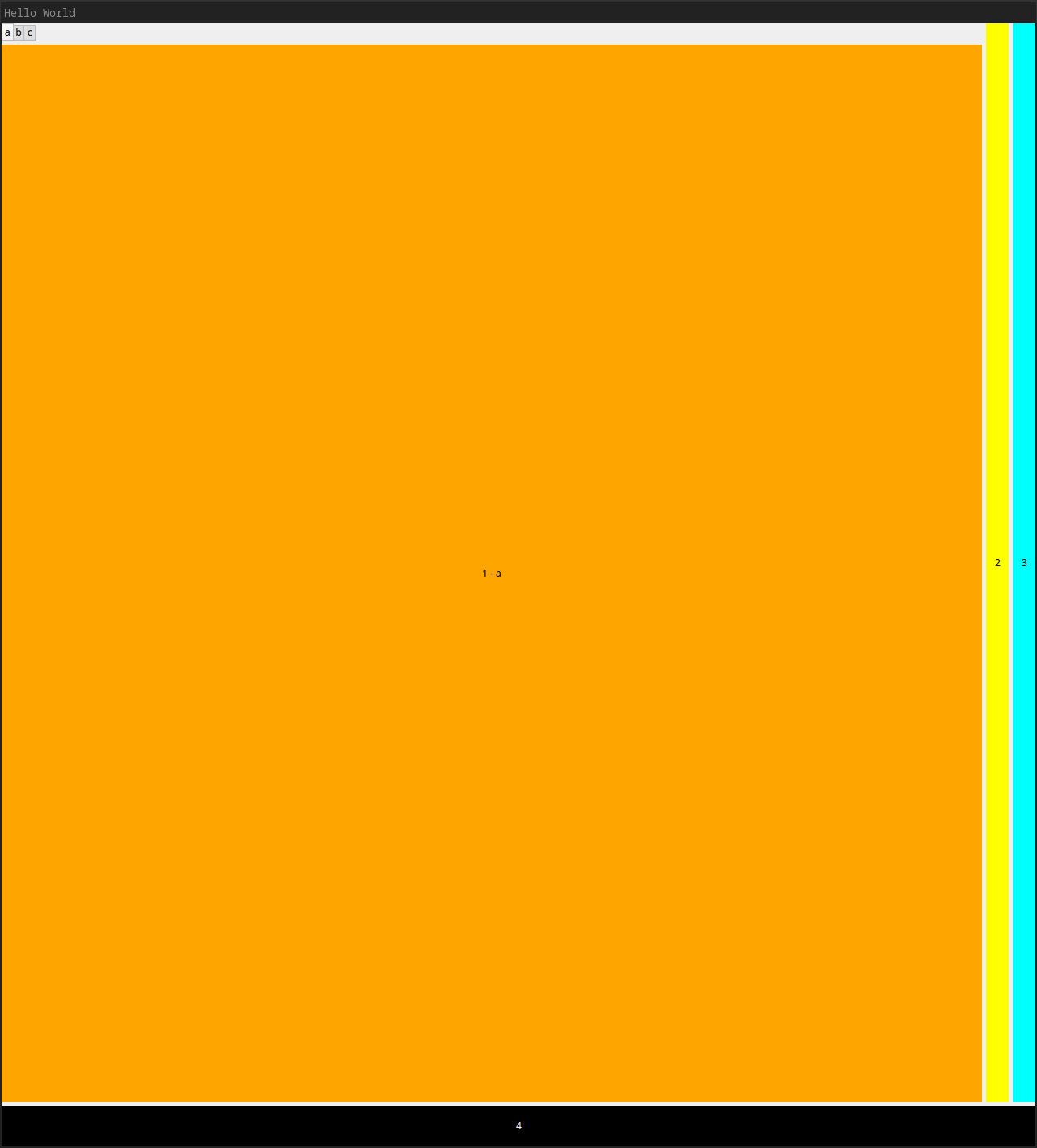
I'm wondering why the TabBar in the following code seems to set the implicit width and height of the element in the layout. I would have expected the orange rectangle to be the same width of rectangle 2 and 3, and the same height as rectangle 4.
Why is rectangle "1-a" so big?
I'm using QT 6.10.1 on Linux / Desktop.
import QtQuick
import QtQuick.Controls
import QtQuick.Layouts

ApplicationWindow {
    width: 640
    height: 480
    visible: true
    title: qsTr("Hello World")

    ColumnLayout {
        anchors.fill: parent
        RowLayout {
            ColumnLayout {
                TabBar {
                    id: projectTabBar
                    TabButton {
                        text: "a"
                    }
                    TabButton {
                        text: "b"
                    }
                    TabButton {
                        text: "c"
                    }
                }
                StackLayout {
                    currentIndex: projectTabBar.currentIndex
                    Rectangle {
                        color: "orange"
                        Text {
                            text: "1 - a"
                            anchors.centerIn: parent
                        }
                    }
                    Rectangle {
                        color: "red"
                        Text {
                            text: "1 - b"
                            anchors.centerIn: parent
                        }
                    }
                }
            }
            Rectangle {
                color: "yellow"
                Layout.fillWidth: true
                Layout.fillHeight: true
                Text {
                    text: "2"
                    anchors.centerIn: parent
                }
            }
            Rectangle {
                color: "cyan"
                Layout.fillWidth: true
                Layout.fillHeight: true
                Text {
                    text: "3"
                    anchors.centerIn: parent
                }
            }
        }
        Rectangle {
            Layout.fillHeight: true
            Layout.fillWidth: true
            color: "black"
            Text {
                text: "4"
                anchors.centerIn: parent
                color: "white"
            }
        }
    }
}
Screenshot: