Skip to content
  • Categories
  • Recent
  • Tags
  • Popular
  • Users
  • Groups
  • Search
  • Get Qt Extensions
  • Unsolved
Collapse
Brand Logo
  1. Home
  2. Qt Development
  3. Qt Creator and other tools
  4. Installed library is not seen in Qt Creator
Forum Updated to NodeBB v4.3 + New Features

Installed library is not seen in Qt Creator

Scheduled Pinned Locked Moved Solved Qt Creator and other tools
4 Posts 2 Posters 74 Views 1 Watching
  • Oldest to Newest
  • Newest to Oldest
  • Most Votes
Reply
  • Reply as topic
Log in to reply
This topic has been deleted. Only users with topic management privileges can see it.
  • B Offline
    B Offline
    bask185
    wrote last edited by aha_1980
    #1

    Hi there,

    I started in Qt some10 years ago for my internship. And now I am starting again.

    I have a question. I am trying to install and use QtSerialPort library. I asked chatGpt first, it said: use the Qt maintenance tool, So I did and there are checks that the library is installed.
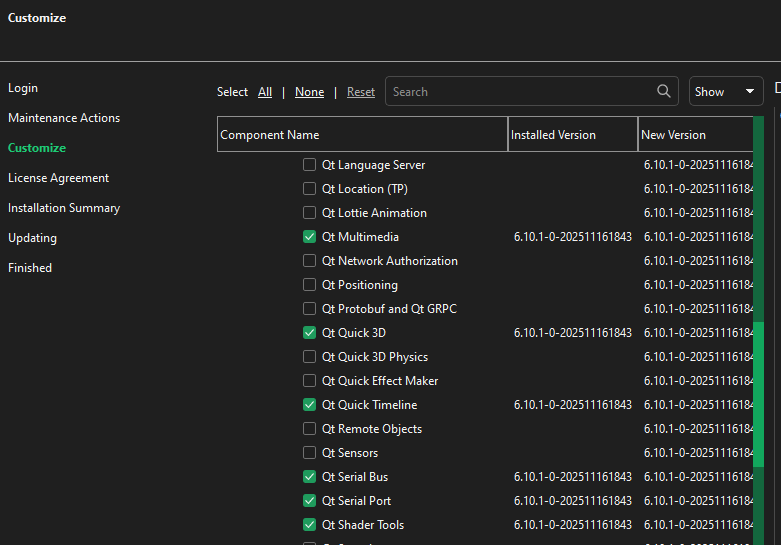
    f7d0b3e0-b013-48d2-8f25-dd4154f1dfa8-afbeelding.png

    But when I include the library. -> not found
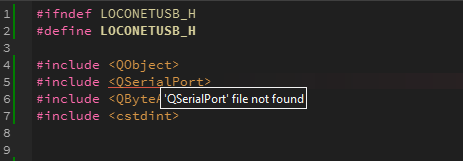
    95a82a3f-fbd2-4845-ba37-82688edf9657-afbeelding.png

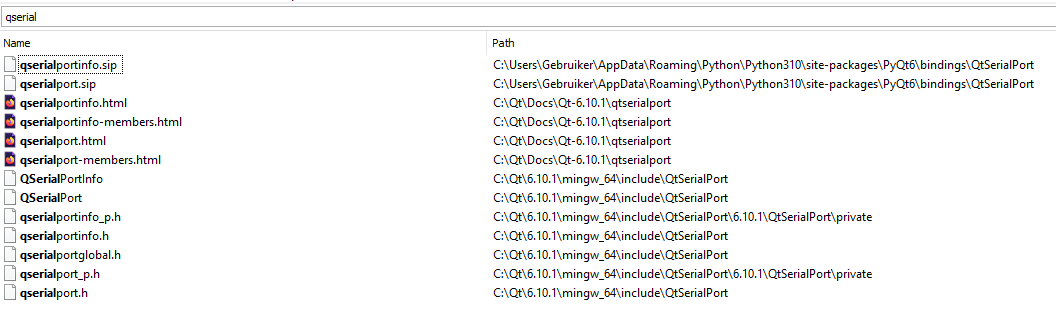
    I was looking my system
    79de98b8-69c4-4e75-8b6a-5d914e76c0de-afbeelding.png
    I can find a header file, though no CPP.

    Anyways. Chad is not helping me further, so the question:
    How do I make use of the QSerialPort library?

    {noformat}
    Qt 6.10.1 (x86_64-little_endian-llp64 shared (dynamic) release build; by MSVC 2022) on "windows"
    OS: Windows 10 Version 22H2 [winnt version 10.0.19045]

    Architecture: x86_64; features: SSE2 SSE3 SSSE3 SSE4.1 SSE4.2 AVX AVX2 RDRAND RDSEED AES

    Kind regards,

    Bas

    1 Reply Last reply
    0
    • SGaistS Offline
      SGaistS Offline
      SGaist
      Lifetime Qt Champion
      wrote last edited by
      #2

      Hi,

      Did you adjust your .pro or CMakeLists.txt file to make use of that module ?

      Interested in AI ? www.idiap.ch
      Please read the Qt Code of Conduct - https://forum.qt.io/topic/113070/qt-code-of-conduct

      1 Reply Last reply
      2
      • B Offline
        B Offline
        bask185
        wrote last edited by
        #3

        No I had not, I lasked chad what to with it. It did tell me before to change this file, but I didn't trust the output.

        I added Qt${QT_VERSION_MAJOR}::SerialPort under target_link

        And I changed this

        find_package(QT NAMES Qt6 Qt5 REQUIRED COMPONENTS Widgets)
        find_package(Qt${QT_VERSION_MAJOR} REQUIRED COMPONENTS Widgets)
        

        in

        find_package(QT NAMES Qt6 Qt5 REQUIRED COMPONENTS Widgets SerialPort)
        find_package(Qt${QT_VERSION_MAJOR} REQUIRED COMPONENTS Widgets SerialPort)
        

        Now it seems to compile

        I do think this is somewhat... complicated. I could not have figured this out myself. We got a fancy maintenance tool, you would think that with something like that, you would not have to edit make files yourself?

        I also read on Qt docs you could right click in your project viewer and click 'add library'. I could not find that button.

        Kind regards,

        Bas

        1 Reply Last reply
        0
        • B bask185 has marked this topic as solved
        • SGaistS Offline
          SGaistS Offline
          SGaist
          Lifetime Qt Champion
          wrote last edited by SGaist
          #4

          I encourage you to go to the QSerialPort documentation.

          It's a the top of the page.

          Installing a module and making use of it in your project are two very different things. There's no reason for the installer nor the maintenance tool to go affect your projects.

          The "adding a library" part is for non Qt modules.

          Interested in AI ? www.idiap.ch
          Please read the Qt Code of Conduct - https://forum.qt.io/topic/113070/qt-code-of-conduct

          1 Reply Last reply
          2

          • Login

          • Login or register to search.
          • First post
            Last post
          0
          • Categories
          • Recent
          • Tags
          • Popular
          • Users
          • Groups
          • Search
          • Get Qt Extensions
          • Unsolved