
Skip to content
  • Categories
  • Recent
  • Tags
  • Popular
  • Users
  • Groups
  • Search
  • Get Qt Extensions
  • Unsolved
Collapse
Brand Logo
  1. Home
  2. Qt Development
  3. General and Desktop
  4. Model-view checkstate signal
Forum Updated to NodeBB v4.3 + New Features

Model-view checkstate signal

Scheduled Pinned Locked Moved Solved General and Desktop
15 Posts 5 Posters 383 Views 2 Watching
  • Oldest to Newest
  • Newest to Oldest
  • Most Votes
Reply
  • Reply as topic
Log in to reply
This topic has been deleted. Only users with topic management privileges can see it.
  • B Offline
    B Offline
    blossomsg
    wrote last edited by
    #6

    Hello,

    @JonB and @Pl45m4 thank you for the brief info.
    correct me if i am wrong, just rephrasing above for clarity

    @JonB said in Model-view checkstate signal:

    I am not sure I understand what you mean by this.

    what i am looking for is, how we connect QCheckBox.clicked.connect(<function>) , same logic or for something similar in MVC, whichever index i click should do something(that something would be in a function)

    This would be a bad practice if i try signaling a function.
    @Pl45m4 said in Model-view checkstate signal:

    I think OP is looking for some kind of 1to1 connection in the model/view, between the checkable item (which is not directly a QCheckBox) and some receiver of the signal... which kinda destroys or bypasses a clean MV(C) structure...

    If I need to try such a thing i can do it with dataChanged.emit in the setData, but again this would be a bad practice, correct?

    Pl45m4P 1 Reply Last reply
    0
    • B blossomsg

      Hello,

      @JonB and @Pl45m4 thank you for the brief info.
      correct me if i am wrong, just rephrasing above for clarity

      @JonB said in Model-view checkstate signal:

      I am not sure I understand what you mean by this.

      what i am looking for is, how we connect QCheckBox.clicked.connect(<function>) , same logic or for something similar in MVC, whichever index i click should do something(that something would be in a function)

      This would be a bad practice if i try signaling a function.
      @Pl45m4 said in Model-view checkstate signal:

      I think OP is looking for some kind of 1to1 connection in the model/view, between the checkable item (which is not directly a QCheckBox) and some receiver of the signal... which kinda destroys or bypasses a clean MV(C) structure...

      If I need to try such a thing i can do it with dataChanged.emit in the setData, but again this would be a bad practice, correct?

      Pl45m4P Offline
      Pl45m4P Offline
      Pl45m4
      wrote last edited by
      #7

      @blossomsg

      That's why I wrote:

      @Pl45m4 said in Model-view checkstate signal:

      You can't connect directly to that checkbox.
      Either you use the dataChanged(...) signal when the data is, well, changed and compare the QModelIndex (row, col) or you add your own logic when you set your data.

      So, use the dataChanged signal, which is already there and sort out the correct model index + value.


      If debugging is the process of removing software bugs, then programming must be the process of putting them in.

      ~E. W. Dijkstra

      1 Reply Last reply
      1
      • B Offline
        B Offline
        blossomsg
        wrote last edited by
        #8

        noted.
        if possible can you provide a code snippet, just for understanding connections?
        It would be helpful
        Thank You.

        Pl45m4P 1 Reply Last reply
        0
        • B blossomsg

          noted.
          if possible can you provide a code snippet, just for understanding connections?
          It would be helpful
          Thank You.

          Pl45m4P Offline
          Pl45m4P Offline
          Pl45m4
          wrote last edited by Pl45m4
          #9

          @blossomsg said in Model-view checkstate signal:

          if possible can you provide a code snippet, just for understanding connections?

          Code for what? Who made your first (the QCheckBox) example? There you already have similar code.
          Now you just need to use your model's dataChanged(...) signal and figure out what index your checkbox has, depending on its row and column.
          Or you implement your own setData logic and emit your custom signal there


          If debugging is the process of removing software bugs, then programming must be the process of putting them in.

          ~E. W. Dijkstra

          1 Reply Last reply
          3
          • SGaistS Offline
            SGaistS Offline
            SGaist
            Lifetime Qt Champion
            wrote last edited by
            #10

            Hi,

            A model can have multiple views and a view does not necessarily mean a QWidget.

            As my fellow already wrote: use your model.
            Rather than creating it as part of the setModel call, create it before and keep a reference to it. Then connect its dataChanged signal to the slot you want to use it with. The only thing you have to do is extract the information you want to act accordingly.

            Interested in AI ? www.idiap.ch
            Please read the Qt Code of Conduct - https://forum.qt.io/topic/113070/qt-code-of-conduct

            1 Reply Last reply
            2
            • B Offline
              B Offline
              blossomsg
              wrote last edited by
              #11

              Hello All,
              I have tried a version as suggested to connect directly with dataChage in the model
              getting the expected result, can you review and let me know, if there is a better way to do it.
              I have added # NEW to those lines and functions

              from PySide6 import QtCore, QtGui
              
              
              class LModel1(QtCore.QAbstractListModel):
                  def __init__(self, data: list[str], parent=None):
                      super().__init__(parent)
                      self._data = data
                      # from ai claude and fluent python - dict Comprehensions - pg: 79
                      self._check_states = {item: QtCore.Qt.CheckState.Unchecked for item in self._data}
              
                  def data(self, index, /, role=...):
                      if not index.isValid():
                          return None
              
                      item = self._data[index.row()]
              
                      if role == QtCore.Qt.ItemDataRole.DisplayRole:
                          return item
              
                      if role == QtCore.Qt.ItemDataRole.CheckStateRole:
                          return self._check_states[item]
              
                      if role == QtCore.Qt.ItemDataRole.DecorationRole:
                          pixmap = QtGui.QPixmap(10, 10)
                          pixmap.fill(QtCore.Qt.transparent)
                          painter = QtGui.QPainter(pixmap)
                          painter.setRenderHint(QtGui.QPainter.Antialiasing)
                          painter.setBrush(QtGui.QColor("red"))
                          painter.drawRect(pixmap.rect())
                          painter.end()
                          return QtGui.QIcon(pixmap)
              
                      if role == QtCore.Qt.ItemDataRole.ToolTipRole:
                          return item
              
                      if role == QtCore.Qt.ItemDataRole.FontRole:
                          font = QtGui.QFont("Cursive", 12)
                          font.bold()
                          return font
              
                      return None
              
                  def setData(self, index, value, /, role=...):
                      if not index.isValid():
                          return None
              
                      item = self._data[index.row()]
              
                      if role == QtCore.Qt.ItemDataRole.CheckStateRole:
                          self._check_states[item] = value
                          self.dataChanged.connect(self.print_something)  # NEW
                          self.dataChanged.emit(index, index, [role])
                          return True
                      return None
              
                  def flags(self, index, /):
                      if not index.isValid():
                          return None
              
                      return QtCore.Qt.ItemFlag.ItemIsUserCheckable | QtCore.Qt.ItemFlag.ItemIsEnabled | QtCore.Qt.ItemFlag.ItemIsSelectable
              
                  def rowCount(self, /, parent=...):
                      return len(self._data)
              
                  def print_something(self, index):  # NEW
                      item = self._data[index.row()]
                      if self._check_states[item] == QtCore.Qt.CheckState.Checked.value:
                          print("something")
                          return "something"
                      elif self._check_states[item] == QtCore.Qt.CheckState.Unchecked.value:
                          print("something else")
                          return "something else"
                      return None
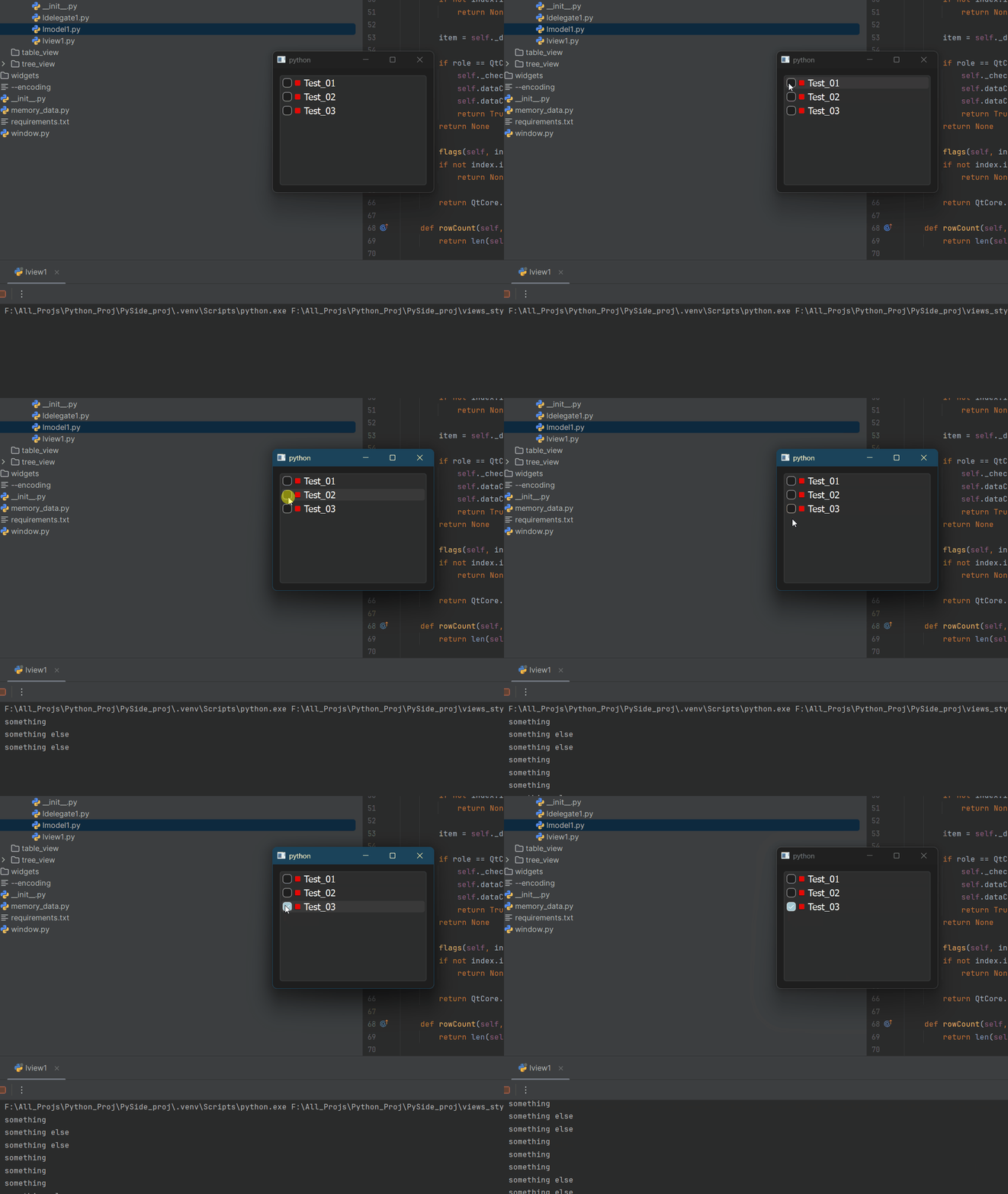
              

              checkstate_with_lmodel.gif

              jsulmJ 1 Reply Last reply
              0
              • B blossomsg

                Hello All,
                I have tried a version as suggested to connect directly with dataChage in the model
                getting the expected result, can you review and let me know, if there is a better way to do it.
                I have added # NEW to those lines and functions

                from PySide6 import QtCore, QtGui
                
                
                class LModel1(QtCore.QAbstractListModel):
                    def __init__(self, data: list[str], parent=None):
                        super().__init__(parent)
                        self._data = data
                        # from ai claude and fluent python - dict Comprehensions - pg: 79
                        self._check_states = {item: QtCore.Qt.CheckState.Unchecked for item in self._data}
                
                    def data(self, index, /, role=...):
                        if not index.isValid():
                            return None
                
                        item = self._data[index.row()]
                
                        if role == QtCore.Qt.ItemDataRole.DisplayRole:
                            return item
                
                        if role == QtCore.Qt.ItemDataRole.CheckStateRole:
                            return self._check_states[item]
                
                        if role == QtCore.Qt.ItemDataRole.DecorationRole:
                            pixmap = QtGui.QPixmap(10, 10)
                            pixmap.fill(QtCore.Qt.transparent)
                            painter = QtGui.QPainter(pixmap)
                            painter.setRenderHint(QtGui.QPainter.Antialiasing)
                            painter.setBrush(QtGui.QColor("red"))
                            painter.drawRect(pixmap.rect())
                            painter.end()
                            return QtGui.QIcon(pixmap)
                
                        if role == QtCore.Qt.ItemDataRole.ToolTipRole:
                            return item
                
                        if role == QtCore.Qt.ItemDataRole.FontRole:
                            font = QtGui.QFont("Cursive", 12)
                            font.bold()
                            return font
                
                        return None
                
                    def setData(self, index, value, /, role=...):
                        if not index.isValid():
                            return None
                
                        item = self._data[index.row()]
                
                        if role == QtCore.Qt.ItemDataRole.CheckStateRole:
                            self._check_states[item] = value
                            self.dataChanged.connect(self.print_something)  # NEW
                            self.dataChanged.emit(index, index, [role])
                            return True
                        return None
                
                    def flags(self, index, /):
                        if not index.isValid():
                            return None
                
                        return QtCore.Qt.ItemFlag.ItemIsUserCheckable | QtCore.Qt.ItemFlag.ItemIsEnabled | QtCore.Qt.ItemFlag.ItemIsSelectable
                
                    def rowCount(self, /, parent=...):
                        return len(self._data)
                
                    def print_something(self, index):  # NEW
                        item = self._data[index.row()]
                        if self._check_states[item] == QtCore.Qt.CheckState.Checked.value:
                            print("something")
                            return "something"
                        elif self._check_states[item] == QtCore.Qt.CheckState.Unchecked.value:
                            print("something else")
                            return "something else"
                        return None
                

                checkstate_with_lmodel.gif

                jsulmJ Offline
                jsulmJ Offline
                jsulm
                Lifetime Qt Champion
                wrote last edited by
                #12

                @blossomsg A slot usually does not return anything

                https://forum.qt.io/topic/113070/qt-code-of-conduct

                1 Reply Last reply
                1
                • B Offline
                  B Offline
                  blossomsg
                  wrote last edited by
                  #13

                  Noted. This is just for testing, if it works according to check/uncheck values(0 and 2).
                  But the end goal is to add a function which will be loading/unloading obj in autodesk maya.
                  But is this in the right direction?

                  SGaistS 1 Reply Last reply
                  0
                  • B Offline
                    B Offline
                    blossomsg
                    wrote last edited by
                    #14

                    one more thing
                    I even tested on claude ai - it even suggested we can addself.model=LModel1 in class LView1 and then do the signal in the view, just curious is that okay as well?

                    1 Reply Last reply
                    0
                    • B blossomsg

                      Noted. This is just for testing, if it works according to check/uncheck values(0 and 2).
                      But the end goal is to add a function which will be loading/unloading obj in autodesk maya.
                      But is this in the right direction?

                      SGaistS Offline
                      SGaistS Offline
                      SGaist
                      Lifetime Qt Champion
                      wrote last edited by
                      #15

                      @blossomsg There's no reason for that slot to be in the model.

                      Depending on how you want to integrate that with Maya, create your own custom view on top of the model that will translate that information in whatever is needed for Maya.
                      A "view" does not mandatory mean a tree or a table, it's really whatever uses the model as a source of information.

                      Interested in AI ? www.idiap.ch
                      Please read the Qt Code of Conduct - https://forum.qt.io/topic/113070/qt-code-of-conduct

                      1 Reply Last reply
                      2
                      • B blossomsg has marked this topic as solved

                      • Login

                      • Login or register to search.
                      • First post
                        Last post
                      0
                      • Categories
                      • Recent
                      • Tags
                      • Popular
                      • Users
                      • Groups
                      • Search
                      • Get Qt Extensions
                      • Unsolved