
Skip to content
  • Categories
  • Recent
  • Tags
  • Popular
  • Users
  • Groups
  • Search
  • Get Qt Extensions
  • Unsolved
Collapse
Brand Logo
  1. Home
  2. General talk
  3. Qt 6
  4. Installation issues of Qt on Windows Server 2022
Qt 6.11 is out! See what's new in the release blog

Installation issues of Qt on Windows Server 2022

Scheduled Pinned Locked Moved Unsolved Qt 6
4 Posts 2 Posters 909 Views 1 Watching
  • Oldest to Newest
  • Newest to Oldest
  • Most Votes
Reply
  • Reply as topic
Log in to reply
This topic has been deleted. Only users with topic management privileges can see it.
  • N Offline
    N Offline
    niceboy
    wrote on last edited by
    #1

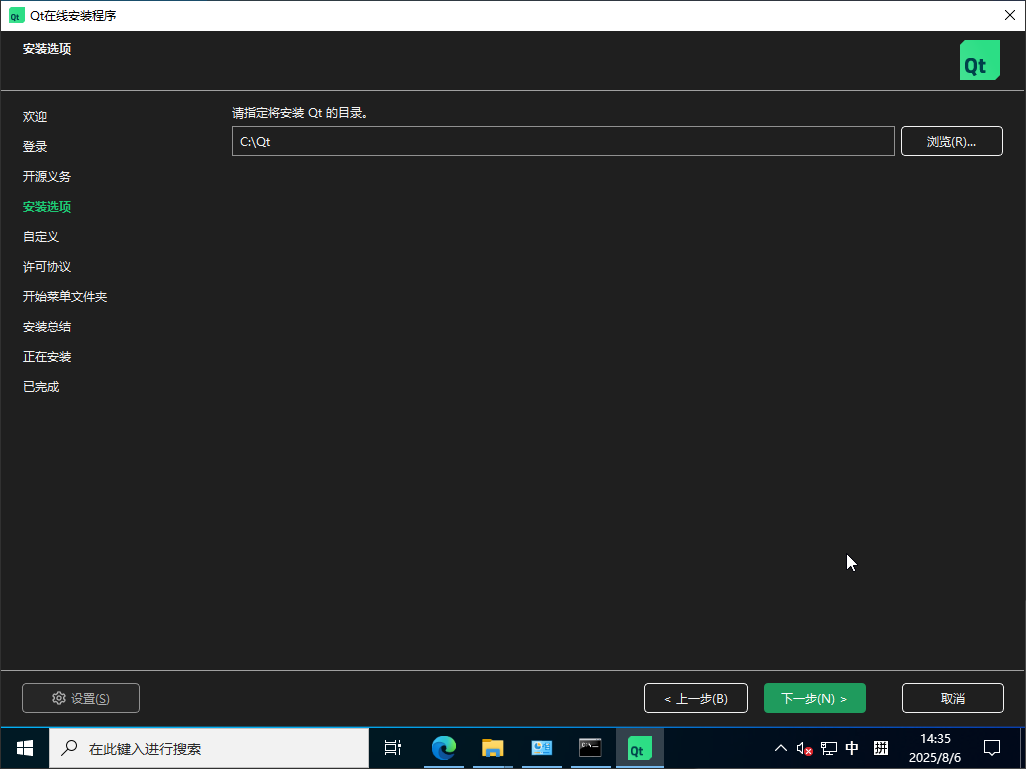
    Can Qt be installed on Windows Server 2022? I encountered a problem during installation. At the step for installation options, it's empty - there are no installation options or custom options available, only the installation path can be modified.
    How can I solve this issue? The Qt version I'm using is the community edition.

    1 Reply Last reply
    0
    • SGaistS Offline
      SGaistS Offline
      SGaist
      Lifetime Qt Champion
      wrote on last edited by
      #2

      Hi and welcome to devnet,

      Which version of Qt are you trying to install ?

      Interested in AI ? www.idiap.ch
      Please read the Qt Code of Conduct - https://forum.qt.io/topic/113070/qt-code-of-conduct

      N 2 Replies Last reply
      0
      • SGaistS SGaist

        Hi and welcome to devnet,

        Which version of Qt are you trying to install ?
        N Offline
        N Offline
        niceboy
        wrote on last edited by
        #3

        @SGaist It is the latest version: qt-online-installer-windows-x64-4.10.0.exe
        there are no installation options or custom options available.
        20250806143548922-f3d1f5c3ba41d08d60c3dbf3b89e3784.png

        1 Reply Last reply
        0
        • SGaistS SGaist

          Hi and welcome to devnet,

          Which version of Qt are you trying to install ?
          N Offline
          N Offline
          niceboy
          wrote on last edited by
          #4

          @SGaist
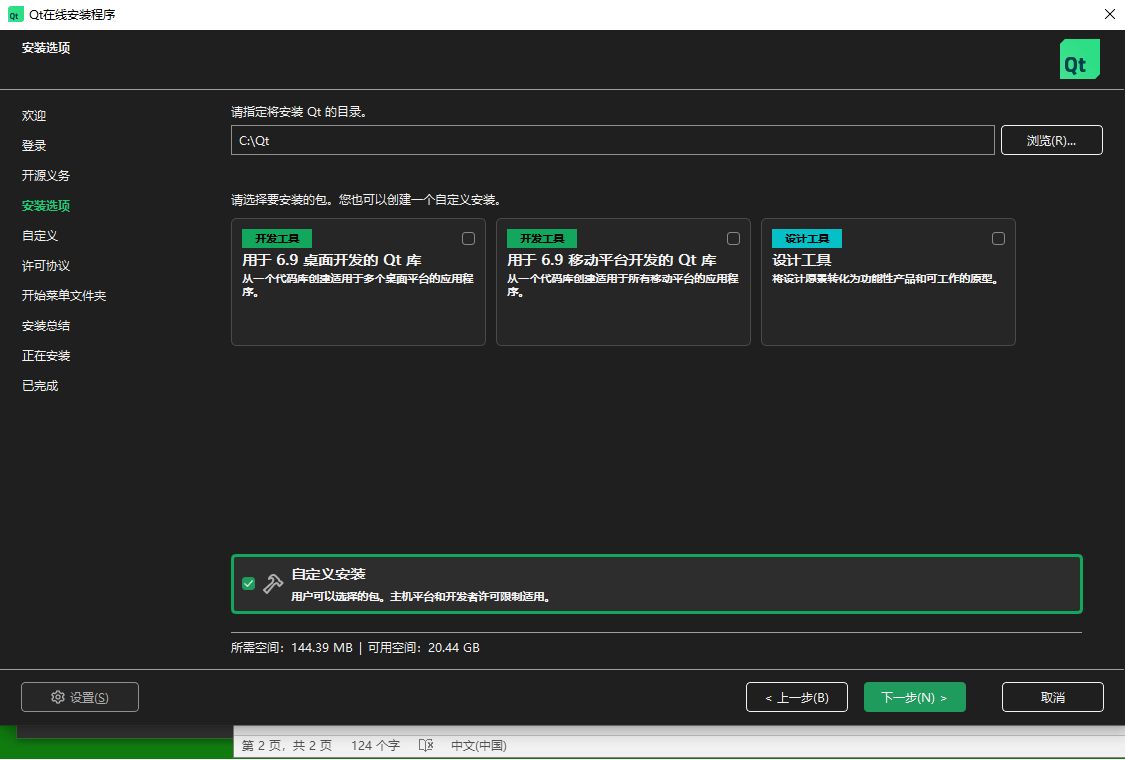
          It should normally be like the following:
          test_py_debug.jpg

          1 Reply Last reply
          0

          • Login

          • Login or register to search.
          • First post
            Last post
          0
          • Categories
          • Recent
          • Tags
          • Popular
          • Users
          • Groups
          • Search
          • Get Qt Extensions
          • Unsolved