
Qt 6.11 is out! See what's new in the release
blog
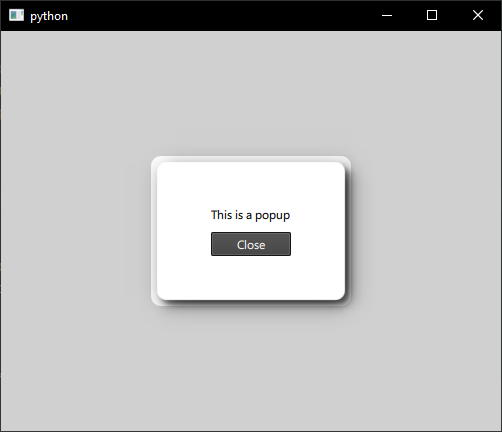
Strange border around popup when adding drop shadow with MultiEffect
-
Here's a minimal QML example that shows the problem I'm encountering:
import QtQuick
import QtQuick.Controls
import QtQuick.Effects

ApplicationWindow {
    width: 500
    height: 400
    visible: true

    color: "#E0E0E0"

    Button {
        text: "Open Popup"
        anchors.centerIn: parent
        onClicked: popup.open()
    }

    Popup {
        id: popup
        modal: true
        focus: true
        x: (parent.width - width) / 2
        y: (parent.height - height) / 2
        width: 200
        height: 150

        background: Rectangle {
            id: bg
            anchors.fill: parent.item
            color: "white"
            radius: 10
        }

        MultiEffect {
            anchors.fill: parent
            source: bg
            shadowEnabled: true
            shadowHorizontalOffset: 5
            shadowVerticalOffset: 5
        }

        Column {
            anchors.centerIn: parent
            spacing: 10

            Text { text: "This is a popup" }
            Button { text: "Close"; onClicked: popup.close() }
        }
    }
}
In the past, I have used
RectangularGlowwith great success. This item was much easier to work with. For example:background: Rectangle { anchors.fill: parent border.width: 1 border.color: "black" color: root.color RectangularGlow { z: -1 anchors.fill: parent glowRadius: 12 spread: 0.1 color: Colors.black opacity: 0.6 } }This works much better. However, unfortunately
import Qt5Compat.GraphicalEffectsis not available to me on this new project because I am using PyQt6, and Qt5Compat is not available with PyQt6, so I'm forced to resort to MultiEffect that has this strange border.I'm not attached to using MultiEffect, so if there's a different way to achieve a dropshadow effect (that is compatible with PyQt6) I'd be happy to use that instead, but MultiEffect is the closest thing I've gotten to achieving this effect.