
Why did "useOpenGL" not work?
-
I wrote a example :
import QtCharts 2.2
import QtQuick 2.2


ChartView {
    title: "Line"
    width: 800
    height: 600
    antialiasing: true

    LineSeries {
        name: "LineSeries"

        XYPoint { x: 0; y: 0 }
        XYPoint { x: 1.1; y: 2.1 }
        XYPoint { x: 1.9; y: 3.3 }
        XYPoint { x: 2.1; y: 2.1 }
        XYPoint { x: 2.9; y: 4.9 }
        XYPoint { x: 3.4; y: 3.0 }
        XYPoint { x: 4.1; y: 3.3 }
    }
}
And got the result:
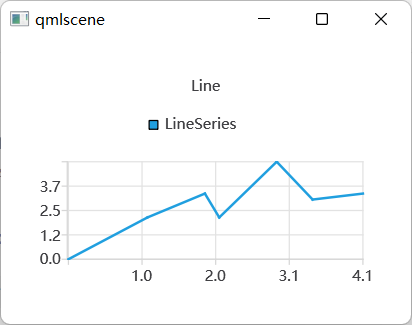
Then set "useOpenGL: true" :
import QtCharts 2.2
import QtQuick 2.2

ChartView {
    title: "Line"
    width: 800
    height: 600
    antialiasing: true

    LineSeries {
        name: "LineSeries"

        useOpenGL: true

        XYPoint { x: 0; y: 0 }
        XYPoint { x: 1.1; y: 2.1 }
        XYPoint { x: 1.9; y: 3.3 }
        XYPoint { x: 2.1; y: 2.1 }
        XYPoint { x: 2.9; y: 4.9 }
        XYPoint { x: 3.4; y: 3.0 }
        XYPoint { x: 4.1; y: 3.3 }
    }
}
and got blank result:
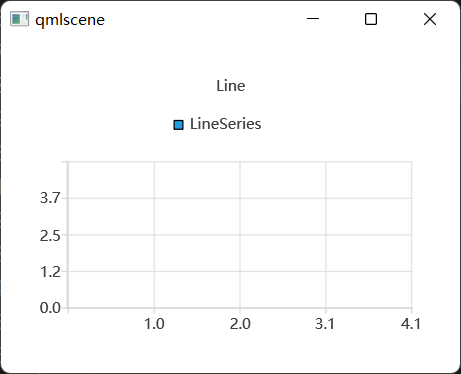
Is there anyone help me?
-
I'm getting the same issue.
Have you solved this problem yet? If true, could you share me how to fix it?
Thanks! -
-
2026 issue still present.
@FishBoneEK hi,
Which version of Qt are you using now ?
On which platform ?
Did you check the bug report system to see if it's something known ?Interested in AI ? www.idiap.ch
Please read the Qt Code of Conduct - https://forum.qt.io/topic/113070/qt-code-of-conduct -
@FishBoneEK hi,
Which version of Qt are you using now ?
On which platform ?
Did you check the bug report system to see if it's something known ?@SGaist Hi, tried on 6.10.1 and 6.10.2 on Windows, the
useOpenGLdoesn't work.
Though the exampleOpenGL Accelerated Series Exampleworks quite well, it doesn't use QtQuick though.
Quick search in Bug Tracker shows nothing relevant. I'd like to report it myself but the "Create" button doesn't work, as mentioned in another thread of mine. -
@FishBoneEK hi,
Which version of Qt are you using now ?
On which platform ?
Did you check the bug report system to see if it's something known ?@SGaist said in Why did "useOpenGL" not work?:
Did you check the bug report system to see if it's something known ?
Note that Qt Charts is now deprecated in favour of Qt Graphs. Even if a bug exists in Qt Charts, it will no longer be fixed.
So, the solution might be to switch to Qt Graphs where GPU rendering is always enabled.
-
@SGaist said in Why did "useOpenGL" not work?:
Did you check the bug report system to see if it's something known ?
Note that Qt Charts is now deprecated in favour of Qt Graphs. Even if a bug exists in Qt Charts, it will no longer be fixed.
So, the solution might be to switch to Qt Graphs where GPU rendering is always enabled.
@JKSH Yeah I'm aware of that, but Qt Charts has a hack: it generates a gap if there's qQNaN. This hack doesn't work in QtGraphs. Would love to have it in the new QtGraphs.

