
MYSQL plugin on M1 Mac?
-
Hi,
Does your installed MySQL libraries also provide symbols for both architectures ?
-
@SGaist Yes, since you're compiling/building from source
@chriam I missed that you're using Ninja (I deleted my previous post)
Because you're on Ninja, that explains the missing link.txt.
Instead:- do the ..acos/bin/qt-cmake... as before
- edit build.ninja file (it should be in the /Users/chriam/Qt/6.3.1/Src/qtbase/src/plugins/sqldrivers directory) so that Ninja builds for arm64.
Easiest is to use sed:
sed -i -e 's/-arch x86_64/-arch arm64/g' /Users/chriam/Qt/6.3.1/Src/qtbase/src/plugins/sqldrivers/build.ninja
- try cmake --build .
-
@SGaist Yes, since you're compiling/building from source
@chriam I missed that you're using Ninja (I deleted my previous post)
Because you're on Ninja, that explains the missing link.txt.
Instead:- do the ..acos/bin/qt-cmake... as before
- edit build.ninja file (it should be in the /Users/chriam/Qt/6.3.1/Src/qtbase/src/plugins/sqldrivers directory) so that Ninja builds for arm64.
Easiest is to use sed:
sed -i -e 's/-arch x86_64/-arch arm64/g' /Users/chriam/Qt/6.3.1/Src/qtbase/src/plugins/sqldrivers/build.ninja
- try cmake --build .
@hskoglund are we talking about the same thing ? I was thinking about the MySQL pre-built libraries that are likely used to link against.
Interested in AI ? www.idiap.ch
Please read the Qt Code of Conduct - https://forum.qt.io/topic/113070/qt-code-of-conduct -
@hskoglund are we talking about the same thing ? I was thinking about the MySQL pre-built libraries that are likely used to link against.
@SGaist Sorry I thought you meant the MySQL stuff from Qt 6.3.1.
The prebuilt MySQL driver installed via Homebrew is only built for one architecture:
file /usr/local/lib/libmysqlclient.dylib
/usr/local/lib/libmysqlclient.dylib: Mach-O 64-bit dynamically linked shared library arm64
This is a different approach that all binaries from Qt and Apple where both architectures are included more here
-
Dear both of you
Everything seems to be fine, GREAT!
chriam: ~/Qt/6.3.1/macos/plugins/sqldrivers/build_sqldrivers % /Users/chriam/Qt/6.3.1/macos/bin/qt-cmake -G Ninja /Users/chriam/Qt/6.3.1/Src/qtbase/src/plugins/sqldrivers -DCMAKE_INSTALL_PREFIX=/Users/chriam/Qt/6.3.1/macos -DMySQL_INCLUDE_DIR="/usr/local/mysql/include" -DMySQL_LIBRARY="/usr/local/mysql/lib/libmysqlclient.dylib" -DCMAKE_OSX_ARCHITECTURES="arm64"
-- The CXX compiler identification is AppleClang 13.1.6.13160021
-- The C compiler identification is AppleClang 13.1.6.13160021
-- The ASM compiler identification is Clang with GNU-like command-line
-- Found assembler: /Applications/Xcode.app/Contents/Developer/Toolchains/XcodeDefault.xctoolchain/usr/bin/clang
-- Detecting CXX compiler ABI info
-- Detecting CXX compiler ABI info - done
-- Check for working CXX compiler: /usr/bin/clang++ - skipped
-- Detecting CXX compile features
-- Detecting CXX compile features - done
-- Detecting C compiler ABI info
-- Detecting C compiler ABI info - done
-- Check for working C compiler: /usr/bin/clang - skipped
-- Detecting C compile features
-- Detecting C compile features - done
-- Looking for pthread.h
-- Looking for pthread.h - found
-- Performing Test CMAKE_HAVE_LIBC_PTHREAD
-- Performing Test CMAKE_HAVE_LIBC_PTHREAD - Success
-- Found Threads: TRUE
-- Performing Test HAVE_STDATOMIC
-- Performing Test HAVE_STDATOMIC - Success
-- Found WrapAtomic: TRUE

-- Configuration summary has been written to /Users/chriam/Qt/6.3.1/macos/plugins/sqldrivers/build_sqldrivers/config.summary
-- Configure with --log-level=STATUS or higher to increase the output verbosity.


-- Configuring done
-- Generating done
-- Build files have been written to: /Users/chriam/Qt/6.3.1/macos/plugins/sqldrivers/build_sqldrivers
chriam: ~/Qt/6.3.1/macos/plugins/sqldrivers/build_sqldrivers % sed -i -e 's/-arch x86_64/-arch arm64/g' /Users/chriam/Qt/6.3.1/macos/plugins/sqldrivers/build_sqldrivers/build.ninja
chriam: ~/Qt/6.3.1/macos/plugins/sqldrivers/build_sqldrivers % pwd
/Users/chriam/Qt/6.3.1/macos/plugins/sqldrivers/build_sqldrivers
chriam: ~/Qt/6.3.1/macos/plugins/sqldrivers/build_sqldrivers % ls
CMakeCache.txt		CTestTestfile.cmake	build.ninja-e		config.summary		mysql			qtsqldrivers-config.h	sqlite
CMakeFiles		build.ninja		cmake_install.cmake	lib			plugins			qtsqldrivers-config_p.h
chriam: ~/Qt/6.3.1/macos/plugins/sqldrivers/build_sqldrivers % cmake --build .
[9/11] Linking CXX shared module plugins/sqldrivers/libqsqlmysql.dylib
ld: warning: linking against a dylib which is not safe for use in application extensions: /usr/local/mysql/lib/libmysqlclient.dylib
[11/11] Linking CXX shared module plugins/sqldrivers/libqsqlite.dylib
chriam: ~/Qt/6.3.1/macos/plugins/sqldrivers/build_sqldrivers %
and the dylib is in
chriam: ~ % find ~/Qt -name libqsqlmysql.dylib /Users/chriam/Qt/6.3.1/macos/plugins/sqldrivers/build_sqldrivers/plugins/sqldrivers/libqsqlmysql.dylib chriam: ~ %@hskoglund Actually, the build.ninja file is in ~/Qt/6.3.1/macos/plugins/sqldrivers/build_sqldrivers/build.ninja rather than in the qtbase/src subdirectory (i.e., in the build_sqldrivers directory that this time I put on a different place). I guess to install/copy it to the right place will be straight forward, I will try/do it in the next few days and let you know... I am extremely thankful for your help, appreciate a lot!
@SGaist Thanks for your input! Actually, I didn't install MySQL by Homebrew but downloaded it from Oracle (tested it, it seems to work perfectly fine). I did understand your question about the MySQL libraries regarding both architectures, but when compiling the command specifies x86_64 architecture for compiling the plugin,chriam: ~/Qt/6.3.1/macos/plugins/sqldrivers/build_sqldrivers % cmake --build . [8/11] Linking CXX shared module plugins/sqldrivers/libqsqlmysql.dylib FAILED: plugins/sqldrivers/libqsqlmysql.dylib : && /usr/bin/clang++ -g -DNDEBUG -O2 -arch x86_64 -isysroot ...and the linking warning
ld: warning: ignoring file /usr/local/mysql/lib/libmysqlclient.dylib, building for macOS-x86_64 but attempting to link with file built for macOS-arm64suggested that the installed MySQL libraries are arm64 but the Qt plugin x86_64.
Anyhow, as I said, extremely glad that it seems to work (I will ignore the "linking against a dylib which is not safe for use in application extensions" for now), thanks again both of you,
Christoph
-
chriam: ~/Qt/6.3.1/macos/plugins/sqldrivers/build_sqldrivers % cmake --install .
-- Install configuration: "RelWithDebInfo"
-- Installing: /Users/chriam/Qt/6.3.1/macos/lib/cmake/Qt6Sql/Qt6QMYSQLDriverPluginConfig.cmake
-- Installing: /Users/chriam/Qt/6.3.1/macos/lib/cmake/Qt6Sql/Qt6QMYSQLDriverPluginConfigVersion.cmake
-- Installing: /Users/chriam/Qt/6.3.1/macos/lib/cmake/Qt6Sql/Qt6QMYSQLDriverPluginConfigVersionImpl.cmake
-- Installing: /Users/chriam/Qt/6.3.1/macos/./plugins/sqldrivers/libqsqlmysql.dylib
-- Installing: /Users/chriam/Qt/6.3.1/macos/lib/cmake/Qt6Sql/Qt6QMYSQLDriverPluginTargets.cmake
-- Installing: /Users/chriam/Qt/6.3.1/macos/lib/cmake/Qt6Sql/Qt6QMYSQLDriverPluginTargets-relwithdebinfo.cmake
-- Installing: /Users/chriam/Qt/6.3.1/macos/./plugins/sqldrivers/libqsqlmysql.dylib.dSYM
-- Installing: /Users/chriam/Qt/6.3.1/macos/./plugins/sqldrivers/libqsqlmysql.dylib.dSYM/Contents
-- Installing: /Users/chriam/Qt/6.3.1/macos/./plugins/sqldrivers/libqsqlmysql.dylib.dSYM/Contents/Resources
-- Installing: /Users/chriam/Qt/6.3.1/macos/./plugins/sqldrivers/libqsqlmysql.dylib.dSYM/Contents/Resources/DWARF
-- Installing: /Users/chriam/Qt/6.3.1/macos/./plugins/sqldrivers/libqsqlmysql.dylib.dSYM/Contents/Resources/DWARF/qsqlmysql
-- Installing: /Users/chriam/Qt/6.3.1/macos/./plugins/sqldrivers/libqsqlmysql.dylib.dSYM/Contents/Info.plist
-- Installing: /Users/chriam/Qt/6.3.1/macos/lib/cmake/Qt6Sql/Qt6QMYSQLDriverPluginAdditionalTargetInfo.cmake
-- Installing: /Users/chriam/Qt/6.3.1/macos/lib/cmake/Qt6Sql/Qt6QSQLiteDriverPluginConfig.cmake
-- Installing: /Users/chriam/Qt/6.3.1/macos/lib/cmake/Qt6Sql/Qt6QSQLiteDriverPluginConfigVersion.cmake
-- Installing: /Users/chriam/Qt/6.3.1/macos/lib/cmake/Qt6Sql/Qt6QSQLiteDriverPluginConfigVersionImpl.cmake
-- Installing: /Users/chriam/Qt/6.3.1/macos/./plugins/sqldrivers/libqsqlite.dylib
-- Old export file "/Users/chriam/Qt/6.3.1/macos/lib/cmake/Qt6Sql/Qt6QSQLiteDriverPluginTargets.cmake" will be replaced.  Removing files [/Users/chriam/Qt/6.3.1/macos/lib/cmake/Qt6Sql/Qt6QSQLiteDriverPluginTargets-relwithdebinfo.cmake].
-- Installing: /Users/chriam/Qt/6.3.1/macos/lib/cmake/Qt6Sql/Qt6QSQLiteDriverPluginTargets.cmake
-- Installing: /Users/chriam/Qt/6.3.1/macos/lib/cmake/Qt6Sql/Qt6QSQLiteDriverPluginTargets-relwithdebinfo.cmake
-- Up-to-date: /Users/chriam/Qt/6.3.1/macos/./plugins/sqldrivers/libqsqlite.dylib.dSYM
-- Up-to-date: /Users/chriam/Qt/6.3.1/macos/./plugins/sqldrivers/libqsqlite.dylib.dSYM/Contents
-- Up-to-date: /Users/chriam/Qt/6.3.1/macos/./plugins/sqldrivers/libqsqlite.dylib.dSYM/Contents/Resources
-- Up-to-date: /Users/chriam/Qt/6.3.1/macos/./plugins/sqldrivers/libqsqlite.dylib.dSYM/Contents/Resources/DWARF
-- Installing: /Users/chriam/Qt/6.3.1/macos/./plugins/sqldrivers/libqsqlite.dylib.dSYM/Contents/Resources/DWARF/qsqlite
-- Installing: /Users/chriam/Qt/6.3.1/macos/./plugins/sqldrivers/libqsqlite.dylib.dSYM/Contents/Info.plist
-- Installing: /Users/chriam/Qt/6.3.1/macos/lib/cmake/Qt6Sql/Qt6QSQLiteDriverPluginAdditionalTargetInfo.cmake
chriam: ~/Qt/6.3.1/macos/plugins/sqldrivers/build_sqldrivers % find ~/Qt -name libqsqlmysql.dylib
/Users/chriam/Qt/6.3.1/macos/plugins/sqldrivers/libqsqlmysql.dylib
/Users/chriam/Qt/6.3.1/macos/plugins/sqldrivers/build_sqldrivers/plugins/sqldrivers/libqsqlmysql.dylib
Everything perfect!
So for anybody who struggles with the same problem: Once you know where to make the architecture spec changes (thanks again @hskoglund) the procedure to compile the Qt MySQL plugin for an M1/M2 Mac is straight forward:
chriam: ~/Qt/6.3.1/Src % ./configure -sql-mysql -- -DCMAKE_INCLUDE_PATH="/usr/local/mysql/include" -DCMAKE_LIBRARY_PATH="/usr/local/mysql/lib"

…
Qt Sql Drivers:
  DB2 (IBM) .............................. no
  InterBase .............................. no
  MySql .................................. yes
  OCI (Oracle) ........................... no
  ODBC ................................... no
  PostgreSQL ............................. no
  SQLite ................................. yes
    Using system provided SQLite ......... no
…

chriam: ~/Qt/6.3.1/macos/plugins/sqldrivers % mkdir build_sqldrivers

chriam: ~/Qt/6.3.1/macos/plugins/sqldrivers/build_sqldrivers % /Users/chriam/Qt/6.3.1/macos/bin/qt-cmake -G Ninja /Users/chriam/Qt/6.3.1/Src/qtbase/src/plugins/sqldrivers -DCMAKE_INSTALL_PREFIX=/Users/chriam/Qt/6.3.1/macos -DMySQL_INCLUDE_DIR="/usr/local/mysql/include" -DMySQL_LIBRARY="/usr/local/mysql/lib/libmysqlclient.dylib" -DCMAKE_OSX_ARCHITECTURES="arm64"

chriam: ~/Qt/6.3.1/macos/plugins/sqldrivers/build_sqldrivers % sed -i -e 's/-arch x86_64/-arch arm64/g' /Users/chriam/Qt/6.3.1/macos/plugins/sqldrivers/build_sqldrivers/build.ninja

chriam: ~/Qt/6.3.1/macos/plugins/sqldrivers/build_sqldrivers % cmake --build .

chriam: ~/Qt/6.3.1/macos/plugins/sqldrivers/build_sqldrivers % cmake --install .

chriam: ~/Qt/6.3.1/macos/plugins/sqldrivers/build_sqldrivers % find ~/Qt -name libqsqlmysql.dylib
where the by sed the following four lines in the build.ninja file are corrected:

@SGaist: Actually, if binaries from Oracle have been downloaded, only arm64 is installed, I noticed:

-
Thanks for the detailed analysis !
-
B BushyAxis793 referenced this topic on
-
H hskoglund referenced this topic on
-
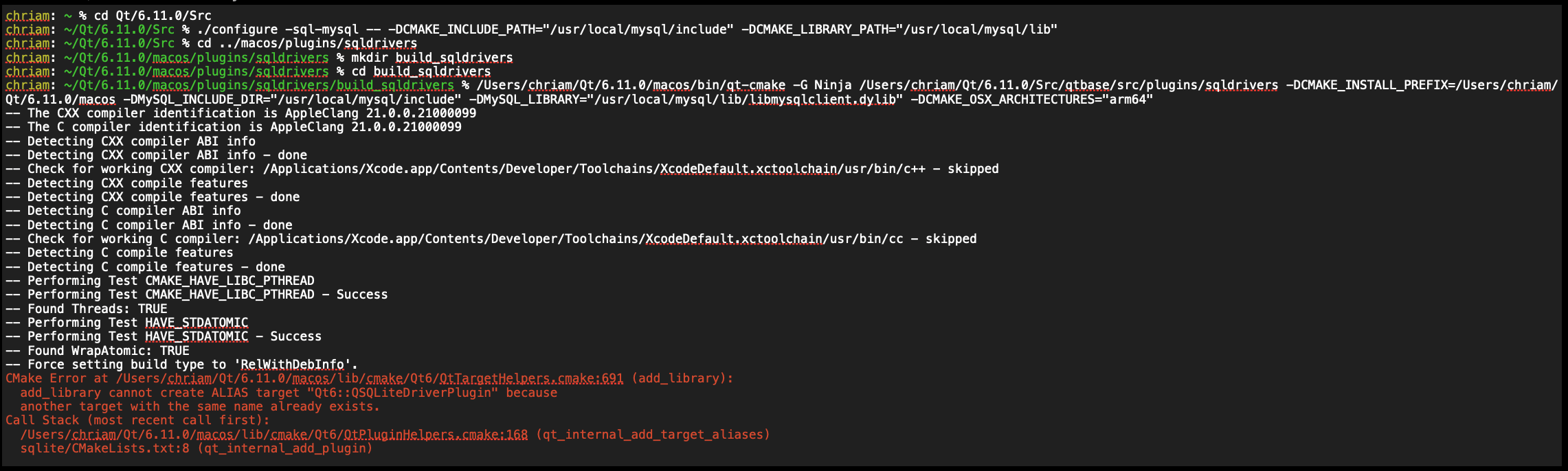
...as of April 28, 2026, still for the MySQL plugin compilation, now for Qt 6.11.0, the compilation / installation would be:

but 1st, for the Ninja build, there ist the following error:
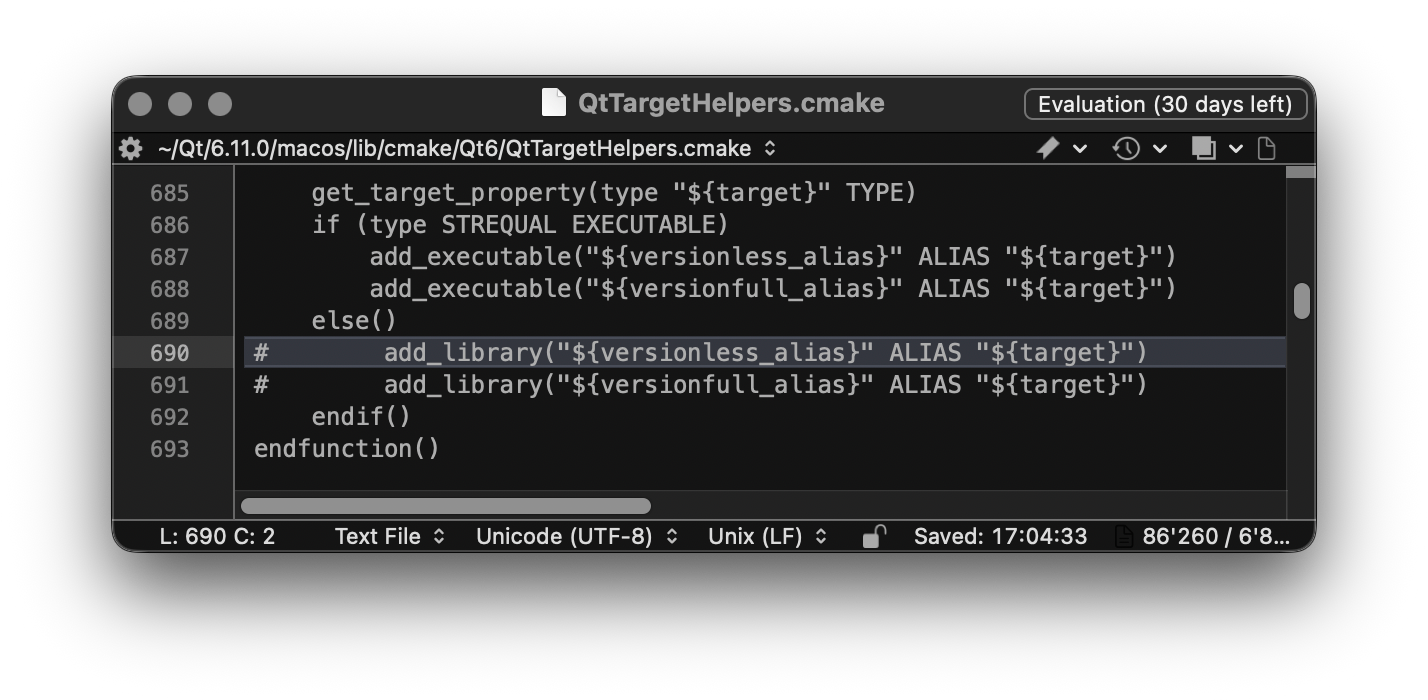
Therefore, outcommented lines 690, 691 in ~Qt/6.11.0/macos/lib/cmake/Qt6/QtTargetHelpers.cmake:
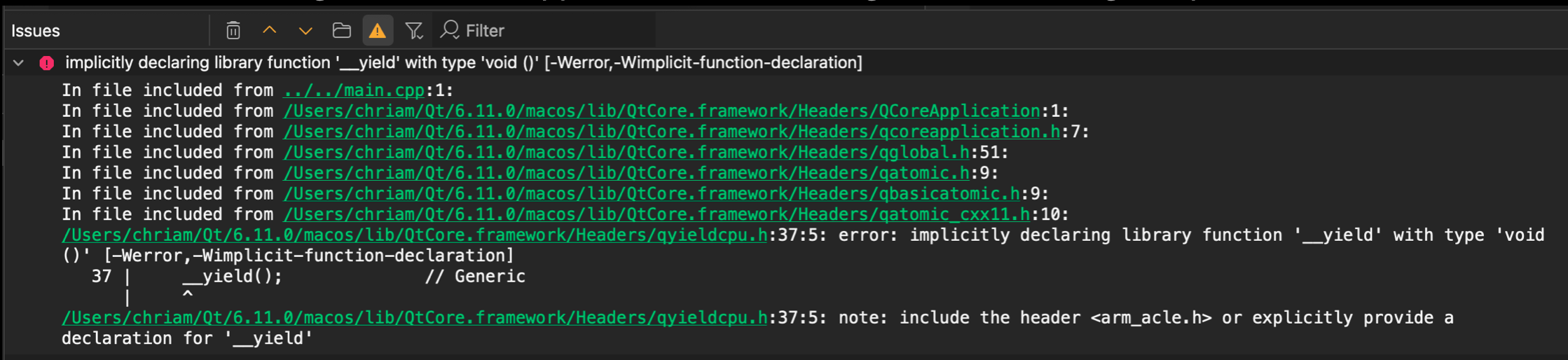
and 2nd, when compiling the following minimal driver listing example, the following error is reported:
Therefore, added <arm_acle h› to ~Qt/6.11.0/macos/lib/QtCore.framework/Headers/gyieldcpu.h:
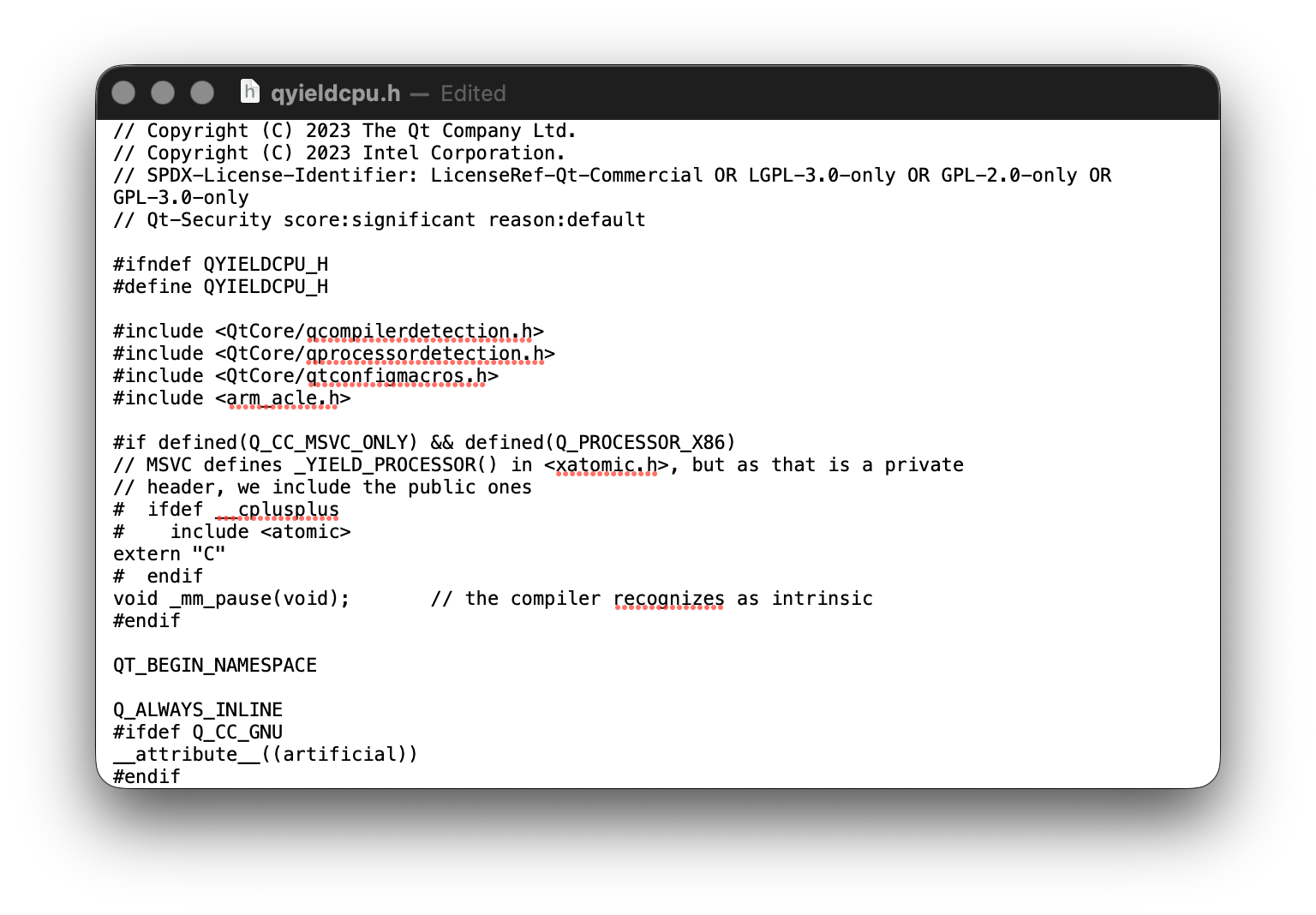
Then, everything is fine:

-
yield(): https://qt-project.atlassian.net/browse/QTBUG-145264
cmake: https://qt-project.atlassian.net/browse/QTBUG-145563both topics also discussed in the forum
yield: https://forum.qt.io/post/837367
cmake: https://forum.qt.io/topic/164512Qt Online Installer direct download: https://download.qt.io/official_releases/online_installers/
Visit the Qt Academy at https://academy.qt.io/catalog -
yield(): https://qt-project.atlassian.net/browse/QTBUG-145264
cmake: https://qt-project.atlassian.net/browse/QTBUG-145563both topics also discussed in the forum
yield: https://forum.qt.io/post/837367
cmake: https://forum.qt.io/topic/164512@Christian-Ehrlicher Thanks!!


