
Qt 6.12 LTS is out! See what's new in the release
blog
WinUI 3 drop-in QStyle for Widgets. Mica, dark mode, accent colors, and no stylesheets
Showcase
1
Posts
1
Posters
2
Views
1
Watching
-
Hi all,
here is WinUI3Style, a Qt6 (and Qt5) Widgets style inspired by Windows 11. Demo video attached. It is coded with extensive use of LLM but with lots of automated tests and manual reviews.
https://github.com/JulienMaille/WinUI3Style
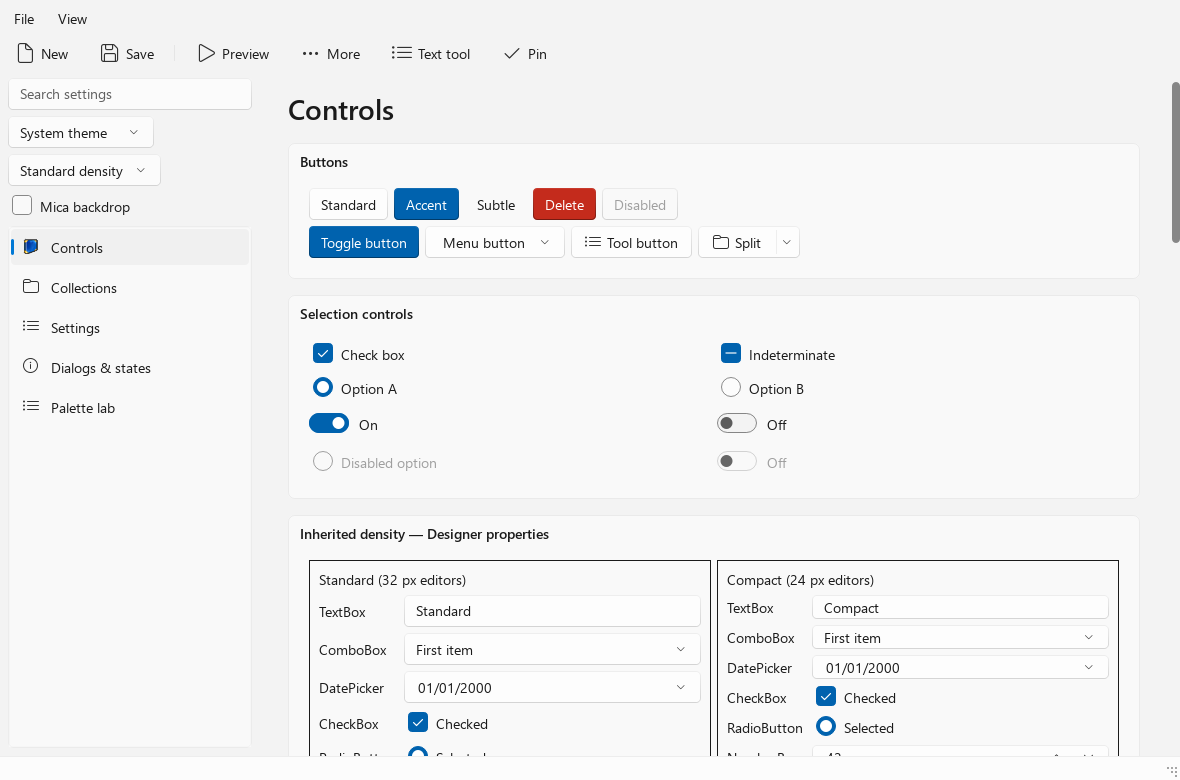
What it does:- light and dark themes, with system accent colors
- animated hover, press, and focus states
- Mica backdrop for the main window, and rounded popups
- standard and compact density
- Fluent glyphs
- ToggleSwitch, accent/subtle/destructive buttons
- settings cards, all enabled by setting a dynamic property on stock widgets. No custom painting in your app
There’s no QSS (stylesheets) anywhere, no custom classes. Everything is painted by QStyle, so your widgets stay native Qt widgets.
It’s also a loadable style plugin (winui3 / winui3compact), so it can work without recompiling your app.It’s a first preview, not full WinUI parity.
A portable Windows gallery package is available if you just want to see itWhere I’d love help:
- try it in a real app and report what looks wrong
- missing or ugly widgets
- testing on different Windows versions, DPI settings, and Qt versions
- PRs, even small ones
-
J JulienMaille marked this topic as a regular topic