Skip to content
  • Categories
  • Recent
  • Tags
  • Popular
  • Users
  • Groups
  • Search
  • Get Qt
  • Unsolved
Collapse
Brand Logo
  1. Home
  2. Qt Development
  3. General and Desktop
  4. Possible missed Enter event in Qt 6.9.3 causing QPushButton hover state to get stuck
Qt 6.12 LTS is out! See what's new in the release blog

Possible missed Enter event in Qt 6.9.3 causing QPushButton hover state to get stuck

Scheduled Pinned Locked Moved Unsolved General and Desktop
11 Posts 3 Posters 282 Views 1 Watching
  • Oldest to Newest
  • Newest to Oldest
  • Most Votes
Reply
  • Reply as topic
Log in to reply
This topic has been deleted. Only users with topic management privileges can see it.
  • D Offline
    D Offline
    DongHao
    wrote last edited by
    #1

    Title: Possible missed Enter event in Qt 6.9.3 causing QPushButton hover state to get stuck

    Hi everyone,

    I'm investigating an intermittent QPushButton hover issue in Qt 6.9.3 on Windows.

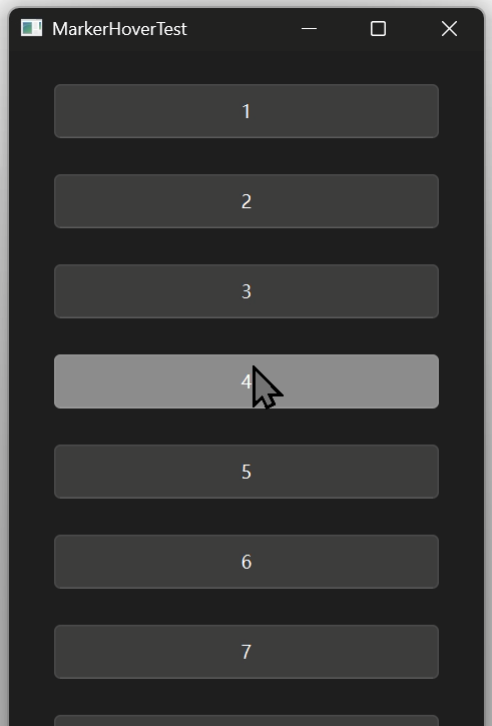
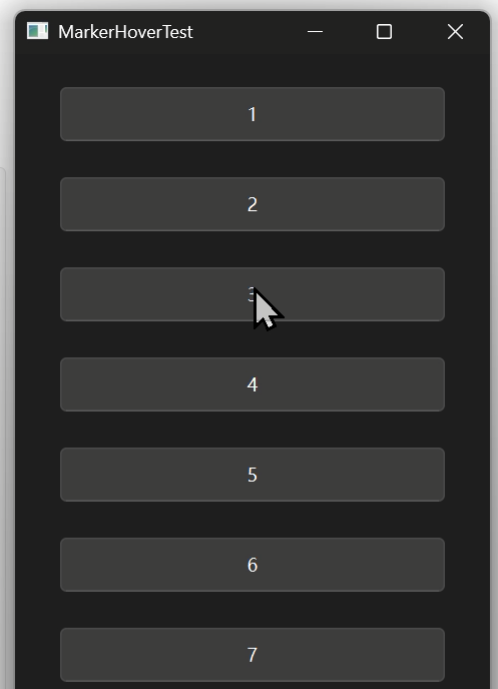
    Sometimes the mouse pointer is visibly inside a QPushButton, but the button does not enter its hover state. Moving the mouse further inside the button does not always restore the hover effect.

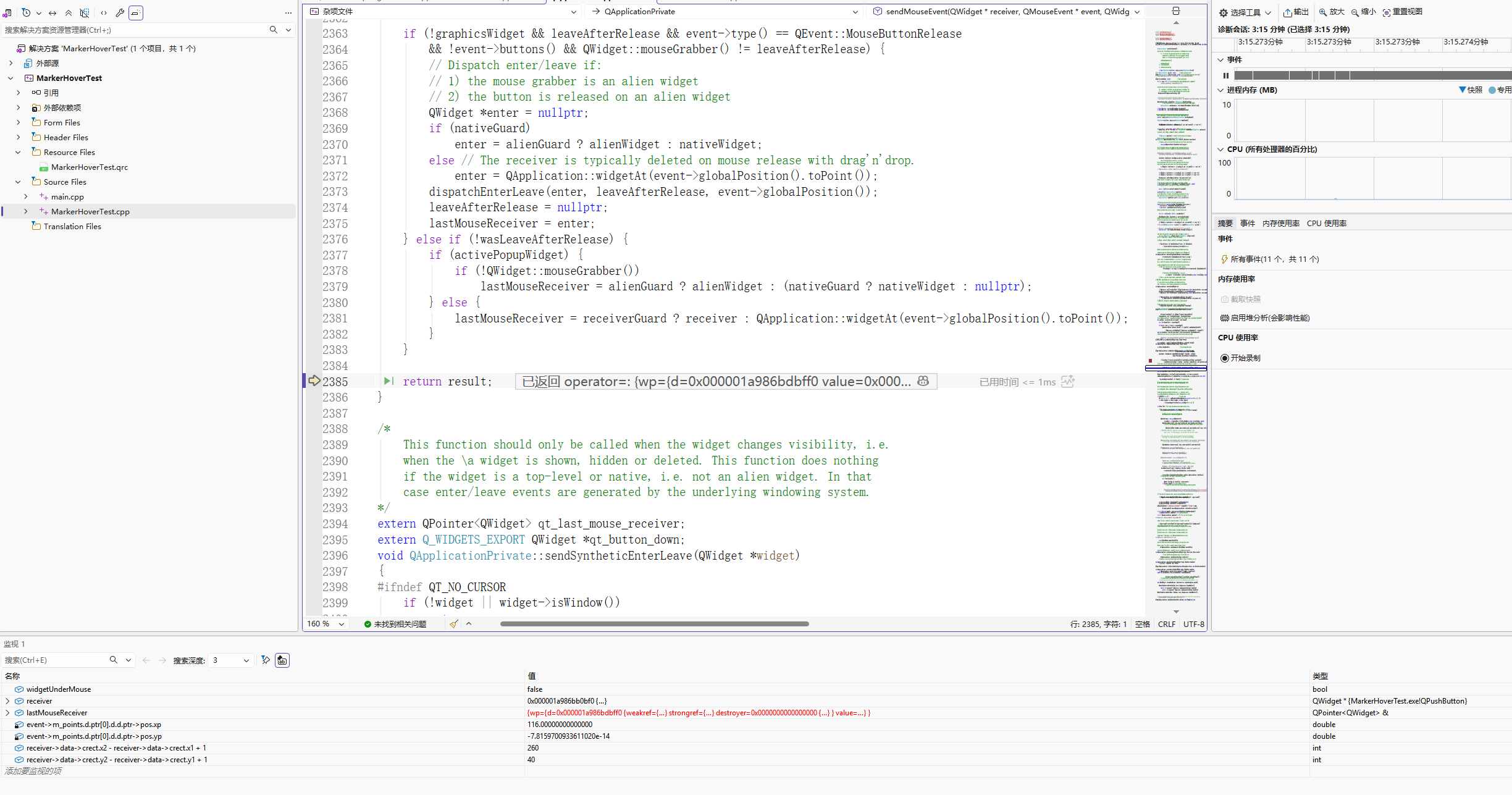
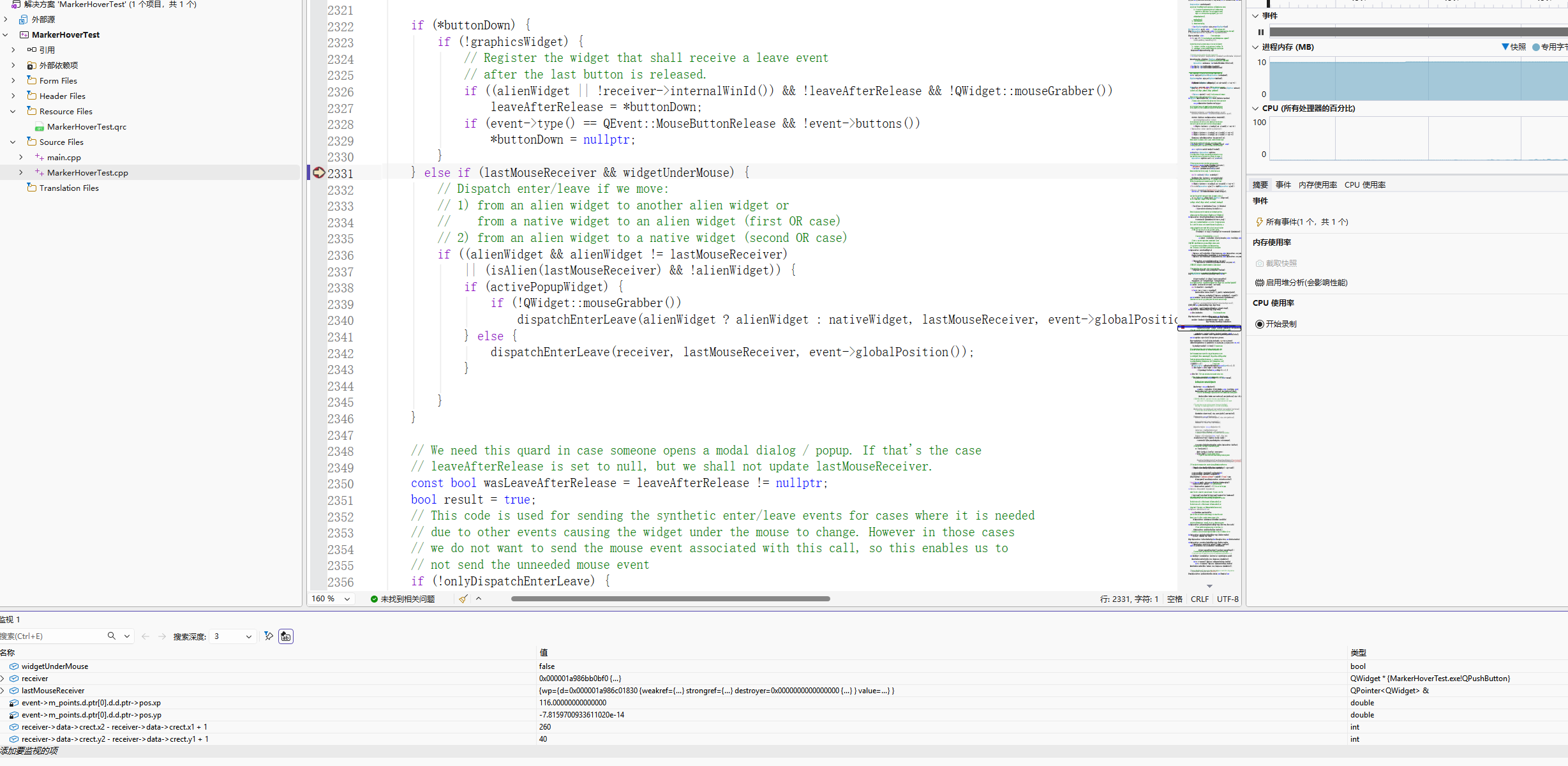
    While examining QApplicationPrivate::sendMouseEvent() in qapplication.cpp, I noticed a potentially problematic sequence:

    1. The mouse event's local Y coordinate can contain a tiny negative floating-point value, such as -8.5265128291212022e-14.
    2. QRectF(receiver->rect()).contains(event->position()) then returns false.
    3. This may prevent dispatchEnterLeave() from being called.
    4. However, lastMouseReceiver may still be updated to receiver.
    5. On subsequent mouse movements, alienWidget may already equal lastMouseReceiver, so another Enter event may not be generated.

    My concern is that lastMouseReceiver could indicate that the mouse has entered the widget, while the widget's WA_UnderMouse attribute remains false.

    Could this sequence cause the hover state to remain incorrect until the mouse leaves and re-enters the widget?

    I haven't yet confirmed whether this is a Qt bug or an application-specific issue.

    Has anyone encountered similar behavior, or could someone familiar with Qt Widgets event handling help verify this logic?

    Thanks in advance!
    2f3d71d29f4c800d3b137691b1767875.png
    5d7fdb7bbd7c88a71ed1c7aac4824674.png

    1 Reply Last reply
    0
    • SGaistS Offline
      SGaistS Offline
      SGaist
      Lifetime Qt Champion
      wrote last edited by
      #2

      Hi and welcome to devnet,

      Can you test with a more recent version of Qt ? 6.12 just got released and would be a better target for a fix if you can still reproduce this issue.

      Interested in AI ? www.idiap.ch
      Please read the Qt Code of Conduct - https://forum.qt.io/topic/113070/qt-code-of-conduct

      1 Reply Last reply
      2
      • Christian EhrlicherC Offline
        Christian EhrlicherC Offline
        Christian Ehrlicher
        Lifetime Qt Champion
        wrote last edited by
        #3

        Also please provide a minimal, compilable example to reproduce the problem.

        Qt Online Installer direct download: https://download.qt.io/official_releases/online_installers/
        Visit the Qt Academy at https://academy.qt.io/catalog

        D 2 Replies Last reply
        0
        • Christian EhrlicherC Christian Ehrlicher

          Also please provide a minimal, compilable example to reproduce the problem.

          D Offline
          D Offline
          DongHao
          wrote last edited by
          #4

          @Christian-Ehrlicher
          Hi
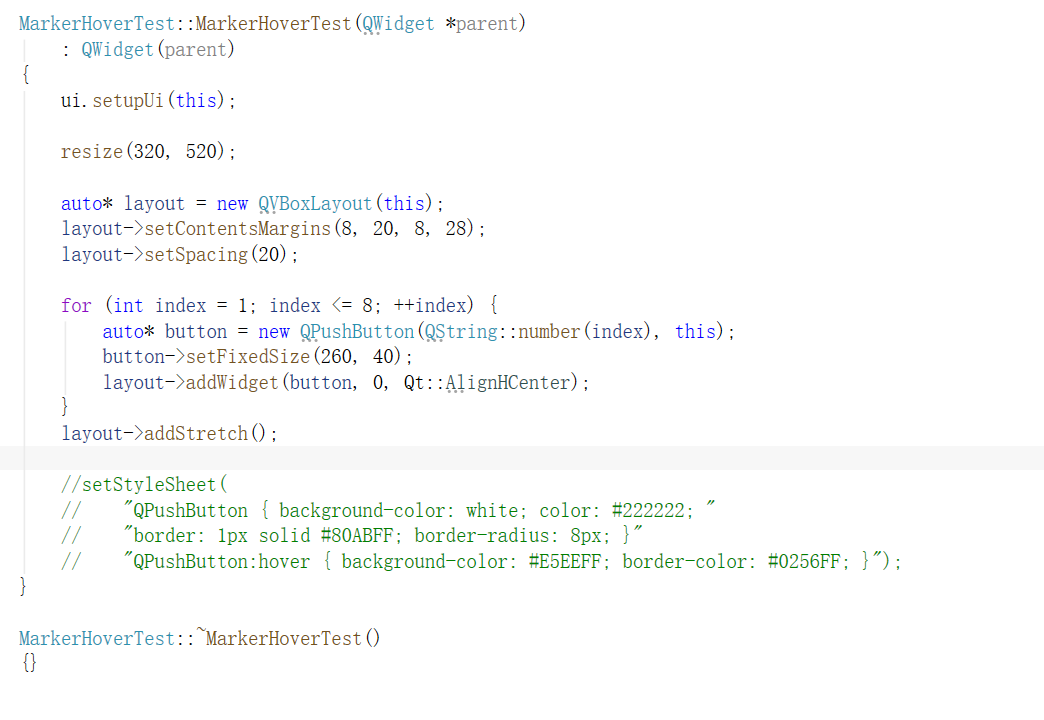
          I've created a minimal example with eight QPushButtons in a QVBoxLayout. I've attached the code screenshot.
          02de40a3-5392-4454-901c-266a73dd16a3-image.png

          1 Reply Last reply
          0
          • Christian EhrlicherC Christian Ehrlicher

            Also please provide a minimal, compilable example to reproduce the problem.

            D Offline
            D Offline
            DongHao
            wrote last edited by
            #5

            @Christian-Ehrlicher
            a0a93d3b-20dd-41be-80be-7fb1082e4d37-image.png
            3e49f450-16df-4410-984d-af64669c3a86-image.png

            1 Reply Last reply
            0
            • Christian EhrlicherC Offline
              Christian EhrlicherC Offline
              Christian Ehrlicher
              Lifetime Qt Champion
              wrote last edited by
              #6

              Please post it as text, not images

              Qt Online Installer direct download: https://download.qt.io/official_releases/online_installers/
              Visit the Qt Academy at https://academy.qt.io/catalog

              D 3 Replies Last reply
              1
              • Christian EhrlicherC Christian Ehrlicher

                Please post it as text, not images

                D Offline
                D Offline
                DongHao
                wrote last edited by
                #7
                This post is deleted!
                1 Reply Last reply
                0
                • Christian EhrlicherC Christian Ehrlicher

                  Please post it as text, not images

                  D Offline
                  D Offline
                  DongHao
                  wrote last edited by
                  #8

                  @Christian-Ehrlicher
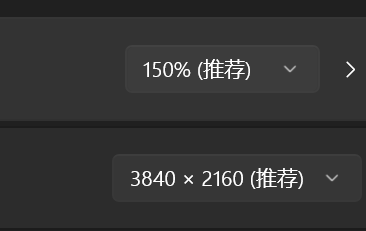
                  Thanks for taking a look. I’ve attached a minimal, compilable Qt Widgets example. I reproduced the issue with Qt 6.9.3 on Windows at 150% display scaling.

                  The debugger confirmed that Qt selected the QPushButton as the mouse event receiver, but the mapped local Y coordinate was approximately -7.82e-14 at the button’s top edge. This made widgetUnderMouse false, so sendMouseEvent() skipped the Enter event. It still updated lastMouseReceiver to that button, so moving farther into the button did not trigger another Enter.

                  I checked the upstream qtbase dev source and found the same coordinate mapping and event dispatch logic. This suggests the issue is still present upstream, though I’ve only confirmed it at runtime on Qt 6.9.3.

                  1 Reply Last reply
                  0
                  • Christian EhrlicherC Christian Ehrlicher

                    Please post it as text, not images

                    D Offline
                    D Offline
                    DongHao
                    wrote last edited by Christian Ehrlicher
                    #9

                    @Christian-Ehrlicher

                    #include <QtWidgets>
                    
                    int main(int argc, char **argv)
                    {
                        QApplication app(argc, argv);
                        QWidget window;
                        window.setWindowTitle(QStringLiteral("MarkerHoverTest"));
                        window.resize(320, 520);
                        auto *layout = new QVBoxLayout(&window);
                        layout->setContentsMargins(8, 20, 8, 28);
                        layout->setSpacing(20);
                    
                        for (int i = 1; i <= 8; ++i) {
                            auto *button = new QPushButton(QString::number(i), &window);
                            button->setFixedSize(260, 40);
                            layout->addWidget(button, 0, Qt::AlignHCenter);
                        }
                        layout->addStretch();
                        window.show();
                        return app.exec();
                    }
                    
                    D 1 Reply Last reply
                    0
                    • D DongHao

                      @Christian-Ehrlicher

                      #include <QtWidgets>
                      
                      int main(int argc, char **argv)
                      {
                          QApplication app(argc, argv);
                          QWidget window;
                          window.setWindowTitle(QStringLiteral("MarkerHoverTest"));
                          window.resize(320, 520);
                          auto *layout = new QVBoxLayout(&window);
                          layout->setContentsMargins(8, 20, 8, 28);
                          layout->setSpacing(20);
                      
                          for (int i = 1; i <= 8; ++i) {
                              auto *button = new QPushButton(QString::number(i), &window);
                              button->setFixedSize(260, 40);
                              layout->addWidget(button, 0, Qt::AlignHCenter);
                          }
                          layout->addStretch();
                          window.show();
                          return app.exec();
                      }
                      
                      D Offline
                      D Offline
                      DongHao
                      wrote last edited by
                      #10

                      @DongHao
                      afabc7ef-875d-4361-8f10-ab0f6b612fac-image.png

                      1 Reply Last reply
                      0
                      • Christian EhrlicherC Offline
                        Christian EhrlicherC Offline
                        Christian Ehrlicher
                        Lifetime Qt Champion
                        wrote last edited by
                        #11

                        It's already fixed - please use a recent Qt version
                        QTBUG-128391

                        Qt Online Installer direct download: https://download.qt.io/official_releases/online_installers/
                        Visit the Qt Academy at https://academy.qt.io/catalog

                        1 Reply Last reply
                        0

                        • Login

                        • Login or register to search.
                        • First post
                          Last post
                        0
                        • Categories
                        • Recent
                        • Tags
                        • Popular
                        • Users
                        • Groups
                        • Search
                        • Get Qt
                        • Unsolved