
Preview a Free AI Video Generator Clip in a Qt Desktop App
-
Preview a Free AI Video Generator Clip in a Qt Desktop App
A preview button has two jobs. First it has to fetch the clip, then it has to open a file the media backend can play. If both jobs share one generic error message, a reviewer has no way to decide whether to retry the link or choose a local copy.
This Qt 6 Widgets example uses PySide6 to download a short clip from an approved link and open it through Qt Multimedia. The playback check uses a synthetic MP4 served on loopback. The address field is for a direct media link to a file you have permission to download.

Illustration of the two stages: finish the download, then open the local file.
Save the whole response before opening the player
QNetworkAccessManagermakes the request. The app writes chunks to aQSaveFileinside a private temporary directory. A response with a declared size above 10 MiB is rejected early. The byte count is also checked as chunks arrive, including when the server supplies no length. There is a five-second transfer inactivity timeout and a separate twelve-second deadline for the whole operation.The sample accepts HTTPS media links and loopback HTTP for testing. It rejects redirects, partial responses and empty files. Once a complete HTTP 200 response passes the checks and the file is committed,
QMediaPlayergets a local file URL. A decoder error is reported separately. Even a successful HTTP response can contain a page or text that the media backend can't open.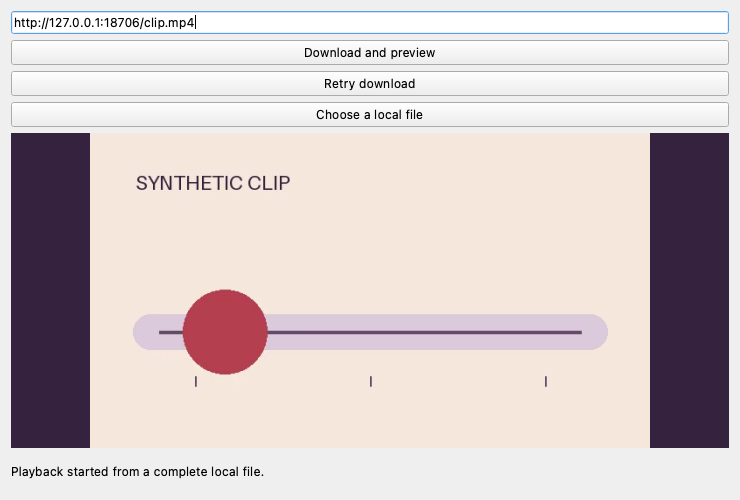
The Qt example plays the synthetic fixture after receiving and committing the complete local file.
Run the example
In Python 3.12, install PySide6 and save the sample below as
preview.py.python -m pip install PySide6==6.10.1 python preview.pyEnter an authorized direct clip URL and choose Download and preview. Retry download repeats the last accepted address. To correct it, edit the field and use Download and preview again. Choose a local file uses the same playback path as a completed download.
import sys

from PySide6.QtCore import QIODevice, QSaveFile, QTemporaryDir, QTimer, QUrl, Qt
from PySide6.QtGui import QPixmap
from PySide6.QtMultimedia import QAudioOutput, QMediaPlayer, QVideoSink
from PySide6.QtNetwork import QNetworkAccessManager, QNetworkReply, QNetworkRequest
from PySide6.QtWidgets import (
    QApplication, QFileDialog, QLabel, QLineEdit, QPushButton, QVBoxLayout, QWidget,
)


MAX_BYTES = 10 * 1024 * 1024
CHUNK = 64 * 1024


class Preview(QWidget):
    def __init__(self):
        super().__init__()
        self.setWindowTitle("Short clip preview")
        self.resize(740, 500)
        self.directory = QTemporaryDir()
        if not self.directory.isValid():
            raise RuntimeError("Cannot create a private temporary directory.")
        self.path = self.directory.filePath("preview.mp4")

        self.manager = QNetworkAccessManager(self)
        self.reply = None
        self.deadline = QTimer(self, singleShot=True)
        self.deadline.timeout.connect(lambda: self.reject_download("Download exceeded 12 seconds."))
        self.player = QMediaPlayer(self)
        self.audio = QAudioOutput(self)
        self.sink = QVideoSink(self)
        self.player.setAudioOutput(self.audio)
        self.player.setVideoSink(self.sink)
        self.player.errorOccurred.connect(
            lambda _, message: self.status.setText(f"Could not play the file: {message}")
        )

        self.address = QLineEdit(placeholderText="https://…/clip.mp4")
        self.fetch = QPushButton("Download and preview")
        self.retry = QPushButton("Retry download")
        self.local = QPushButton("Choose a local file")
        self.video = QLabel("No clip loaded", alignment=Qt.AlignmentFlag.AlignCenter)
        self.video.setMinimumSize(560, 315)
        self.video.setStyleSheet("background: #34223f; color: #f7e8dc;")
        self.status = QLabel("Enter a direct link to a clip you have permission to use.", wordWrap=True)
        self.sink.videoFrameChanged.connect(self.draw_frame)

        layout = QVBoxLayout(self)
        for widget in (self.address, self.fetch, self.retry, self.local, self.video, self.status):
            layout.addWidget(widget)
        self.fetch.clicked.connect(lambda: self.start_download(self.address.text()))
        self.retry.clicked.connect(lambda: self.start_download(self.last_address))
        self.local.clicked.connect(self.choose_local)
        self.retry.setEnabled(False)

    def draw_frame(self, frame):
        image = frame.toImage()
        if not image.isNull():
            if self.video.text() == "Opening clip…":
                self.status.setText("Playback started from a complete local file.")
            self.video.setPixmap(QPixmap.fromImage(image).scaled(
                self.video.size(), Qt.AspectRatioMode.KeepAspectRatio,
                Qt.TransformationMode.SmoothTransformation,
            ))

    def choose_local(self):
        path, _ = QFileDialog.getOpenFileName(self, "Choose a local clip")
        if path:
            self.play(path)

    def play(self, path):
        self.player.stop()
        self.video.setText("Opening clip…")
        self.status.setText("Opened a local file. Loading video…")
        self.player.setSource(QUrl.fromLocalFile(path))
        self.player.play()

    def start_download(self, address):
        if self.reply is not None:
            return
        url = QUrl(address.strip(), QUrl.ParsingMode.StrictMode)
        loopback = url.scheme() == "http" and url.host() == "127.0.0.1"
        if (not url.isValid() or not url.host() or url.userInfo()
                or (url.scheme() != "https" and not loopback)):
            self.status.setText("Use a direct HTTPS link, or 127.0.0.1 for the local test.")
            return

        self.last_address = address
        self.player.stop()
        self.player.setSource(QUrl())
        self.video.setText("Waiting for complete download…")
        self.file = QSaveFile(self.path)
        if not self.file.open(QIODevice.OpenModeFlag.WriteOnly):
            self.status.setText("Could not open a temporary download file.")
            return

        request = QNetworkRequest(url)
        request.setAttribute(QNetworkRequest.Attribute.RedirectPolicyAttribute,
                             QNetworkRequest.RedirectPolicy.ManualRedirectPolicy)
        request.setTransferTimeout(5000)
        self.received = 0
        self.failure = ""
        self.reply = self.manager.get(request)
        self.reply.setReadBufferSize(CHUNK)
        self.reply.metaDataChanged.connect(self.check_headers)
        self.reply.readyRead.connect(self.read_data)
        self.reply.finished.connect(self.finish_download)
        for button in (self.fetch, self.retry, self.local):
            button.setEnabled(False)
        self.status.setText("Downloading…")
        self.deadline.start(12000)

    def check_headers(self):
        status = self.reply.attribute(QNetworkRequest.Attribute.HttpStatusCodeAttribute)
        if status is not None and status != 200:
            self.reject_download(f"Download returned HTTP {status}. Check the direct link.")
        elif self.reply.header(QNetworkRequest.KnownHeaders.ContentLengthHeader) is not None:
            declared = int(self.reply.header(QNetworkRequest.KnownHeaders.ContentLengthHeader))
            if declared > MAX_BYTES:
                self.reject_download("Download exceeds 10 MiB.")

    def read_data(self):
        while not self.failure and self.reply.bytesAvailable():
            data = self.reply.read(min(CHUNK, MAX_BYTES - self.received + 1))
            if not data:
                break
            self.received += len(data)
            if self.received > MAX_BYTES:
                self.reject_download("Download exceeds 10 MiB.")
            elif self.file.write(data) != len(data):
                self.reject_download("Could not write the temporary file.")

    def reject_download(self, message):
        self.failure = message
        if self.reply is not None and not self.reply.isFinished():
            self.reply.abort()

    def finish_download(self):
        self.deadline.stop()
        self.read_data()
        reply, self.reply = self.reply, None
        error = self.failure
        if not error and reply.error() != QNetworkReply.NetworkError.NoError:
            error = f"Download failed: {reply.errorString()}"
        if not error and reply.attribute(QNetworkRequest.Attribute.HttpStatusCodeAttribute) != 200:
            error = "Expected a complete HTTP 200 response."
        if not error and not self.received:
            error = "The server returned an empty file."
        reply.deleteLater()

        if error:
            self.file.cancelWriting()
            self.file.commit()
        elif not self.file.commit():
            error = "Could not finish writing the temporary file."
        for button in (self.fetch, self.retry, self.local):
            button.setEnabled(True)
        if error:
            self.video.setText("No clip loaded")
            self.status.setText(error)
        else:
            self.play(self.path)

    def closeEvent(self, event):
        if self.reply is not None:
            self.reject_download("Download cancelled.")
        self.player.stop()
        self.player.setSource(QUrl())
        super().closeEvent(event)


if __name__ == "__main__":
    app = QApplication(sys.argv)
    window = Preview()
    window.show()
    raise SystemExit(app.exec())
Check download, size, and playback failures
For a local check, place an owned short MP4 in a test folder as
clip.mp4. Startpython -m http.server 18706 --bind 127.0.0.1from that folder. Point the app tohttp://127.0.0.1:18706/clip.mp4and try the following changes one at a time.Check What to look for Change the URL to an absent filename An HTTP 404 message appears. Enter the corrected URL and try again. Serve a file larger than 10 MiB The app rejects the download and opens no player source. Serve a text file with an MP4 extension The download finishes. Qt reports a playback error after trying to open the local file. Choose the good MP4 directly from disk The same clip plays without a network request. I checked these cases with Qt 6.10.1 and its FFmpeg multimedia backend on macOS. The loopback fixture also verified that the byte limit works when the server omits the length, that the app rejects a 302 redirect, and that the overall deadline stops a slow response. After the 404, Retry download repeated the failed URL and the corrected URL played.
Illustration of two recovery paths: retry the download or choose a local clip.
Qt's network manager and media player are independent here. On another machine, try the saved clip with the local button when the download succeeds but playback fails. The installed multimedia backend and the file's encoding can affect what plays.
For a disposable preview, the Flaq AI free AI video generator describes a five-second free clip with no signup required. Save an authorized copy and open it locally, or host a copy at a direct URL that you control. The Qt request fetches a finished media file.
This guide is by the Flaq AI team and references our own tool.