

QML HighDPI scaling problem on Windows 11
-
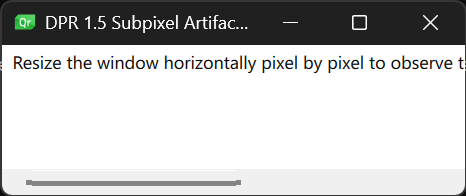
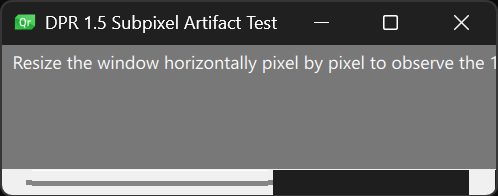
Some lines (like scrollbars) looks broken on HighDPI.
Windows 11 26H2, Qt 6.12.0 built from sources with MinGW-w64 (g++ version 16.2.0), 4k monitor, scaling 150%.
AMD Ryzen 5 5600, NVidia GeForce GTX 1660 Super (driver v617.14).
Minimal Reproducible Example (main.qml):import QtQuick import QtQuick.Controls Window { width: 343 // odd value height: 100 visible: true title: "DPR 1.5 Subpixel Artifact Test" Rectangle { anchors.fill: parent color: "#f0f0f0" ScrollView { anchors.fill: parent TextArea { text: "Resize the window horizontally pixel by pixel to observe the 1px line / scrollbar shifting and thickening to 2px." } } } }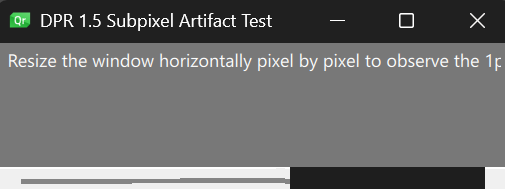
Font dialog from examples\quickcontrols\texteditor:
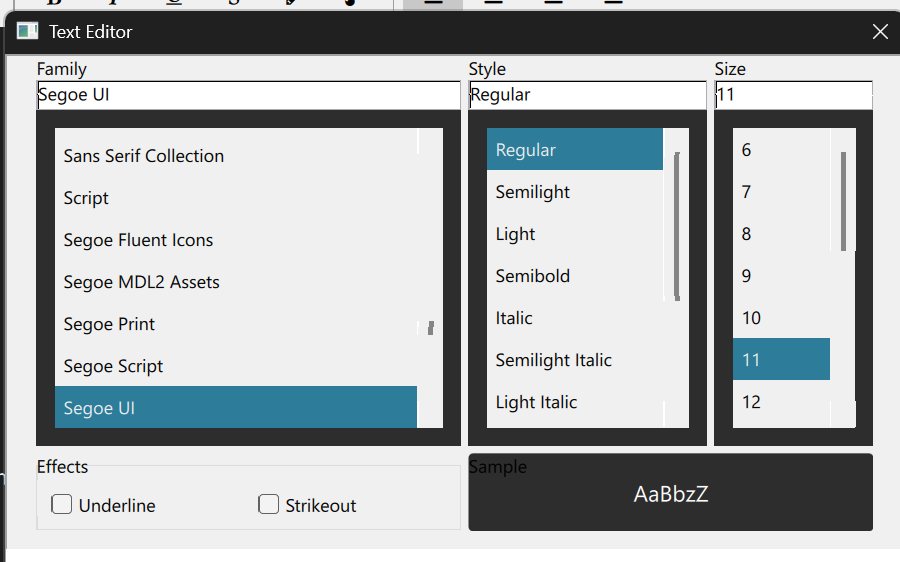
Could you please tell me what might be causing this behavior? How can it be fixed?
Tried, but it didn't help:- set QT_SCALE_FACTOR_ROUNDING_POLICY=Round
- set QSG_RHI_BACKEND=opengl
- set QSG_RHI_BACKEND=d3d11
- set QSG_RHI_BACKEND=software
- set QML_USE_GLYPH_CACHE_WORKAROUND=1
- set QT_ENABLE_REGULAR_EXPRESSION_OPTION_WIN=1
- set QSG_RENDER_LOOP=basic
- set QT_QPA_PLATFORM=windows:dpiawareness=1
- set QT_QPA_PLATFORM=windows:fontengine=freetypedirectwrite
- set QML_XHR_ALLOW_FILE_READ=1
-
If you add
Component.onCompleted:
    console.log(Screen.devicePixelRatio)
What's the output?
-
If you add
Component.onCompleted:
    console.log(Screen.devicePixelRatio)
What's the output?
@Axel-Spoerl
qml: 1.5 -
Okay, thanks @Yuri.
What you see is technically a consequence of alternating rounding decisions. Since you have set a rounding policy, this should not happen.Can you do me two more favors please:
- It's unlikely that the problem sits with MinGW. To exclude it completely, could you try MSVC instead?
- To see whether it's a regression, could you try an older Qt build, preferably 6.8?
-
Okay, thanks @Yuri.
What you see is technically a consequence of alternating rounding decisions. Since you have set a rounding policy, this should not happen.Can you do me two more favors please:
- It's unlikely that the problem sits with MinGW. To exclude it completely, could you try MSVC instead?
- To see whether it's a regression, could you try an older Qt build, preferably 6.8?
@Axel-Spoerl
Thanks @Axel-Spoerl.
The same code on Qt 6.8.3 MSVC 2022 has the same problem. But colors are differs from Qt 6.12.0 version.
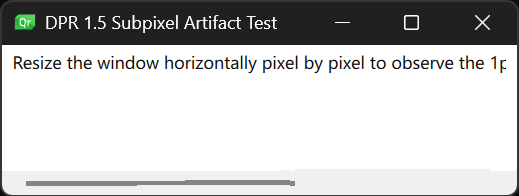
On Qt 6.8.3 MinGW 15.2 it starts with errors:
qml: 1.5
Failed to create swapchain. Retrying by requesting a software rasterizer, if applicable for the 3D API implementation.
Failed to build or resize swapchain
Failed to present: IDXGISwapChain is unavailable
Failed to end frame
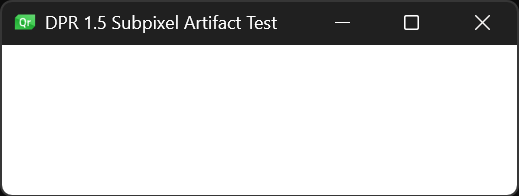
If backend is OpenGL (set QSG_RHI_BACKEND=opengl) then window with any size starts without this problem, but the problem returns on window resizing.
Identical behavior on any Qt and compiler version.
Qt 6.8.3 (MSVC and MinGW):
Qt 6.12.0 MinGW:
-
Thanks @Yuri, that's very helpful.
Your tests rule out the compiler, the graphics backend (it even happens with software) and a recent regression.
What's left is how geometry maps to device pixels at a fractional scale factor.At 150%, one logical pixel is 1.5 physical pixels. Anything at an odd logical coordinate lands on half a physical pixel. Qt Quick doesn't snap item geometry to physical pixels, so a 1px line covers sometimes one and sometimes two physical pixels. If it's antialiased, it gets smeared across an extra pixel.
The scrollbars show this most. With the default style on Windows 11 (FluentWinUI3), the ScrollBar comes from Fusion: a thin, rounded and therefore antialiased handle. It changes while you resize because the window's logical size is a whole number but its physical size isn't always divisible by 1.5. For example, 515 physical pixels is 343.33 logical, but the window reports 343. Items attached to the right or bottom edge, like the scrollbars, end up half a physical pixel off in one direction or the other. Which way depends on the window width, so it flips with every pixel you resize.
I wrote earlier that the rounding policy should prevent this. I have to correct myself here. It's only true if it actually takes effect. With QT_SCALE_FACTOR_ROUNDING_POLICY=Round, 1.5 becomes 2, and at 2 the artifacts should disappear. Your log shows qml: 1.5, though. Could you set the variable in the same shell you start the app from and check what Screen.devicePixelRatio prints?
- If it prints 2 and the artifacts are still there, that's a bug and worth a report.
- If it still prints 1.5, the variable isn't reaching the application.
You can solve the problem by either bumping the scale factor to 2. That should solve everything, if 2 is acceptable.
Otherwise you can use a custom scrollbar, that is more forgiving. I experimented a bit:import QtQuick import QtQuick.Controls Window { width: 343 height: 100 visible: true title: "DPR 1.5 Subpixel Artifact Test" component FlatScrollBar: ScrollBar { id: bar contentItem: Rectangle { implicitWidth: 4 // 4 logical = 6 physical pixels at 150% implicitHeight: 4 antialiasing: false color: bar.pressed ? bar.palette.dark : bar.palette.mid opacity: 0.0 states: State { name: "active" when: bar.policy === ScrollBar.AlwaysOn || (bar.active && bar.size < 1.0) PropertyChanges { bar.contentItem.opacity: 0.75 } } transitions: Transition { from: "active" SequentialAnimation { PauseAnimation { duration: 450 } NumberAnimation { target: bar.contentItem; duration: 200; property: "opacity"; to: 0.0 } } } } } Rectangle { anchors.fill: parent color: "#f0f0f0" ScrollView { id: scrollView anchors.fill: parent ScrollBar.horizontal: FlatScrollBar { parent: scrollView x: scrollView.leftPadding y: scrollView.height - height width: scrollView.availableWidth active: scrollView.ScrollBar.vertical.active } ScrollBar.vertical: FlatScrollBar { parent: scrollView x: scrollView.mirrored ? 0 : scrollView.width - width y: scrollView.topPadding height: scrollView.availableHeight active: scrollView.ScrollBar.horizontal.active } TextArea { text: "Resize the window horizontally pixel by pixel to observe the 1px line / scrollbar shifting and thickening to 2px." } } } } -
Thanks @Yuri, that's very helpful.
Your tests rule out the compiler, the graphics backend (it even happens with software) and a recent regression.
What's left is how geometry maps to device pixels at a fractional scale factor.At 150%, one logical pixel is 1.5 physical pixels. Anything at an odd logical coordinate lands on half a physical pixel. Qt Quick doesn't snap item geometry to physical pixels, so a 1px line covers sometimes one and sometimes two physical pixels. If it's antialiased, it gets smeared across an extra pixel.
The scrollbars show this most. With the default style on Windows 11 (FluentWinUI3), the ScrollBar comes from Fusion: a thin, rounded and therefore antialiased handle. It changes while you resize because the window's logical size is a whole number but its physical size isn't always divisible by 1.5. For example, 515 physical pixels is 343.33 logical, but the window reports 343. Items attached to the right or bottom edge, like the scrollbars, end up half a physical pixel off in one direction or the other. Which way depends on the window width, so it flips with every pixel you resize.
I wrote earlier that the rounding policy should prevent this. I have to correct myself here. It's only true if it actually takes effect. With QT_SCALE_FACTOR_ROUNDING_POLICY=Round, 1.5 becomes 2, and at 2 the artifacts should disappear. Your log shows qml: 1.5, though. Could you set the variable in the same shell you start the app from and check what Screen.devicePixelRatio prints?
- If it prints 2 and the artifacts are still there, that's a bug and worth a report.
- If it still prints 1.5, the variable isn't reaching the application.
You can solve the problem by either bumping the scale factor to 2. That should solve everything, if 2 is acceptable.
Otherwise you can use a custom scrollbar, that is more forgiving. I experimented a bit:import QtQuick import QtQuick.Controls Window { width: 343 height: 100 visible: true title: "DPR 1.5 Subpixel Artifact Test" component FlatScrollBar: ScrollBar { id: bar contentItem: Rectangle { implicitWidth: 4 // 4 logical = 6 physical pixels at 150% implicitHeight: 4 antialiasing: false color: bar.pressed ? bar.palette.dark : bar.palette.mid opacity: 0.0 states: State { name: "active" when: bar.policy === ScrollBar.AlwaysOn || (bar.active && bar.size < 1.0) PropertyChanges { bar.contentItem.opacity: 0.75 } } transitions: Transition { from: "active" SequentialAnimation { PauseAnimation { duration: 450 } NumberAnimation { target: bar.contentItem; duration: 200; property: "opacity"; to: 0.0 } } } } } Rectangle { anchors.fill: parent color: "#f0f0f0" ScrollView { id: scrollView anchors.fill: parent ScrollBar.horizontal: FlatScrollBar { parent: scrollView x: scrollView.leftPadding y: scrollView.height - height width: scrollView.availableWidth active: scrollView.ScrollBar.vertical.active } ScrollBar.vertical: FlatScrollBar { parent: scrollView x: scrollView.mirrored ? 0 : scrollView.width - width y: scrollView.topPadding height: scrollView.availableHeight active: scrollView.ScrollBar.horizontal.active } TextArea { text: "Resize the window horizontally pixel by pixel to observe the 1px line / scrollbar shifting and thickening to 2px." } } } }@Axel-Spoerl
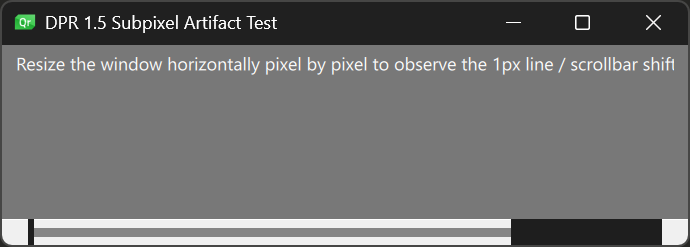
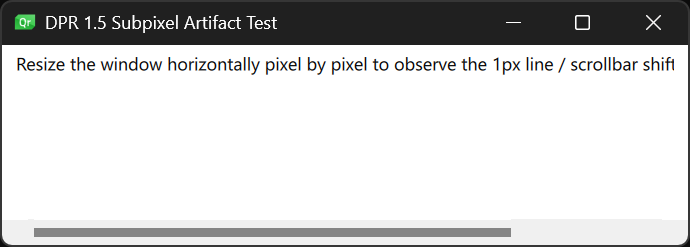
Your code runs with some warnings:qml test.qml file:///C:/Qt/6.12.0/mingw64_162/bin/test.qml:12:24: QML QQuickRectangle: The current style does not support customization of this control (property: "contentItem" item: QQuickRectangle(0x21868a6e230, parent=0x0, geometry=0,0 4x4)). Please customize a non-native style (such as Basic, Fusion, Material, etc). For more information, see: https://doc.qt.io/qt-6/qtquickcontrols2-customize.html#customization-reference file:///C:/Qt/6.12.0/mingw64_162/bin/test.qml:12:24: QML QQuickRectangle: The current style does not support customization of this control (property: "contentItem" item: QQuickRectangle(0x21868a6d6f0, parent=0x0, geometry=0,0 4x4)). Please customize a non-native style (such as Basic, Fusion, Material, etc). For more information, see: https://doc.qt.io/qt-6/qtquickcontrols2-customize.html#customization-reference qml: 2But with QT_SCALE_FACTOR_ROUNDING_POLICY=Round the problem is gone.
Qt 6.12.0 MinGW:
Qt 6.8.3 MSVC:
Also on every resizing it prints this message:qrc:/qt-project.org/imports/QtQuick/Controls/Windows/ScrollBar.qml:37:49: Unable to assign [undefined] to intI also see that in Qt 6.12 a black rectangle is drawn on the scrollbar, which is not present in Qt 6.8. But this problem is not related to this topic.
-
Thanks @Yuri, that confirms it. At a device pixel ratio of 2, every logical pixel is exactly two physical pixels, so nothing can land on half a pixel and the artifacts disappear. At 1.5 they're a consequence of fractional scaling rather than a bug in Qt Quick. So you can choose between QT_SCALE_FACTOR_ROUNDING_POLICY=Round (crisp, but a 200% UI) and staying at 150% with these unpleasant effects.
Sorry about the warnings, those are my fault. I said earlier that your scrollbars come from FluentWinUI3/Fusion, but on Windows the default is the native Windows style, and it can't be customized. That causes both messages, including the Unable to assign [undefined] to int on resize. Basing the custom scrollbar on Fusion's ScrollBar fixes it. Only these two lines change:
import QtQuick.Controls.Fusion as Fusion

component FlatScrollBar: Fusion.ScrollBar {
Fusion is only used for this one component. All other controls keep the Windows style.
About the black rectangle on the scrollbar in 6.12 that isn't there in 6.8: if it shows up at 100% scaling too, or with Round, it looks like a regression. Could you file a bug report at https://bugreports.qt.io with your example and both screenshots (6.8 and 6.12)? Please post the link here so others can follow it.
-
Thanks @Yuri, that confirms it. At a device pixel ratio of 2, every logical pixel is exactly two physical pixels, so nothing can land on half a pixel and the artifacts disappear. At 1.5 they're a consequence of fractional scaling rather than a bug in Qt Quick. So you can choose between QT_SCALE_FACTOR_ROUNDING_POLICY=Round (crisp, but a 200% UI) and staying at 150% with these unpleasant effects.
Sorry about the warnings, those are my fault. I said earlier that your scrollbars come from FluentWinUI3/Fusion, but on Windows the default is the native Windows style, and it can't be customized. That causes both messages, including the Unable to assign [undefined] to int on resize. Basing the custom scrollbar on Fusion's ScrollBar fixes it. Only these two lines change:
import QtQuick.Controls.Fusion as Fusion

component FlatScrollBar: Fusion.ScrollBar {
Fusion is only used for this one component. All other controls keep the Windows style.
About the black rectangle on the scrollbar in 6.12 that isn't there in 6.8: if it shows up at 100% scaling too, or with Round, it looks like a regression. Could you file a bug report at https://bugreports.qt.io with your example and both screenshots (6.8 and 6.12)? Please post the link here so others can follow it.
@Axel-Spoerl
Sorry. It looks like the black rectangle isn't a regression, but rather the implementation of dark mode support. In version 6.8, dark mode wasn't applied automatically. If the system color theme is light, both versions look identical.
Qt 6.8.3, Dark theme, scale 100%:
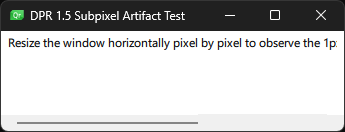
Qt 6.12.0, Light theme, scale 100%:
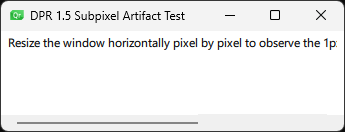
Interestingly, even at 100% scale, the scrollbar looks a bit jagged in both versions, even though the scrollbar itself is straight.However, Fusion.ScrollBar looks good. Thank You.
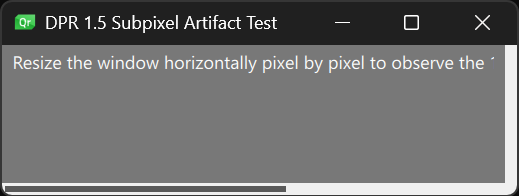
Should I close the topic as resolved?
-
Y Yuri has marked this topic as solved
