
QDateTime::currentDateTime timezone issue ?
-
Hello,
I am currently have a real strange issue with QDateTime::currentDatetime that I cannot comprehend.
We have some code in Qt 5.12 we are porting to Qt 6.9.3. We are developping for Windows using MSVC2019.
The code uses
QDateTime::currentDatetime(). This worked fine in Qt 5.12 but in Qt 6.9.3 I have a 3 hour offset on my machine (this doesn't happen to my coworkers).I can fix this issue by sending the proper timezone to currentDateTime but when debugging it looks like currentDateTime already uses the right timezone:
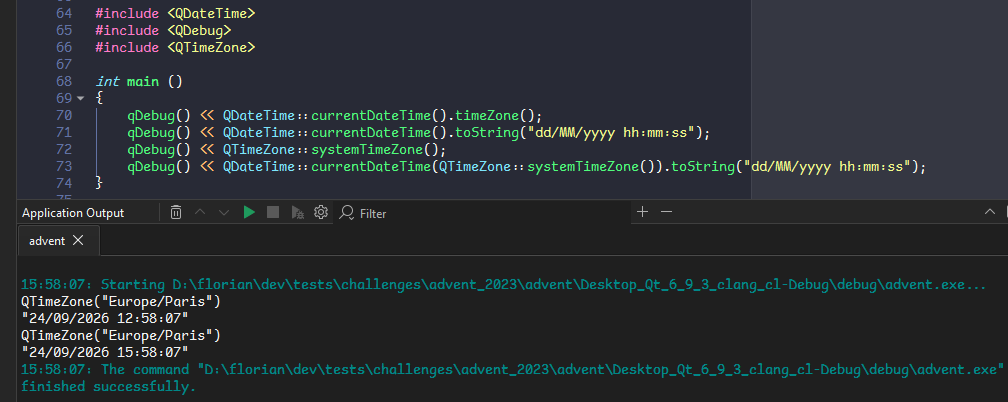
I've been trying to understand what the issue could be, if there is anything I may have done wrong, but I have absolutely no clue of what is happening here.
Is this a known issue, have I made a mistake or is there something weird happening here ?
-
@f222
Two very quick checks to eliminate, which may be irrelevant:- Does your machine/user have any
TZenvironment variable set? - Does your Registry have
HKEY_LOCAL_MACHINE\SYSTEM\CurrentControlSet\Control\TimeZoneInformationand is it same as other users?
@JonB Oh you found the issue.
I had a
TZen variable set toGMT1(my coworker didn't have said variable) and the time displayed matches the GMT-1. If I set that variable toGMT-2or remove it I do get the correct GMT+2 time.That being said while the time in the QDateTime matches that TZ variable the Timezone in the QDateTime doesn't so there might still be an issue there. I'll update my ticket.
- Does your machine/user have any
-
Looks like a bug, consider reporting it (but maybe first check with newest Qt version, perhaps it has already been fixed?).
-
Please use a recent Qt version. Also you forgot to create a Q(Core)Application object. This works fine for me with Qt 6.12 (git HEAD):
int main(int argc, char** argv) { QCoreApplication app(argc, argv); qDebug() << QDateTime::currentDateTime().timeZone(); qDebug() << QDateTime::currentDateTime().toString("dd/MM/yyyy hh:mm:ss"); qDebug() << QTimeZone::systemTimeZone(); qDebug() << QDateTime::currentDateTime(QTimeZone::systemTimeZone()).toString("dd/MM/yyyy hh:mm:ss"); return 0; } QTimeZone("Europe/Berlin") "25/09/2026 10:37:14" QTimeZone("Europe/Berlin") "25/09/2026 10:37:14" -
Hello,
I am currently have a real strange issue with QDateTime::currentDatetime that I cannot comprehend.
We have some code in Qt 5.12 we are porting to Qt 6.9.3. We are developping for Windows using MSVC2019.
The code uses
QDateTime::currentDatetime(). This worked fine in Qt 5.12 but in Qt 6.9.3 I have a 3 hour offset on my machine (this doesn't happen to my coworkers).I can fix this issue by sending the proper timezone to currentDateTime but when debugging it looks like currentDateTime already uses the right timezone:
I've been trying to understand what the issue could be, if there is anything I may have done wrong, but I have absolutely no clue of what is happening here.
Is this a known issue, have I made a mistake or is there something weird happening here ?
@f222
I have a quite different platform/environment from you: Qt 6.10.2 as supplied with Ubuntu 26.04, gcc compiler. I confirm your code works correctly for me --- perhaps not surprisingly since you say yours does not happen to coworkers.Btw, I thought initially the lack of
QCoreApplicationmight affect it, but I tried mine with and without and it made no difference (still correct). You might just put one in in case it affects your situation.From https://codebrowser.dev/qt6/qtbase/src/corelib/time/qdatetime.cpp.html#_ZN9QDateTime15currentDateTimeERK9QTimeZone the definition of QDateTime QDateTime::currentDateTime(const QTimeZone &zone) introduced at Qt 6.5 reads:
QDateTime QDateTime::currentDateTime(const QTimeZone &zone)
{
    return fromMSecsSinceEpoch(currentMSecsSinceEpoch(), zone);
}
while the overload without parameter is:
QDateTime QDateTime::currentDateTime()
{
    return currentDateTime(QTimeZone::LocalTime);
}
Knowing this you might want to investigate a bit further why they are giving you different results in your environment and find where the underlying odd behaviour is coming from.
-
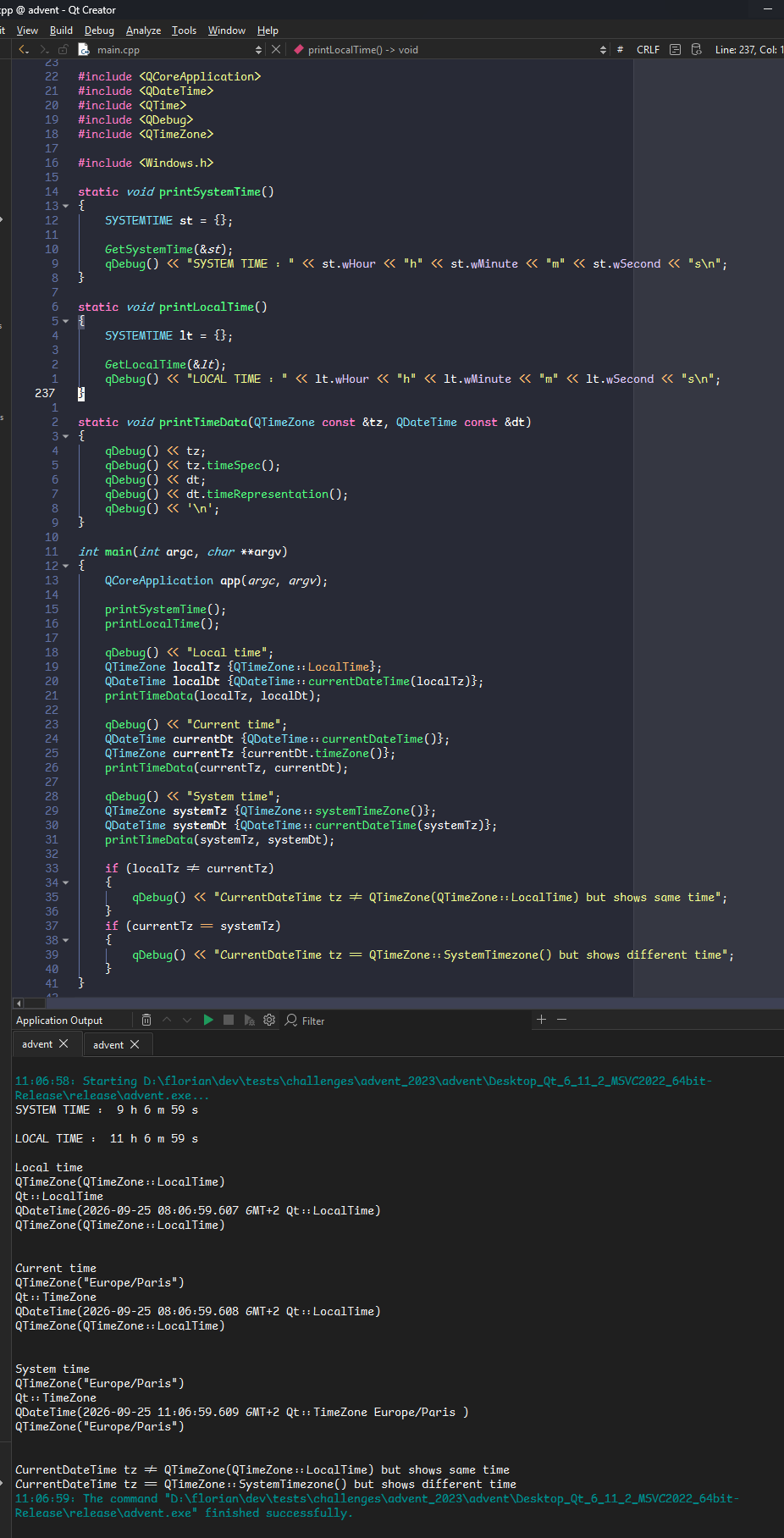
I've been doing some more tests and its getting even weirder:
- Added QCoreApplication instanciation
- Updated Qt version (same result with Qt 6.11.2 and 6.12.0 rc)
From what I see now:
- Systemtime is correct UTC
- LocalTime is my OS displayed time
- When getting a currentDateTime from a timezone build with Qt::localTime the timezones seem to be different but I'm getting the same time
- When getting a currentDateTime from a timeZone build with systemTimezone the timezones seem to be equal but I'm getting a different time
I'm going to open a ticket but since the issue is only happening on my machine I think there must be something weird somewhere else 🤔
-
I've been doing some more tests and its getting even weirder:
- Added QCoreApplication instanciation
- Updated Qt version (same result with Qt 6.11.2 and 6.12.0 rc)
From what I see now:
- Systemtime is correct UTC
- LocalTime is my OS displayed time
- When getting a currentDateTime from a timezone build with Qt::localTime the timezones seem to be different but I'm getting the same time
- When getting a currentDateTime from a timeZone build with systemTimezone the timezones seem to be equal but I'm getting a different time
I'm going to open a ticket but since the issue is only happening on my machine I think there must be something weird somewhere else 🤔
-
@f222
Two very quick checks to eliminate, which may be irrelevant:- Does your machine/user have any
TZenvironment variable set? - Does your Registry have
HKEY_LOCAL_MACHINE\SYSTEM\CurrentControlSet\Control\TimeZoneInformationand is it same as other users?
@JonB Oh you found the issue.
I had a
TZen variable set toGMT1(my coworker didn't have said variable) and the time displayed matches the GMT-1. If I set that variable toGMT-2or remove it I do get the correct GMT+2 time.That being said while the time in the QDateTime matches that TZ variable the Timezone in the QDateTime doesn't so there might still be an issue there. I'll update my ticket.
- Does your machine/user have any
-
F f222 has marked this topic as solved
-
@JonB Oh you found the issue.
I had a
TZen variable set toGMT1(my coworker didn't have said variable) and the time displayed matches the GMT-1. If I set that variable toGMT-2or remove it I do get the correct GMT+2 time.That being said while the time in the QDateTime matches that TZ variable the Timezone in the QDateTime doesn't so there might still be an issue there. I'll update my ticket.
@f222
Glad I could help :) Don't understand the issue in your second paragraph so i will leave that with you.It was a guess about
TZ. That is a normal environment variable under Linux (which I use) but not so much under Windows. There it gets complicated: it may depend on the compiler code you use (MinGW vs MSVC). I believe it is also used automatically by the C runtime code you link/dynamically load (DLLs) against. How that in turn relates to C++ runtime code I don't know. And I suspect Windows calls do not use it, only C/C++; and then I don't know which Qt calls' implementations use C/C++ functions versus Windows-SDK ones, and maybe a mixture (e.g. your time calculation calls use the C/C++TZvariable but your name-of-timezone uses a Windows call?). And for all I know Qt's internal code may have changed in that area between your old-working Qt5 and new-non-working Qt6. It's all perhaps a minefield, suck it and see :)


