
Looking for a Penpot plugin to integrate my workflow with Qt Design Studio
-
Hi there, I'm an aspiring designer and volunteer at the open-source CoMaps project https://www.comaps.app/. I will spare you an essay about what CoMaps is.
In the CoMaps project I would make designs to help the Qt-based desktop UI forward, which is currently in an experimental state. I had experience in Figma from my college study, but I chose to learn Penpot for this because I prefer ethical open-source tools with better privacy.
What I'm running into is that I wanted to make a design in Penpot, and then import assets (with button states) into Qt Design Studio. Qt Design Studio is for the Qt UI framework, and is meant to integrate with a Qt development pipeline.
I can export SVG from Penpot, and then use that in the Qt Design Studio, setting things up from scratch. But I like the usability of Penpot a lot more than Qt Design Studio. Some parts are not very streamlined, having to sometimes learn a bit of QML syntax (and I don't like to program).
To accommodate designers, the Qt company over the years made Qt Design Studio bridge plugins for Adobe Illustrator, Adobe Photoshop, Adobe XD, Sketch and Figma. But I'm not happy with this, as these software and plugins are proprietary, and all except for the Figma plugin require enterprise licenses. Not to mention that none of these applications respect user privacy.
Penpot uses web technology under the hood. Qt uses QML scripting language under the hood. Qt Design Studio is nothing more than a visual designer-focused editor of the underlying QML. Both Qt itself and Qt Design Studio are open source, and QML has good documentation, and so has making Penpot plugins.I'm wondering how complex a Penpot plugin to export components (with its states/overlays) to Qt Design Studio would be? And would anybody here have the motivation to make one?
-
Thanks a lot for the detailed and respectful answer.
@JKSH said in Looking for a Penpot plugin to integrate my workflow with Qt Design Studio:
Can you confirm if Qt Quick integration is in the works?
In the works, yeah kind of. The only thing I can show you right now is screenshots of discussions we had in the community Zulip:
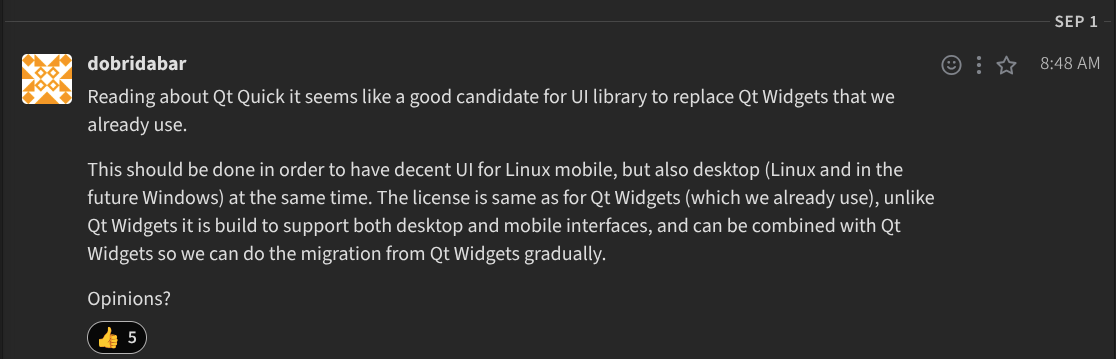
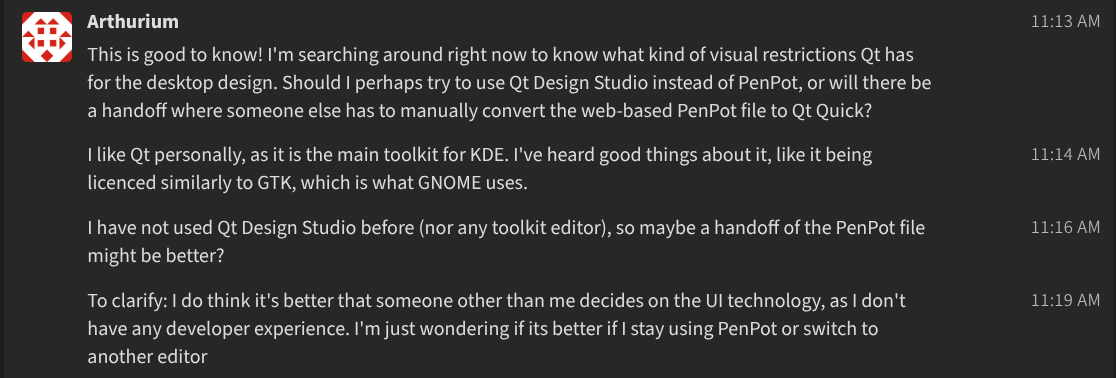
After this I did initial testing with Qt Design Studio, and told them it might be too advanced for me without any developer experience. This was discussed further with them and they told me I will have to try it, unless I can get a dedicated programmer to work on it. This is because most programmers in the project are working on the Java Android build and the swift iOS builds, while we haven't got anyone yet who volunteered to work on the Qt builds, which are for desktop (both Linux and Windows) and mobile Linux.
That is to say, if you are reading this and feel like this is up your alley, join the Zulip : )
I have followed over 5 Qt Academy tutorials on Qt Design Studio so I at least got the hang of the basics now. I can import SVGs, group them into parent rectangles and anchor them, but button states (hovered, clicked, etc) are still a bit too hard for me at the moment. And I don't know how to make the app respond to me resizing the window in runtime, which is a core thing I want to test my (mobile-desktop) responsive designs with. Or maybe I should do that in editor-time instead?
Should I try looking at the QML-focused Qt Academy tutorials to solve these problems?
@JKSH said in Looking for a Penpot plugin to integrate my workflow with Qt Design Studio:
I'm happy to help answer questions about using QML or Qt Widgets, but I'm not in a position to contribute code directly to the plugin. Others might.
Okay I was wondering, could you give any tips for me (a slight beginner) how I would go about slowly converting the Qt Widgets UI to Qt Quick (as Dobridabar from the screenshot suggested a gradual migration)? Might it be possible to involve Qt Design Studio with the Qt Widgets code?
In the less desirable scenario, I have to use Figma to make my designs, add button states, overlays, and then give the Qt export files to the dedicated developer, who only has to integrate the technical functionalities of the maps app (which is already done for a big portion). It would certainly go against my ideals, but it would at least be a pragmatic solution to the problem.
@Arthurium said in Looking for a Penpot plugin to integrate my workflow with Qt Design Studio:
In the works, yeah kind of. The only thing I can show you right now is screenshots of discussions we had in the community Zulip:
I see, so Qt Quick integration is in early-idea phase.
most programmers in the project are working on the Java Android build
One possibility is to ask the Android folks to see if they're willing to give it a test drive. We do offer Qt Tools for Android Studio, which lets developers embed Qt Quick views into an existing Android app: https://www.qt.io/blog/qt-tools-for-android-studio
(The blog post seems to have some dead links. The entry point to the docs is https://doc.qt.io/qttoolsforandroid/ and instructions to install the tools and run the example are at https://doc.qt.io/qttoolsforandroid/android-studio-tools-installation.html#running-the-example
and the swift iOS builds
There is a similar initiative for Swift developers, but it's in pre-release stage (much less mature than the Android tools): https://forums.swift.org/t/qt-bridge-for-swift-looking-for-early-feedback/84415
One possibility is for the Android and/or Swift devs start building Qt Quick components, which the Desktop devs could start using too. This might be a pathway to get the same UI components running on ALL CoMap platforms.
I don't know how to make the app respond to me resizing the window in runtime, which is a core thing I want to test my (mobile-desktop) responsive designs with. Or maybe I should do that in editor-time instead?
If you just create a new "Empty" Qt Design Studio project, and then click "Run App", that should resize to your window, right? Please give that a try, and see if you've done something differently from the default project (we could help you to troubleshoot if you provide details)
Should I try looking at the QML-focused Qt Academy tutorials to solve these problems?
I think those are for programmers. Do those tutorials only if you want to dip your toes into programming.
Okay I was wondering, could you give any tips for me (a slight beginner) how I would go about slowly converting the Qt Widgets UI to Qt Quick (as Dobridabar from the screenshot suggested a gradual migration)?
Hmm... migrating an existing project from Qt Widgets to Qt Quick can be tricky, even for a programmer who is experienced at Qt. You can't simply replace a Widget button with a Qt Quick button, for example -- you'd need to replace one whole window at a time, at least (and that's only feasible if the widgets have been architected in a nice, modular way).
And as mentioned before, you'd definitely need a programmer to "connect" a Qt Quick window to the application.
Might it be possible to involve Qt Design Studio with the Qt Widgets code?
The role of Qt Design Studio is only to do visual design (basically the same role as Figma/Penpot). The main difference between Qt Design Studio and Figma/Penpot is that the former's outputs are more "ready-to-use" by a programmer.
Qt Design Studio cannot be mixed with Qt Widgets, and it does not really help with any other migration tasks. You need a programmer to perform the actual migration.
-
Hi there, I'm an aspiring designer and volunteer at the open-source CoMaps project https://www.comaps.app/. I will spare you an essay about what CoMaps is.
In the CoMaps project I would make designs to help the Qt-based desktop UI forward, which is currently in an experimental state. I had experience in Figma from my college study, but I chose to learn Penpot for this because I prefer ethical open-source tools with better privacy.
What I'm running into is that I wanted to make a design in Penpot, and then import assets (with button states) into Qt Design Studio. Qt Design Studio is for the Qt UI framework, and is meant to integrate with a Qt development pipeline.
I can export SVG from Penpot, and then use that in the Qt Design Studio, setting things up from scratch. But I like the usability of Penpot a lot more than Qt Design Studio. Some parts are not very streamlined, having to sometimes learn a bit of QML syntax (and I don't like to program).
To accommodate designers, the Qt company over the years made Qt Design Studio bridge plugins for Adobe Illustrator, Adobe Photoshop, Adobe XD, Sketch and Figma. But I'm not happy with this, as these software and plugins are proprietary, and all except for the Figma plugin require enterprise licenses. Not to mention that none of these applications respect user privacy.
Penpot uses web technology under the hood. Qt uses QML scripting language under the hood. Qt Design Studio is nothing more than a visual designer-focused editor of the underlying QML. Both Qt itself and Qt Design Studio are open source, and QML has good documentation, and so has making Penpot plugins.I'm wondering how complex a Penpot plugin to export components (with its states/overlays) to Qt Design Studio would be? And would anybody here have the motivation to make one?
Hi, and welcome!
@Arthurium said in Looking for a Penpot plugin to integrate my workflow with Qt Design Studio:
In the CoMaps project I would make designs to help the Qt-based desktop UI forward, which is currently in an experimental state.
I had a quick look at the CoMaps source code, and I saw that they use Qt Widgets (not Qt Quick/QML) for their GUIs: https://codeberg.org/comaps/comaps/src/branch/main/qt/qt_common/map_widget.hpp
Can you confirm if Qt Quick integration is in the works?
To accommodate designers, the Qt company over the years made Qt Design Studio bridge plugins for Adobe Illustrator, Adobe Photoshop, Adobe XD, Sketch and Figma. But I'm not happy with this, as these software and plugins are proprietary, and all except for the Figma plugin require enterprise licenses.
To be precise, the tools that need Qt Design Studio Enterprise licenses are the old "Qt Bridges" (including Qt Bridge for Figma). These are now deprecated, replaced by the Figma to Qt plugin: https://www.qt.io/blog/figma-to-qt-1.0
The Figma to Qt plugin...
- Does not require an Enterprise license
- Does not require Qt Design Studio either!
Some parts are not very streamlined, having to sometimes learn a bit of QML syntax (and I don't like to program).
Hmm... You can do all your visual design in Figma/Penpot. But even after you manage to convert the Penpot designs to QML, and even if CoMaps is offering Qt Quick integration, you'd still to do some programming to make your QML files interactive, read the data sources, and transform the data to on-screen visuals. Qt Design Studio won't really add value to your workflow... what you need is a partner who's a programmer/developer (or spend some time learning it yourself).
I'm wondering how complex a Penpot plugin to export components (with its states/overlays) to Qt Design Studio would be?
I guess that would depend on the developer's experience in writing Penpot plugins, their knowledge of QML, and their general software engineering skills.
And would anybody here have the motivation to make one?
I'm happy to help answer questions about using QML or Qt Widgets, but I'm not in a position to contribute code directly to the plugin. Others might.
-
Hi, and welcome!
@Arthurium said in Looking for a Penpot plugin to integrate my workflow with Qt Design Studio:
In the CoMaps project I would make designs to help the Qt-based desktop UI forward, which is currently in an experimental state.
I had a quick look at the CoMaps source code, and I saw that they use Qt Widgets (not Qt Quick/QML) for their GUIs: https://codeberg.org/comaps/comaps/src/branch/main/qt/qt_common/map_widget.hpp
Can you confirm if Qt Quick integration is in the works?
To accommodate designers, the Qt company over the years made Qt Design Studio bridge plugins for Adobe Illustrator, Adobe Photoshop, Adobe XD, Sketch and Figma. But I'm not happy with this, as these software and plugins are proprietary, and all except for the Figma plugin require enterprise licenses.
To be precise, the tools that need Qt Design Studio Enterprise licenses are the old "Qt Bridges" (including Qt Bridge for Figma). These are now deprecated, replaced by the Figma to Qt plugin: https://www.qt.io/blog/figma-to-qt-1.0
The Figma to Qt plugin...
- Does not require an Enterprise license
- Does not require Qt Design Studio either!
Some parts are not very streamlined, having to sometimes learn a bit of QML syntax (and I don't like to program).
Hmm... You can do all your visual design in Figma/Penpot. But even after you manage to convert the Penpot designs to QML, and even if CoMaps is offering Qt Quick integration, you'd still to do some programming to make your QML files interactive, read the data sources, and transform the data to on-screen visuals. Qt Design Studio won't really add value to your workflow... what you need is a partner who's a programmer/developer (or spend some time learning it yourself).
I'm wondering how complex a Penpot plugin to export components (with its states/overlays) to Qt Design Studio would be?
I guess that would depend on the developer's experience in writing Penpot plugins, their knowledge of QML, and their general software engineering skills.
And would anybody here have the motivation to make one?
I'm happy to help answer questions about using QML or Qt Widgets, but I'm not in a position to contribute code directly to the plugin. Others might.
Thanks a lot for the detailed and respectful answer.
@JKSH said in Looking for a Penpot plugin to integrate my workflow with Qt Design Studio:
Can you confirm if Qt Quick integration is in the works?
In the works, yeah kind of. The only thing I can show you right now is screenshots of discussions we had in the community Zulip:
After this I did initial testing with Qt Design Studio, and told them it might be too advanced for me without any developer experience. This was discussed further with them and they told me I will have to try it, unless I can get a dedicated programmer to work on it. This is because most programmers in the project are working on the Java Android build and the swift iOS builds, while we haven't got anyone yet who volunteered to work on the Qt builds, which are for desktop (both Linux and Windows) and mobile Linux.
That is to say, if you are reading this and feel like this is up your alley, join the Zulip : )
I have followed over 5 Qt Academy tutorials on Qt Design Studio so I at least got the hang of the basics now. I can import SVGs, group them into parent rectangles and anchor them, but button states (hovered, clicked, etc) are still a bit too hard for me at the moment. And I don't know how to make the app respond to me resizing the window in runtime, which is a core thing I want to test my (mobile-desktop) responsive designs with. Or maybe I should do that in editor-time instead?
Should I try looking at the QML-focused Qt Academy tutorials to solve these problems?
@JKSH said in Looking for a Penpot plugin to integrate my workflow with Qt Design Studio:
I'm happy to help answer questions about using QML or Qt Widgets, but I'm not in a position to contribute code directly to the plugin. Others might.
Okay I was wondering, could you give any tips for me (a slight beginner) how I would go about slowly converting the Qt Widgets UI to Qt Quick (as Dobridabar from the screenshot suggested a gradual migration)? Might it be possible to involve Qt Design Studio with the Qt Widgets code?
In the less desirable scenario, I have to use Figma to make my designs, add button states, overlays, and then give the Qt export files to the dedicated developer, who only has to integrate the technical functionalities of the maps app (which is already done for a big portion). It would certainly go against my ideals, but it would at least be a pragmatic solution to the problem.
-
Thanks a lot for the detailed and respectful answer.
@JKSH said in Looking for a Penpot plugin to integrate my workflow with Qt Design Studio:
Can you confirm if Qt Quick integration is in the works?
In the works, yeah kind of. The only thing I can show you right now is screenshots of discussions we had in the community Zulip:
After this I did initial testing with Qt Design Studio, and told them it might be too advanced for me without any developer experience. This was discussed further with them and they told me I will have to try it, unless I can get a dedicated programmer to work on it. This is because most programmers in the project are working on the Java Android build and the swift iOS builds, while we haven't got anyone yet who volunteered to work on the Qt builds, which are for desktop (both Linux and Windows) and mobile Linux.
That is to say, if you are reading this and feel like this is up your alley, join the Zulip : )
I have followed over 5 Qt Academy tutorials on Qt Design Studio so I at least got the hang of the basics now. I can import SVGs, group them into parent rectangles and anchor them, but button states (hovered, clicked, etc) are still a bit too hard for me at the moment. And I don't know how to make the app respond to me resizing the window in runtime, which is a core thing I want to test my (mobile-desktop) responsive designs with. Or maybe I should do that in editor-time instead?
Should I try looking at the QML-focused Qt Academy tutorials to solve these problems?
@JKSH said in Looking for a Penpot plugin to integrate my workflow with Qt Design Studio:
I'm happy to help answer questions about using QML or Qt Widgets, but I'm not in a position to contribute code directly to the plugin. Others might.
Okay I was wondering, could you give any tips for me (a slight beginner) how I would go about slowly converting the Qt Widgets UI to Qt Quick (as Dobridabar from the screenshot suggested a gradual migration)? Might it be possible to involve Qt Design Studio with the Qt Widgets code?
In the less desirable scenario, I have to use Figma to make my designs, add button states, overlays, and then give the Qt export files to the dedicated developer, who only has to integrate the technical functionalities of the maps app (which is already done for a big portion). It would certainly go against my ideals, but it would at least be a pragmatic solution to the problem.
@Arthurium said in Looking for a Penpot plugin to integrate my workflow with Qt Design Studio:
In the works, yeah kind of. The only thing I can show you right now is screenshots of discussions we had in the community Zulip:
I see, so Qt Quick integration is in early-idea phase.
most programmers in the project are working on the Java Android build
One possibility is to ask the Android folks to see if they're willing to give it a test drive. We do offer Qt Tools for Android Studio, which lets developers embed Qt Quick views into an existing Android app: https://www.qt.io/blog/qt-tools-for-android-studio
(The blog post seems to have some dead links. The entry point to the docs is https://doc.qt.io/qttoolsforandroid/ and instructions to install the tools and run the example are at https://doc.qt.io/qttoolsforandroid/android-studio-tools-installation.html#running-the-example
and the swift iOS builds
There is a similar initiative for Swift developers, but it's in pre-release stage (much less mature than the Android tools): https://forums.swift.org/t/qt-bridge-for-swift-looking-for-early-feedback/84415
One possibility is for the Android and/or Swift devs start building Qt Quick components, which the Desktop devs could start using too. This might be a pathway to get the same UI components running on ALL CoMap platforms.
I don't know how to make the app respond to me resizing the window in runtime, which is a core thing I want to test my (mobile-desktop) responsive designs with. Or maybe I should do that in editor-time instead?
If you just create a new "Empty" Qt Design Studio project, and then click "Run App", that should resize to your window, right? Please give that a try, and see if you've done something differently from the default project (we could help you to troubleshoot if you provide details)
Should I try looking at the QML-focused Qt Academy tutorials to solve these problems?
I think those are for programmers. Do those tutorials only if you want to dip your toes into programming.
Okay I was wondering, could you give any tips for me (a slight beginner) how I would go about slowly converting the Qt Widgets UI to Qt Quick (as Dobridabar from the screenshot suggested a gradual migration)?
Hmm... migrating an existing project from Qt Widgets to Qt Quick can be tricky, even for a programmer who is experienced at Qt. You can't simply replace a Widget button with a Qt Quick button, for example -- you'd need to replace one whole window at a time, at least (and that's only feasible if the widgets have been architected in a nice, modular way).
And as mentioned before, you'd definitely need a programmer to "connect" a Qt Quick window to the application.
Might it be possible to involve Qt Design Studio with the Qt Widgets code?
The role of Qt Design Studio is only to do visual design (basically the same role as Figma/Penpot). The main difference between Qt Design Studio and Figma/Penpot is that the former's outputs are more "ready-to-use" by a programmer.
Qt Design Studio cannot be mixed with Qt Widgets, and it does not really help with any other migration tasks. You need a programmer to perform the actual migration.
-
A Arthurium has marked this topic as solved
-
Thanks a lot for all this information. It has helped me get clarity on the questions that have been bugging me for weeks. I can now decide better what I want to do, and why.
I will definitely share these with them ideas about unifying the UI for mobile and desktop with Qt, as it seems like it doesn't necessarily warrant replacing starting their application from scratch, only their UI code will get replaced (and its bindings).
