
QtCreator 20 defaulting to Unix makefilesfor cmake on Ubuntu
-
Using a clean installation of Ubuntu, I installed latest Qt and used QtCreator to open my cmake project. I see that it defaults to the CMAKE_GENERATOR being Unix Makefiles, so is only building the project on one core. So how do I switch it to using Ninja? There seems to be three places to change. First is the "Kit Configuration" dialog. I can set Ninja there, but it seems to make no difference. Then there is the Initial Configuration and Current Configuration tabs. Editing the fields CMAKE_GENERATOTR in both those tabs, causes the entry to go red in color, but when I run cmake, they get changed back to Unix makefiles.
This is the second new machine I have had this problem on. On the first I somehow after going round and round in circles, I managed to put /home/david/Qt/Tools/Ninja/ninja into the CMAKE_GEBERATOR field and have it stick there. It remains red in color, but the builds work. But on this second machine using trial and error I still cant make it stick, it always reverts to Unix makefiles even though Ninja is selected in Kit Configuration. Help would be appreciated.
-
Using a clean installation of Ubuntu, I installed latest Qt and used QtCreator to open my cmake project. I see that it defaults to the CMAKE_GENERATOR being Unix Makefiles, so is only building the project on one core. So how do I switch it to using Ninja? There seems to be three places to change. First is the "Kit Configuration" dialog. I can set Ninja there, but it seems to make no difference. Then there is the Initial Configuration and Current Configuration tabs. Editing the fields CMAKE_GENERATOTR in both those tabs, causes the entry to go red in color, but when I run cmake, they get changed back to Unix makefiles.
This is the second new machine I have had this problem on. On the first I somehow after going round and round in circles, I managed to put /home/david/Qt/Tools/Ninja/ninja into the CMAKE_GEBERATOR field and have it stick there. It remains red in color, but the builds work. But on this second machine using trial and error I still cant make it stick, it always reverts to Unix makefiles even though Ninja is selected in Kit Configuration. Help would be appreciated.
@ChortleMortal This usually happens when you don't have
ninjainPATH.macOS with homebrew has this issue too.
My fix was to go to Preferences > Devices > Local PC and add
/opt/homebrew/binto theSearch in directoriesfield.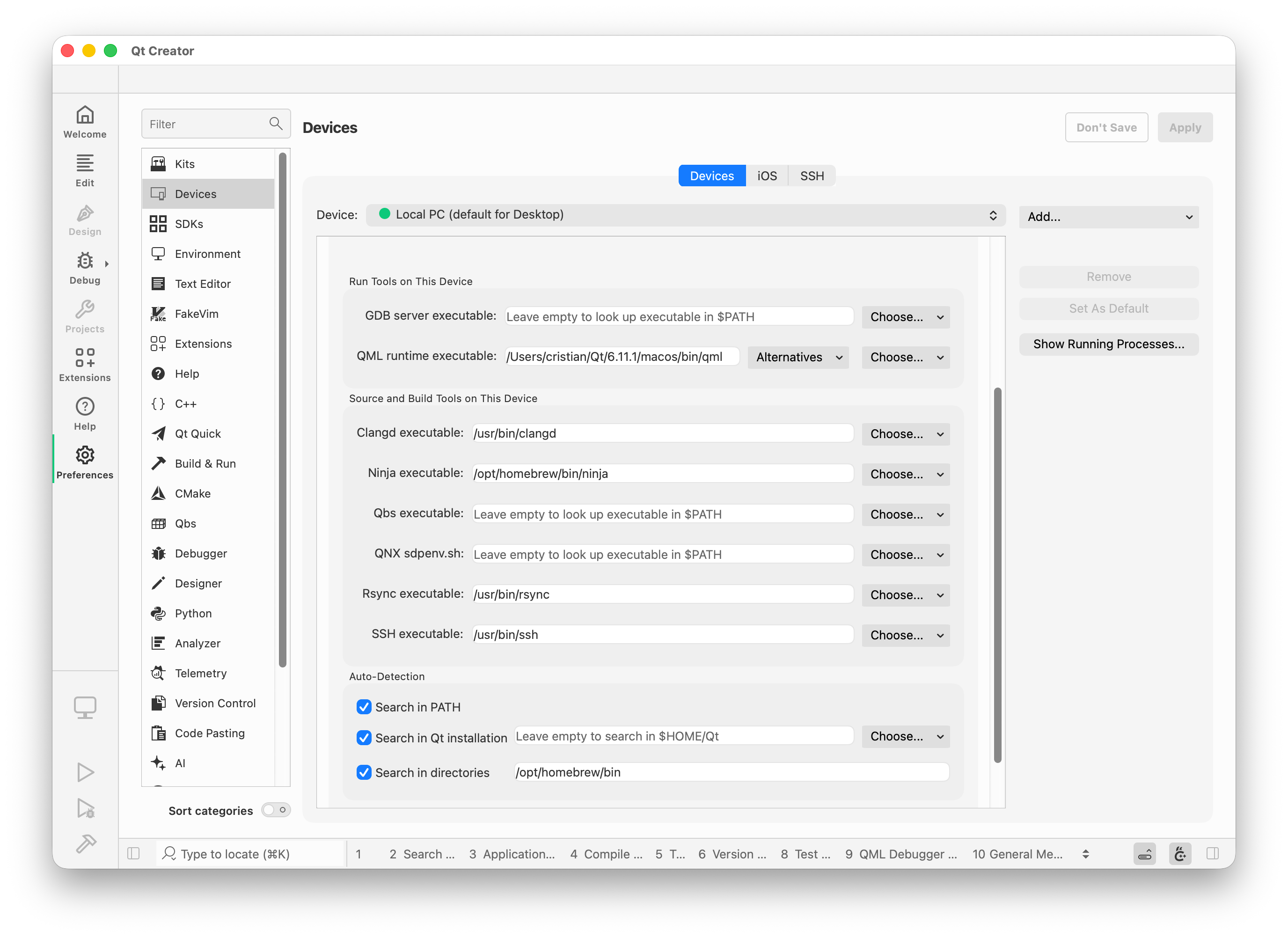
The other option is to set the
CMAKE_MAKE_PROGRAMCMake variable to your/path/to/ninjaexecutable, whilst havingCMAKE_GENERATORset toNinja. -
@ChortleMortal This usually happens when you don't have
ninjainPATH.macOS with homebrew has this issue too.
My fix was to go to Preferences > Devices > Local PC and add
/opt/homebrew/binto theSearch in directoriesfield.The other option is to set the
CMAKE_MAKE_PROGRAMCMake variable to your/path/to/ninjaexecutable, whilst havingCMAKE_GENERATORset toNinja.@cristian-adam
Thank you so much, Both your solutions work. Your posting t not only solves the problem for me but adds clarity as to what is happening.I set both CMAKE_GENERATOR and CMAKE_MAKE_PROGRAM and now cmake is running and building on all cores.
After this I looked at the Devices tab in preferences and saw the relationship of the programs qtcreator uses and PATH. Coming from the windows environment I had never looked at this preference page before. All my entries were empty, meaning it used $PATH. qtinstaller puts ninja in Qt/Tools/Ninja but presumably does nothing to the path. So I set the path to ninja in the Devices page, then created a new session and used another repository, and this time it defaulted to Ninja, and of course worked perfectly
Once again thanks,
David -
C ChortleMortal has marked this topic as solved
-
And if you have Ninja installed via Qt SDK, you should have in your
QtCreator.inisomething like:[CMakeSpecificSettings] NinjaPath=/Users/cristian/Qt/Tools/Ninja//ninjawhich should get
CMAKE_MAKE_PROGRAMset to this value.
