
SVG rendering differently on Linux vs windows.
-
Hi All,
Qt 6.5.3,
win10/win11 vs
Ubuntu 24.04.1 xcfe or wayland platform plugin, both exhibit same behavior.Recently I've ported a number of icons from PNG to SVG, and the new SVG icons are displaying in a smaller size on Linux relative to windows.
I'm using the inbuilt iconengine functionality to load an SVG as a resource from an stylesheet.
Specifically the images are used as the "has siblings open / closed" images within a QTreeView.My Stylesheet is
    QTreeView::branch:has-children:!has-siblings:closed,
    QTreeView::branch:closed:has-children:has-siblings { border-image: none; image: url(:/BrowserWidget/ClosedArrow.svg); }
    QTreeView::branch:open:has-children:!has-siblings,
    QTreeView::branch:open:has-children:has-siblings { border-image: none; image: url(:/BrowserWidget/OpenArrow.svg); }
On windows this looks like:
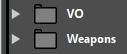
however on Linux it looks like:
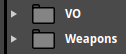
Notice that the arrow is significantly smaller on the Linux version.
They are both using identical SVG images, stylesheet, and drawing code.Has anyone seen anything like this before?
I'd really like to avoid using different SVG images on each platformthe source for the SVG itself is very simple,
<svg width="10" height="10" viewBox="0 0 10 10" fill="none" xmlns="http://www.w3.org/2000/svg">
<path d="M8 5.00009L2 8.66009V1.34009L8 5.00009Z" fill="#CCCCCC"/>
</svg>
If I had to guess, I would say that the Linux version is showing the SVG at 1:1, but the windows version is doing some additional scaling to increase the visible size of the image used. Because the view box is 10x10, but the actual image drawn is less than that, and the window's screen shot shows the arrow as occupying close to a 10x10 box, But the linux arrow is much smaller.
Because I am using the stylesheet and iconengine to handle the SVG loading, and not explicitly reading it with QtSvg,
I dont have much control over how the image is handled.
I've tried adding a height and width argument to the stylesheet, but that doesn't seem to have any effect?
Perhaps this is the issue/Bug?
I dont have a good understanding of what the width and height values do in the case of an SVG resource.I'd love some help and or explanation of what is going on?
- James
-
Hi,
Out of curiosity, what happens if your set the
icon-sizein your stylesheet ? -
Thanks for the suggestion, but using the
icon-sizein my stylesheet doesn't have any effect.
I'm working on reproducing the issue in simpler Qt only sample.
Perhaps there is some other aspect of our styling that is causing the problem.
But strange that things are OK on Mac and Windows, but I have this specific issue on Linux. -
I've created a very simple TreeView sample app that lets me modify the stylesheet directly within the code,
but nothing i do seems to effect the size of the Arrow icons attached to the sibling with children items in the Treeview.the code...
#include <QApplication>
#include <QScreen>
#include <QTreeView>
#include <QStandardItemModel>
#include <QHeaderView>


int main(int argc, char *argv[]) {
    QApplication app(argc, argv);

    // 1. Create the Tree View and populate data
    QTreeView treeView;
    QStandardItemModel model(4, 2);
    model.setHeaderData(0, Qt::Horizontal, "Task Name");
    model.setHeaderData(1, Qt::Horizontal, "Status");

    // Fill dummy hierarchical data
    for (int i = 0; i < 3; ++i) {
        QStandardItem *parentItem = new QStandardItem(QString("Project Phase %1").arg(i + 1));
        QStandardItem *statusItem = new QStandardItem("In Progress");
        model.setItem(i, 0, parentItem);
        model.setItem(i, 1, statusItem);

        for (int j = 0; j < 2; ++j) {
            QStandardItem *childItem = new QStandardItem(QString("Sub-task %1.%2").arg(i + 1).arg(j + 1));
            QStandardItem *childStatus = new QStandardItem("Pending");
            parentItem->appendRow(QList<QStandardItem*>() << childItem << childStatus);
        }
    }

    treeView.setModel(&model);
    treeView.expandAll();

    // Enable alternating backgrounds required by the stylesheet
    treeView.setAlternatingRowColors(true);

    // 2. Define and Apply the QSS Stylesheet
    QString treeStylesheet = R"(
        /* Main view styling */
     QTreeView { background: #4d4d4d; selection-color: black; selection-background-color: #f9d20e; border-bottom-right-radius: 4px; border-bottom-left-radius: 4px; show-decoration-selected: 1; }
     QTreeView::item { height: 25px; padding-left: 7px; background-color: transparent; }
     QTreeView::branch:has-siblings:!adjoins-item { border: none; }
     QTreeView::branch:has-siblings:adjoins-item { border: none; }
     QTreeView::branch:!has-children:!has-siblings:adjoins-item { border: none; }
     QTreeView::branch:has-children:!has-siblings:closed,
     QTreeView::branch:closed:has-children:has-siblings { border-image: none; image: url(:/ClosedArrow.svg);      width: 5px; height: 5px; }
     QTreeView::branch:open:has-children:!has-siblings,
     QTreeView::branch:open:has-children:has-siblings { border-image: none; image: url(:/OpenArrow.svg);      width: 5px; height: 5px; }
     QTreeView QLineEdit { color: #000000; background: #ffffff }
     QTreeView QScrollBar:vertical { padding-left: 3px; background: black; width: 11px; margin: 0px; }


    )";

    treeView.setStyleSheet(treeStylesheet);
    treeView.resize(450, 300);
    treeView.show();

    return app.exec();
}
I've been swapping out the PNG's and SVG's - each result in a different size of the triangle that get rendered, but neither SVG or PNG are effected by the icon-size or, width and height properties?
How am I supposed to get matched sizes?
The SVG file is near exact copy of the PNG image, why am i getting such different results?
and what is the correct way to control the icon size for this specific icon / image?Regards,
-
Do you also have somewhere a set of images to test ?
-
There are the PNG's...


Hmm it wont let me attach the SVG's
But I'll paste the svg.
Closed Arrow<path d="M8 5.00009L2 8.66009V1.34009L8 5.00009Z" fill="#CCCCCC"/> </svg> Open Arrow <svg width="10" height="10" viewBox="0 0 10 10" fill="none" xmlns="http://www.w3.org/2000/svg"> <path d="M8.65997 2L4.99997 8L1.33997 2H8.65997Z" fill="#CCCCCC"/> </svg>Looking at the images side by side I can see they are slightly different,
But in a way that is the opposite of how they are displayed ion the sample app!!The png versions have the triangle touching the sides of the image,
However in the SVG's the triangles has some empty space around the triangle.
But in the sample the png version the arrows looks smaller, and the svg looks bigger? -
I know very little about SVG syntax. However, what I see is that there is a fill color set. Usually, shapes also have an outline/border/stroke. Maybe you can specify the stroke width as well (maybe as 0?). There might be different defaults on Windows and Linux about the outline. It's just a wild guess.
-
The
widthandheightproperties is not supported for theimageproperty. See also https://doc.qt.io/qt-6/stylesheet-reference.html#image why a png is rendered with a different sice than a svg.I've filled a bug report about this and also created an initial patch
https://qt-project.atlassian.net/browse/QTBUG-147536 -
Ahh thanks for the additional info, and for the Bug link.
That would seem to explain the behavior I am seeing - on Linux anyway.It seems that the only solution for the moment is to modify the SVG themselves :(
-
I've tested the same code against Qt 6.9.3 and it doesn't seem to be an issue there.

