
Maybe im to dumb, but i cant get the icons to work.
-
Hi and welcome to devnet,
No worries, we all started somewhere and had to learn.
Which format are the images you want to use for your icons ?
How are you setting them in your code ?Interested in AI ? www.idiap.ch
Please read the Qt Code of Conduct - https://forum.qt.io/topic/113070/qt-code-of-conduct -
Hi and welcome to devnet,
No worries, we all started somewhere and had to learn.
Which format are the images you want to use for your icons ?
How are you setting them in your code ? -
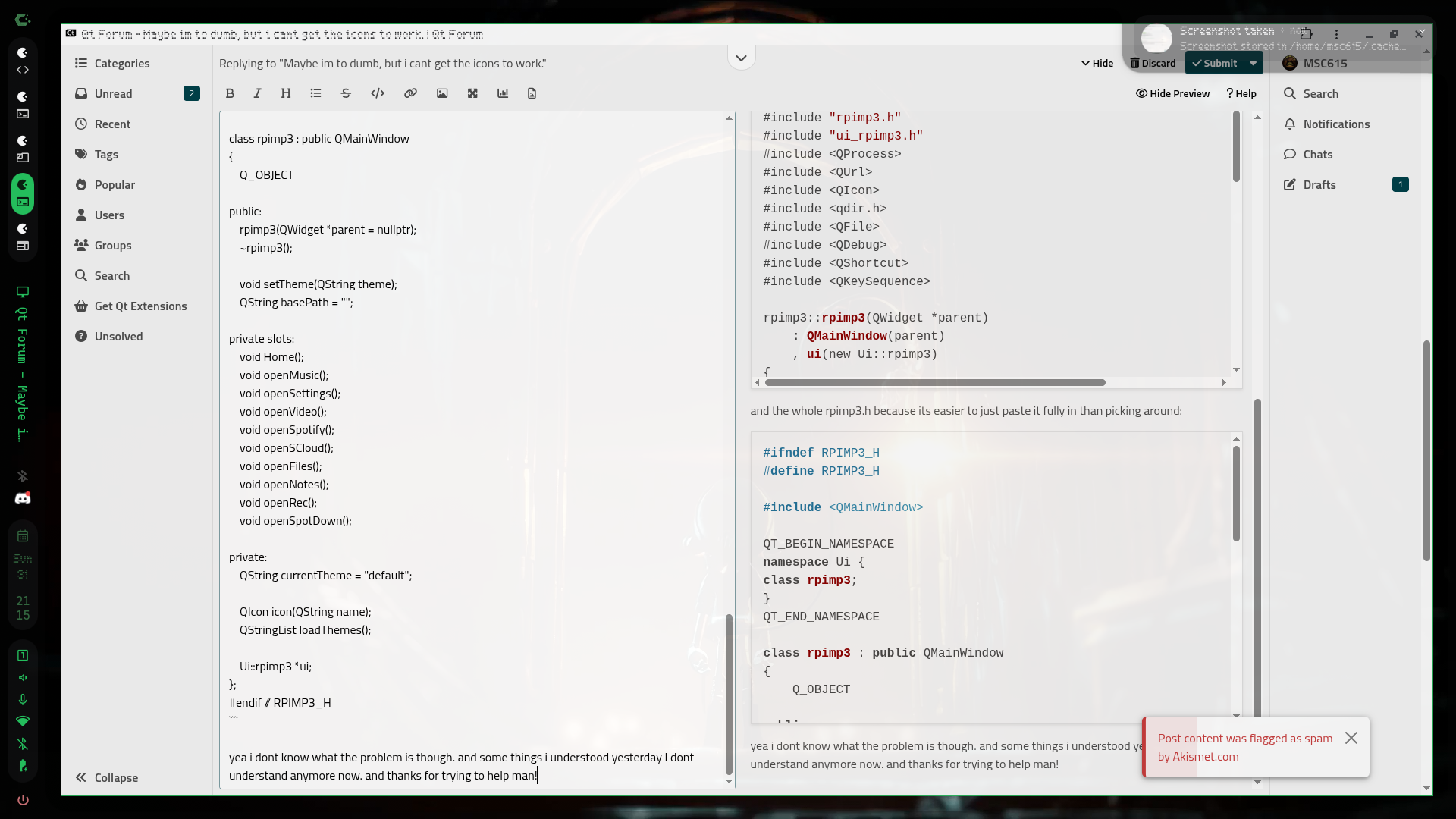
@SGaist somehow i cant reply over my laptop with parts of code. Yea to be honest a lot of code because it includes the whole rpimp3.h and stuff from the cpp file but it marks it as spam all the time.
-
Are you using relative path to load your icons ?
I suppose they are in your sources but the binary is started in the build folder so if you are using a path relative to your application binary location, that will be your main issue.Interested in AI ? www.idiap.ch
Please read the Qt Code of Conduct - https://forum.qt.io/topic/113070/qt-code-of-conduct -
Are you using relative path to load your icons ?
I suppose they are in your sources but the binary is started in the build folder so if you are using a path relative to your application binary location, that will be your main issue. -
So I think we are on the right track.
Can you print and paste here the path that you pass to create the QIcon ? -
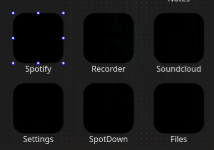
As far as I understand, you want to add icons to the buttons here
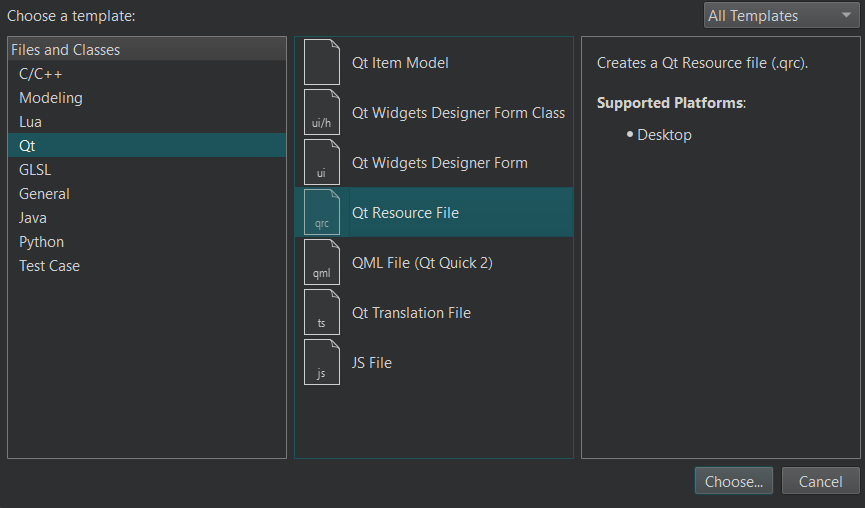
To do this, you first need to add a resources file to your project
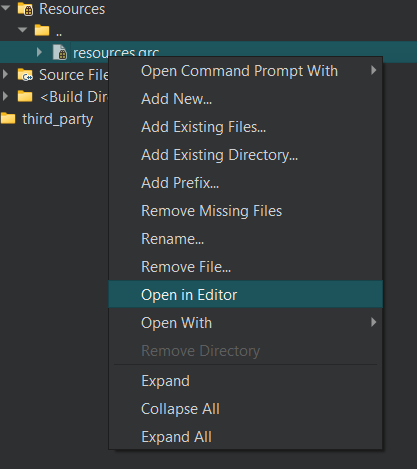
Then, in Qt Creator, you can right-click the xxx.qrc file and select “Open in Editor.
First, you need to add a prefix; I usually just use “/” because I organize them into folders. Then you can add your images by clicking “Add Files.”
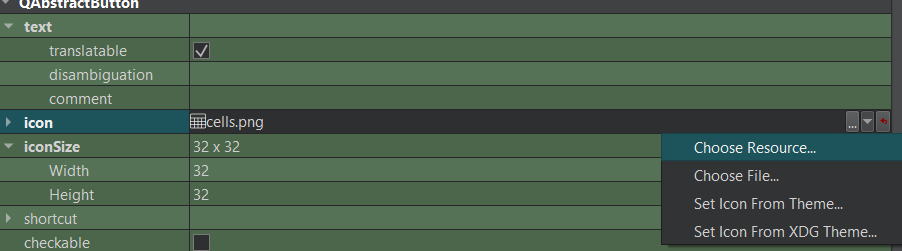
You can also add the icons by selecting them from the “Choose Resources” section in the UI.
-
As far as I understand, you want to add icons to the buttons here
To do this, you first need to add a resources file to your project
Then, in Qt Creator, you can right-click the xxx.qrc file and select “Open in Editor.
First, you need to add a prefix; I usually just use “/” because I organize them into folders. Then you can add your images by clicking “Add Files.”
You can also add the icons by selecting them from the “Choose Resources” section in the UI.
@Joe-von-Habsburg
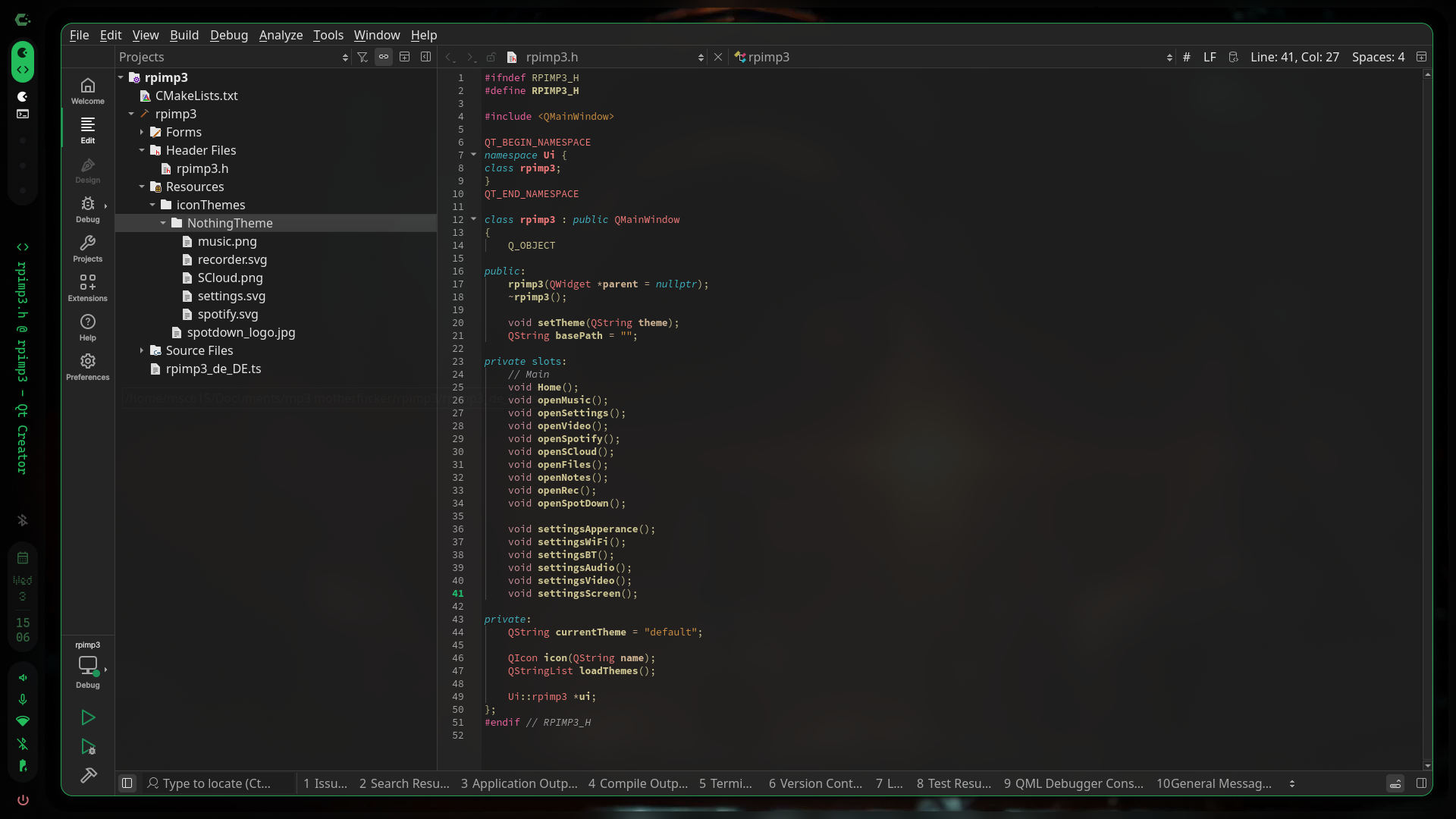 /home/msc615/Pictures/Screenshots/20260603150625.png
i dont know what you meant and how i add the recources.grc(or what it is) file, but i did that a little bit in the past: add existing files. and just so you know: i want changable icons, by choosing the theme in the settings->apperance tab of my app, so i dont know how that would be made possible with the thing you said. -
@Joe-von-Habsburg
/home/msc615/Pictures/Screenshots/20260603150625.png
i dont know what you meant and how i add the recources.grc(or what it is) file, but i did that a little bit in the past: add existing files. and just so you know: i want changable icons, by choosing the theme in the settings->apperance tab of my app, so i dont know how that would be made possible with the thing you said.@MSC615 said in Maybe im to dumb, but i cant get the icons to work.:
i dont know what you meant and how i add the recources.grc(or what it is) file
If you read
@Joe-von-Habsburg said in Maybe im to dumb, but i cant get the icons to work.:
o do this, you first need to add a resources file to your project
I told step by step.
I'm not quite sure what you mean by “changable icons.” Do you want to change the icon itself, or the button color?
If you want to change the icon, you'll need to upload your images to the xxx.qrc file, just as I explained above.
After uploading your photos as described above, here’s what you need to do.
void MainWindow::on_comboBox_currentIndexChanged(int index)
{
    if(index == 0){
       ui->spotify->setIcon(QIcon(QPixmap(":/Resources/images/spotify_black.png"));
    }
    else if (index == 1){
       ui->spotify->setIcon(QIcon(QPixmap(":/Resources/images/spotify_red.png"));
    }
    ...
}
you need "xxx.qrc" file
If you want to change only button color, same steps
void MainWindow::on_comboBox_currentIndexChanged(int index)
{
    if(index == 0){
       ui->spotify->setStyleSheets("background-color:black;");
    }
    else if (index == 1){
       ui->spotify->setStyleSheets("background-color:red;");
    }
    ...
}
If you change icon color. I do not know how it is work in qt. Maybe SVG module helps
-
@MSC615 said in Maybe im to dumb, but i cant get the icons to work.:
i dont know what you meant and how i add the recources.grc(or what it is) file
If you read
@Joe-von-Habsburg said in Maybe im to dumb, but i cant get the icons to work.:
o do this, you first need to add a resources file to your project
I told step by step.
I'm not quite sure what you mean by “changable icons.” Do you want to change the icon itself, or the button color?
If you want to change the icon, you'll need to upload your images to the xxx.qrc file, just as I explained above.
After uploading your photos as described above, here’s what you need to do.
void MainWindow::on_comboBox_currentIndexChanged(int index)
{
    if(index == 0){
       ui->spotify->setIcon(QIcon(QPixmap(":/Resources/images/spotify_black.png"));
    }
    else if (index == 1){
       ui->spotify->setIcon(QIcon(QPixmap(":/Resources/images/spotify_red.png"));
    }
    ...
}
you need "xxx.qrc" file
If you want to change only button color, same steps
void MainWindow::on_comboBox_currentIndexChanged(int index)
{
    if(index == 0){
       ui->spotify->setStyleSheets("background-color:black;");
    }
    else if (index == 1){
       ui->spotify->setStyleSheets("background-color:red;");
    }
    ...
}
If you change icon color. I do not know how it is work in qt. Maybe SVG module helps
@Joe-von-Habsburg said in Maybe im to dumb, but i cant get the icons to work.:
'm not quite sure what you mean by “changable icons.”
with that i meant changable icons, like icon themes but with custom icons. im planning to go with two themes, and other users can simply create their own and paste them i the iconTheme folder.
-
I still do not understan what you want.
Do you want like that ?

If it is, you need add black and red icon together.
If you want to change ICON COLOR, i do not know how, please look SVG module. Maybe help you -
I still do not understan what you want.
Do you want like that ?
If it is, you need add black and red icon together.
If you want to change ICON COLOR, i do not know how, please look SVG module. Maybe help you@Joe-von-Habsburg no, i have like a icon for the recorder app(only a example) in the Nothing Phone style, and one in (this is my plan) Murder drones style. it doesnt only change some colors, it also adds new things like a gliched-out-organic-fleshy-ripped-arm-thingy (typical Murder drones stuff) that grabs a bar of the icon
 ( thats the Nothing styled icon, needed to convert it do png to upload) and therefore the bar is a bit of and rotated to the side or completly ripped out(i know a lot of text, i didnt know how to describe it else). thats what i planned. the icon theme folders are located in the project folder and have the path(after the folder that contains other things that i might add as icons or other things) /rpimp3/iconThemes and currently there are these icon theme folders(the second is currently empty because im ass at designing murder drones stuff) : NothingTheme and MDTheme. a bit confusing how i explained it i think, but take some time understanding my sometimes random gibberish to know what i mean.
 -
You have iconThemes folder.
In the iconThemes you have NothingTheme folder.
NothingTheme folder has icons.there is ok.
iconThemes can be has ABCTheme folder.
and ABCTheme folder has same icons but different styles.If I understand true. You want to like that ?
now You say :
1 - I want to change theme. when theme change icon change.
2 - User can add own icon theme folder.Solution for Question 1 :
add icon to xxx.qrc file
void MainWindow::on_comboBox_currentTextChanged(QString text)
{
    ui->spotify->setIcon(QIcon(QPixmap(QString(":/iconThemes/%1/spotify.png").arg(text)));
    ...
}
That must be work.
Solution for Question 2 :
you need list in iconThemes folder folders. and add to combox on start. also custom themes folder have to have icons with same name.
NOTE :
You may need to copy the “themefolder” folder to the “exe” folder. This way, you can access the file directory without using QRC. It will be easier for you. -
You have iconThemes folder.
In the iconThemes you have NothingTheme folder.
NothingTheme folder has icons.there is ok.
iconThemes can be has ABCTheme folder.
and ABCTheme folder has same icons but different styles.If I understand true. You want to like that ?
now You say :
1 - I want to change theme. when theme change icon change.
2 - User can add own icon theme folder.Solution for Question 1 :
add icon to xxx.qrc file
void MainWindow::on_comboBox_currentTextChanged(QString text)
{
    ui->spotify->setIcon(QIcon(QPixmap(QString(":/iconThemes/%1/spotify.png").arg(text)));
    ...
}
That must be work.
Solution for Question 2 :
you need list in iconThemes folder folders. and add to combox on start. also custom themes folder have to have icons with same name.
NOTE :
You may need to copy the “themefolder” folder to the “exe” folder. This way, you can access the file directory without using QRC. It will be easier for you. -
You have iconThemes folder.
In the iconThemes you have NothingTheme folder.
NothingTheme folder has icons.there is ok.
iconThemes can be has ABCTheme folder.
and ABCTheme folder has same icons but different styles.If I understand true. You want to like that ?
now You say :
1 - I want to change theme. when theme change icon change.
2 - User can add own icon theme folder.Solution for Question 1 :
add icon to xxx.qrc file
void MainWindow::on_comboBox_currentTextChanged(QString text)
{
    ui->spotify->setIcon(QIcon(QPixmap(QString(":/iconThemes/%1/spotify.png").arg(text)));
    ...
}
That must be work.
Solution for Question 2 :
you need list in iconThemes folder folders. and add to combox on start. also custom themes folder have to have icons with same name.
NOTE :
You may need to copy the “themefolder” folder to the “exe” folder. This way, you can access the file directory without using QRC. It will be easier for you.@Joe-von-Habsburg said in Maybe im to dumb, but i cant get the icons to work.:
You may need to copy the “themefolder” folder to the “exe” folder. This way, you can access the file directory without using QRC. It will be easier for you.
follow that way.
for : resouces file add
Right Click your project -> add new file -> qt -> qt resources file -
@Joe-von-Habsburg said in Maybe im to dumb, but i cant get the icons to work.:
You may need to copy the “themefolder” folder to the “exe” folder. This way, you can access the file directory without using QRC. It will be easier for you.
follow that way.
for : resouces file add
Right Click your project -> add new file -> qt -> qt resources file@Joe-von-Habsburg ok, got it, qrc file is in. Now i did add prefix and typed / as prefix, should i also type something in the Lang thing and alias?
-
There's no need; I think you can leave it as “/” in the prefix section because you're creating subfolders within the folder.
To reiterate, you may need to copy it into the EXE folder, or create a folder in another location—such as the Documents folder—and place it there. I’m mentioning this because users can add their own themes. This is because the resources file is compiled along with your application.
-
I think you generally understand what you need to do. Create a folder in a location accessible to the user, check that location when the app launches, and add the themes to the combo box or another location to apply the changes.
The QRC file is necessary for this reason. If the theme folder is missing, the default theme stored there will be used. So it’s not entirely unnecessary.
-
There's no need; I think you can leave it as “/” in the prefix section because you're creating subfolders within the folder.
To reiterate, you may need to copy it into the EXE folder, or create a folder in another location—such as the Documents folder—and place it there. I’m mentioning this because users can add their own themes. This is because the resources file is compiled along with your application.
@Joe-von-Habsburg ok, that means if people want to add their own themes, they need to edit the qrc file? or can i do like i tried to that the code recognizes new folders in the icon themes folder and uses the icons in there?(and holy frick, i need to do a lot to make it easy for others to use it. i also need to make it compatible to my Raspberry Pi 4B with frickin 1GB RAM and 3GB swap. thats gonna be a journey!
-
@Joe-von-Habsburg ok, that means if people want to add their own themes, they need to edit the qrc file? or can i do like i tried to that the code recognizes new folders in the icon themes folder and uses the icons in there?(and holy frick, i need to do a lot to make it easy for others to use it. i also need to make it compatible to my Raspberry Pi 4B with frickin 1GB RAM and 3GB swap. thats gonna be a journey!
@MSC615 said in Maybe im to dumb, but i cant get the icons to work.:
hey need to edit the qrc file
no because qrc file compiler with when your build. my opinion qrc file have to hold defult themes only. users can not change it.
For users :
you have to folder somewhere (documents or exe folder etc.)
that folder has your default themes and user custom themes.you read path and add to combobox


 see that? Do you know why?