
How to Set Up Qt6 Kits in Qt Creator for TI AM437x
-
Hi,
I have completed porting the Linux kernel on Ti's AM437x.
The kernel version is 6.12.49.
Now, I am trying to develop an application using Qt.
However, I am having difficulties configuring the Kits in Qt Creator.
I have set gcc, qmake and GDB from the SDK provided by Ti as follows.-Device type: Generic Linux Device
-Sysroot: /root/SDK/ti-processor-sdk/linux-devkit/sysroots/armv7at2hf-neon-oe-linux-gnueabi- Compiler(C): /root/SDK/ti-processor-sdk/linux-devkit/sysroots/x86_64-arago-linux/usr/bin/arm-oe-linux-gnueabi/arm-oe-linux-gnueabi-gcc
- Compiler(C++) /root/SDK/ti-processor-sdk/linux-devkit/sysroots/x86_64-arago-linux/usr/bin/arm-oe-linux-gnueabi/arm-oe-linux-gnueabi-g++
- Qt version: None
- CMake Tool: /root/SDK/ti-processor-sdk/linux-devkit/sysroots/x86_64-arago-linux/usr/bin/cmake
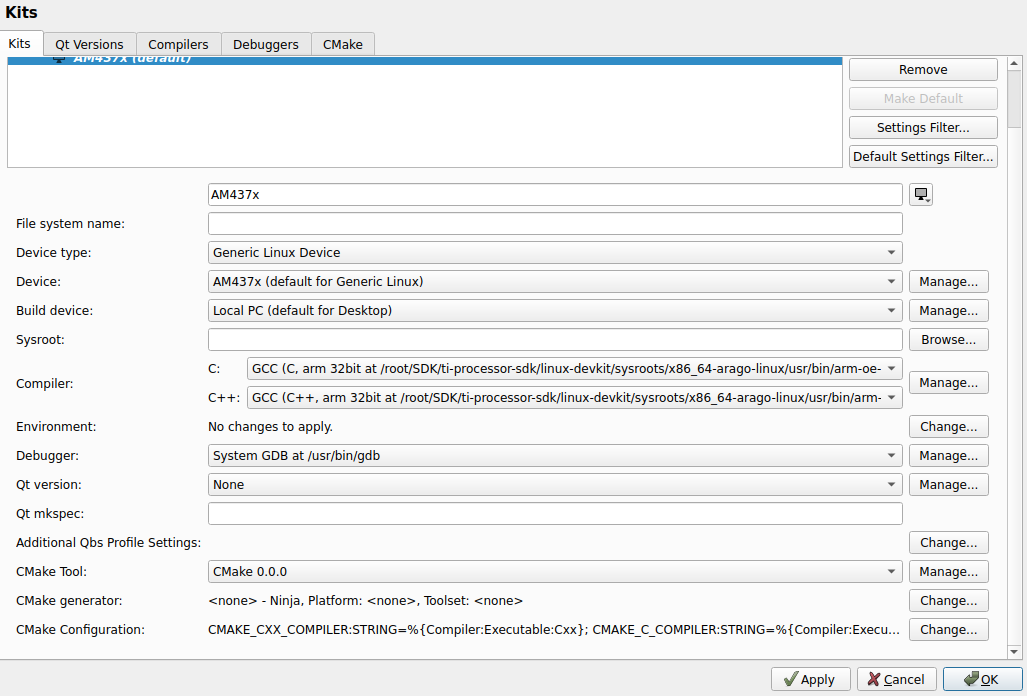
With this configuration, I cannot select a Kit when creating a new project.
Could you please tell me how to properly set up Kits for Qt6? -
Hi,
I have completed porting the Linux kernel on Ti's AM437x.
The kernel version is 6.12.49.
Now, I am trying to develop an application using Qt.
However, I am having difficulties configuring the Kits in Qt Creator.
I have set gcc, qmake and GDB from the SDK provided by Ti as follows.-Device type: Generic Linux Device
-Sysroot: /root/SDK/ti-processor-sdk/linux-devkit/sysroots/armv7at2hf-neon-oe-linux-gnueabi- Compiler(C): /root/SDK/ti-processor-sdk/linux-devkit/sysroots/x86_64-arago-linux/usr/bin/arm-oe-linux-gnueabi/arm-oe-linux-gnueabi-gcc
- Compiler(C++) /root/SDK/ti-processor-sdk/linux-devkit/sysroots/x86_64-arago-linux/usr/bin/arm-oe-linux-gnueabi/arm-oe-linux-gnueabi-g++
- Qt version: None
- CMake Tool: /root/SDK/ti-processor-sdk/linux-devkit/sysroots/x86_64-arago-linux/usr/bin/cmake
With this configuration, I cannot select a Kit when creating a new project.
Could you please tell me how to properly set up Kits for Qt6?
