
QML Tooling in 6.11 blog post series
-
Hello!
I started writing a blog post series on the new features available in QML Tooling for Qt 6.11. You can find part 1 on qmlls at
https://www.qt.io/blog/whats-new-in-qml-language-server-in-6.11 (I copy-pasted it also below)
Parts 2 and 3 will be about context property warnings and a qmllint warning overview.
Feel free to ask any question on QML Tooling in 6.11 here :)Best,
Sami
The latest Qt release, Qt 6.11, is just around the corner. This short blog post series presents the new features that QML tooling brings in Qt 6.11, starting with qmlls in this part 1. Parts 2 and 3 will present newly added qmllint warnings since the last blog post on QML tooling and context property configuration support for QML Tooling.
Go to C++ definition
qmlls shipped with 6.11 supports jumping to C++ definition on projects targeting Qt 6.10 or later. To use this feature, enable qmlls in your editor via this guide for Qt Creator or this guide for VS Code.
I will use Qt Creator for the screenshots.Let's say you have a project that contains a QML element defined in C++:
class MyItem : public QObject {
    Q_OBJECT
    QML_ELEMENT
    ...
};
For qmlls to find its C++ definition, the file defining
MyItemshould be in the QML module'sqt_add_qml_modulecall in CMakeLists.txt:qt_add_qml_module(appuntitled12 ... SOURCES myitem.h myitem.cpp )In your editor, open a QML file that uses
MyItem, right-clickMyItemand useFollow symbol under cursorin Qt Creator orGo to Definitionin VS Code. Alternatively you can also do Ctrl+Click (or Cmd+Click on macOS) onMyItem.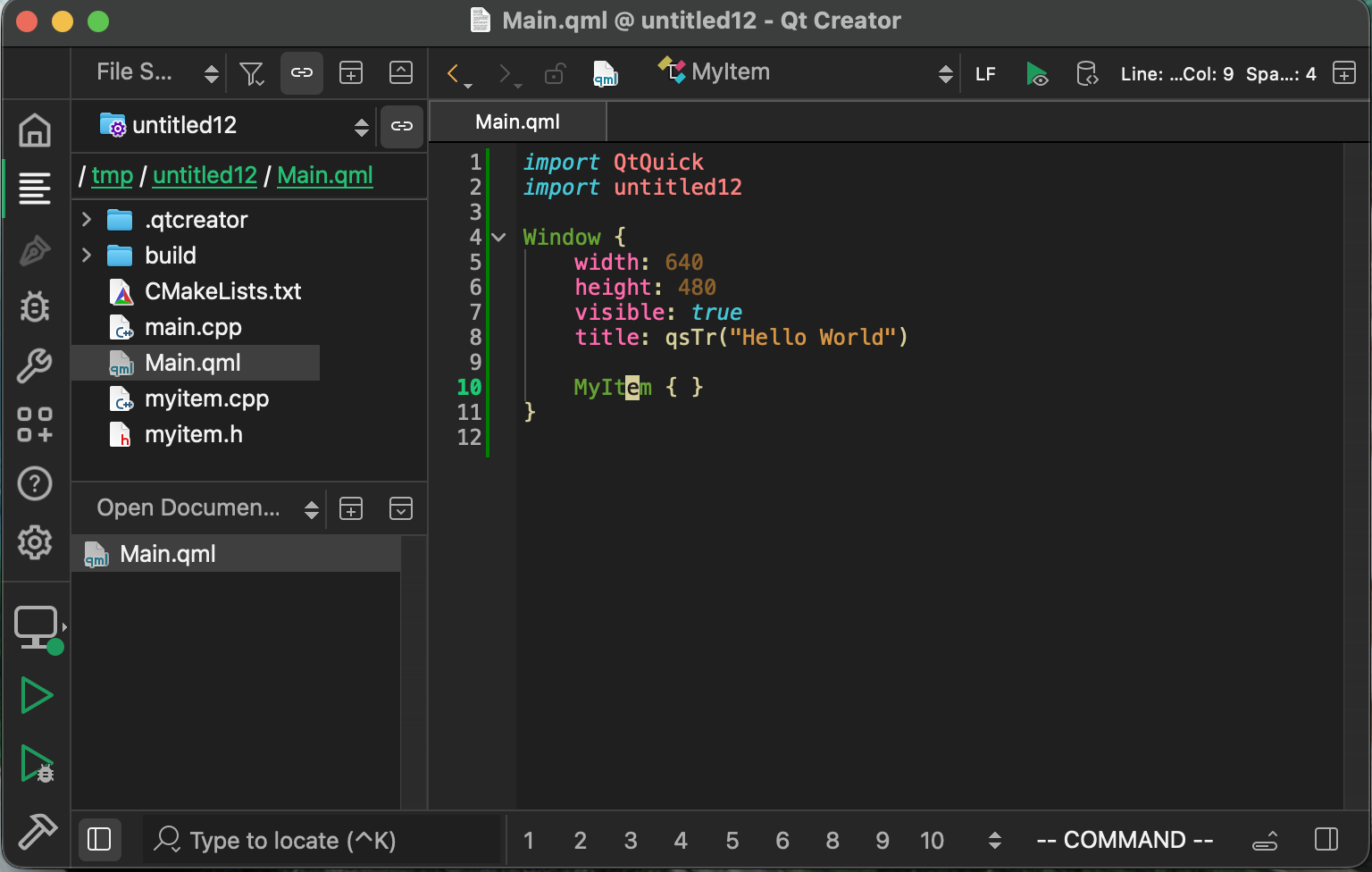
qmlls should make your editor open the C++ file that definesMyItemand position the cursor on the line whereMyItemis defined.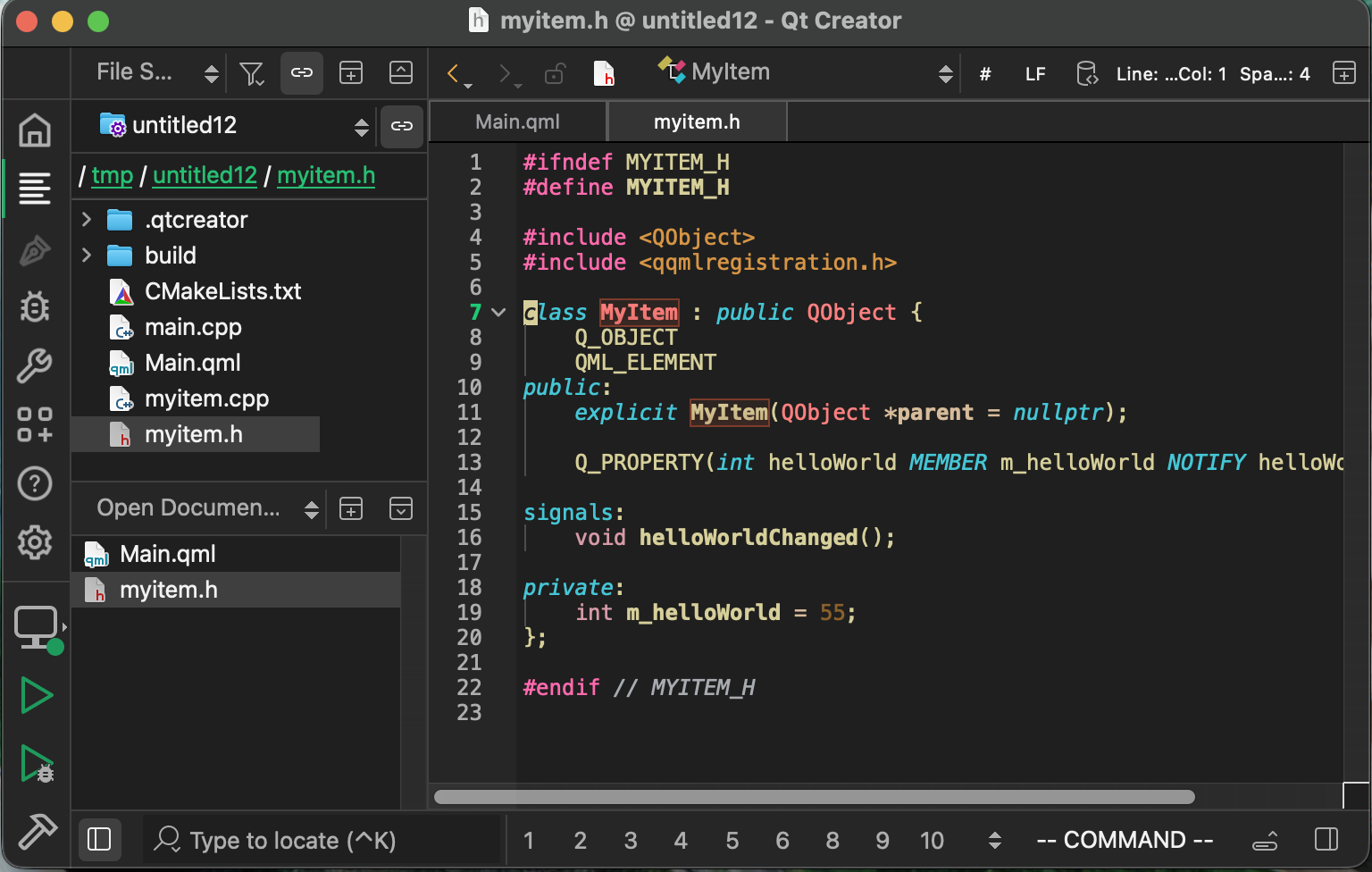
The same should also work for properties, methods, and other members of QML components defined in C++.
You can use the standalone qmlls release to try out this new feature before the Qt 6.11 release. Both Qt Creator and VS Code
have an option to download the standalone qmlls version, see here for Qt Creator and here for VS Code.Multiple project support
Before 6.11, a single instance of qmlls could not support working on multiple QML projects at the same time. Project-specific information, such as import and build paths, was previously global and shared across all opened projects. This used to lead to bugs, such as bogus import warnings during linting, caused by the use of incorrect or unrelated import paths.
With 6.11, we added a way for editors to open multiple projects in qmlls without all the previously mentioned bugs. This provides better support
for editors that can't spawn multiple instances of qmlls, such as Visual Studio.To make qmlls properly open multiple projects in the same instance, editors need to declare the root project folder for each opened project and pass the build path information for each project.
Declaring the root project folder
Editors can use the Language Server Protocol Workspace
folder feature to communicate the "project root folders" to language servers like qmlls. Each project root folder has its own settings, including import paths, and QML files are mapped to their project root folder via their file paths.For example, if there are three workspace folders:
- ~/projects/projectA
- ~/projects/projectA/subproject
- ~/projects/projectB
Then qmlls will open
- ~/projects/projectA/MyComponent.qml in the ~/projects/projectA
workspace - ~/projects/projectA/subproject/MyComponent.qml in the
~/projects/projectA/subproject workspace - ~/projects/projectA/subproject/subfolder/MyComponent.qml in the
~/projects/projectA/subproject workspace
QML files belonging to no project end up in a fallback workspace folder.
Passing the build path information
Passing build path information is a bit harder when opening multiple projects in the same qmlls instance: information passed via command-line parameters and environment variables is applied to all workspace folders. Therefore, qmlls clients need to pass the build paths for each project separately.
To pass the build path information, the editor can send a
$/addBuildDirsnotification with anAddBuildDirsParamsparameter that contains the mapping from workspace folder to build path.export interface UriToBuildDir { baseUri: URI; buildDirs: string[]; } export interface AddBuildDirsParams { buildDirsToSet: UriToBuildDir[]; }With this information, qmlls loads the project-specific information from the build folders for each workspace folder without mixing up type definitions and import paths across workspaces.
Multiple project support
Imagine the following situation: You have a QML component defined in C++ called
MyComponentthat you use in a QML file, and you want to modifyMyComponent. qmlls can't know about any changes toMyComponentuntil after a project build. For instance, a recently added property inMyComponentwill not be recognized. In this situation, this means that every time you modifyMyComponent, you have to build the project before being able to use or adapt the QML usages. This can lead to the following iterative loop:- Modify MyComponent
- Build the project
- Adapt MyComponent usage in .qml file
- Go to 1. for the next MyComponent modification
where step 2 is likely to be forgotten and adds friction to the development process. Outdated warnings, such as the newly added property not existing, might appear in step 3 if step 2 was forgotten. With the CMake Calls feature, step 2 is automatically done by qmlls.
Triggering a CMake Call
qmlls triggers CMake calls during startup and on C++ header changes. It uses the type information in the build folder to locate and watch headers that define C++ components. A file watcher informs qmlls whenever a C++ header is modified or saved to disk.
The CMake call builds the
all_qmltyperegistrationCMake target to generate the type information required by qmlls. This target is lighter than a complete project build because it tries to avoid building QML-unrelated parts of the project. To avoid using up too many resources, qmlls uses one job for the CMake calls by default; see here on how to customize it.For Qt 6.12, it is planned to make qmlls pop up a progress indicator in your editor, if your editor supports it, once a CMake call starts. Qt Creator and VS Code already support the progress indicator functionality. You can cancel the background build from inside your editor via the (x) button on the progress bar. qmlls closes the progress bar once the build finishes, and reloads the information from the build folder to generate new up-to-date qmllint warnings, go-to-definition locations, etc.
Enabling CMake Calls
The feature is disabled by default in Qt Creator and should be enabled by default in VS Code and other editors.
To enable or disable the feature,
- Set the "Enable qmlls's CMake integration" checkbox for Qt Creator.
- Set the "Use no C Make Calls" checkbox for VS Code.
- See the qmlls documentation for other editors.
Summary
We took a look at the new features of qmlls in Qt 6.11: go to C++ definition, multiple project support, and the CMake calls feature, including a small peek at the CMake calls progress indicator coming in Qt 6.12.
Feel free to open a bug report at https://qt-project.atlassian.net/jira/for-you in case you encounter anything weird or not working as expected.
-
Part 2 is out at https://www.qt.io/blog/whats-new-in-qml-tooling-for-qt-6.11-part-2 ! Attaching the content below:
The latest Qt release, Qt 6.11, is just around the corner. This short blog post series presents the new features that QML tooling brings in Qt 6.11. You can find part 1 on new qmlls features here
.qmllint got a lot of new features since our last blog post on qmllint warnings, so this blog post will go through the list of qmllint warnings added between Qt 6.6 and Qt 6.11. A list of all existing qmllint warnings, including examples, can be found in the documentation . We will link to the specific warning documentation for each warning listed here so you can easily find more information and examples on how to trigger and fix the warning.
Shadowing QML members
Shadowing happens when your QML component redefines an id, property, signal, or method that already exists in a base class. It is both a powerful and dangerous construct that can lead to weird unexpected behaviors and reduces performance.
In Qt 6.11, we added the
virtualandoverridekeywords to mark properties that shadow or can be shadowed. In Qt 6.10, we added thefinalkeyword to mark properties that can't be shadowed. Altogether, we have:virtualfor properties that can be shadowed.overridefor properties that must shadow another property.finalfor properties that must not be shadowed.
Properties that have neither
virtual noroverridemight shadow silently: no warning would be emitted by the QML runtime or qmllint. Can you spot which property is shadowing in the following code snippet?// Building.qml import QtQuick Item property int floors property string rotation // like CSS rotate, "-120deg" property date constructionDateWould you have noticed the shadowing property if I hadn't told you there was one? The property
rotationalready exists in the base type Code that expects to see therotationproperty from the base type will see a string instead and probably won't work with the Building component. To fix this, we could rename the rotation property in Building.qml to cssRotation, for example:// Building.qml import QtQuick Item property int floors property string cssRotation // like CSS rotate, "-120deg" property date constructionDateCan you guess what the next code snippet outputs?
import QtQuick

Item
    clip: true
    Component.onCompleted: console.log(clip) // what does this print?
    /* ... */
    function clip()
This snippet prints out
function clip()at runtime, instead of an expected
true, because theclipmethod shadows the property of the same name. This example shows that shadowing does not only happen between properties. It can also happen between any combination of properties, signals, methods, and ids. Especially shadowing with ids can easily become confusing, can you guess what the output of this snippet is?import QtQuick Item x: 42 Component.onCompleted: console.log(x) // what does this print? /* ... */ ItemYou probably guessed correctly that the output is probably not 42. The lookup to x gives a higher priority to ids than to properties, which makes
console.log(x)print out the Item with idx. This is hard to see and debug. Luckily, in Qt 6.12, this won't be a problem anymore with the new [id-shadows-member] qmllint warning.qmllint will warn for situations where:
- A property incorrectly overrides another one. ([property-override]
- Multiple inline components have the same name. ([duplicate-inline-components]
- Multiple members defined in the same type have the same name. ([duplicated-name]
- An id shadows another member if the member is in use. ([id-shadows-member]*)
- A member shadows another one. ([shadow]**)
(*) This warning will be available starting with Qt 6.12.
(**) To get the full set of shadowing warnings, enable the [shadow] category by adding
Shadow=warninginside the.qmllint.inisettings file. The category is disabled by default as not all shadowing cases can currently be fixed. For example, there is currently no way to mark a method as shadowing a property in QML. You can add the// qmllint disable shadowcomment to silence the warning for each occurrence.New JavaScript-specific warnings
We added new JavaScript-specific warnings to qmllint to bring it on par with the embedded Qt Creator QML code model. Those warnings are not really QML-specific, and more about the general usage of JavaScript:
vardeclarations in JavaScript blocks. ([var-used-in-block-scope]- Comma expression usage. ([comma]
- Expression statements that do nothing. ([confusing-expression-statement]
- Expressions like
---xor+++x. ([confusing-minuses] and [confusing-pluses] voidoperator andeval()function usage. ([void] and [eval]==operator usage with value coercion. ([equality-type-coercion]- Usage of
?.on elements that can't be null. ([redundant-optional-chaining] - Usage of empty JavaScript blocks in bindings that don't return any value. ([unintentional-empty-block]
- Code that never runs. ([unreachable-code]
- Case blocks not ending with
return,break,throw, orcontinue. ([unterminated-case] - Usage of variables before their definition. ([var-used-before-declaration]
- Usage of assignment operators in conditionals. ([assignment-in-condition]
Withstatement usage. ([with]- Usage of literal constructors, like
new Boolean(). ([literal-constructor] - Usage of functions before their definition. ([function-used-before-declaration]*)
(*) This warning is not enabled by default.
New enumerations warnings
We added multiple warnings on the usage and definition of enumerations in QML:
- Incorrect usage of
enumas a type name. ([enums-are-not-types] - Enumerations defined at the wrong places. ([non-root-enums]
and [inline-component-enums] - Usage of non-existing enumeration entries. ([missing-enum-entry]
- Lowercase enumerations. ([enum-key-case]
- Enumerations with name collisions. ([enum-entry-matches-enum]
We removed a warning for unscoped enumerations defined in C++ ([restricted-type]) that warned on enum accesses like
ComponentName.EnumName.key. Accessing enums by enum name in QML is allowed in Qt 6.11 and was added by https://codereview.qt-project.org/c/qt/qtdeclarative/+/646544New property warnings
We also added some warnings when assigning or binding values to a property:
- Assigning multiple times to the same non-list property. ([non-list-property]
- Calling a property as if it were a function. ([use-proper-function]
- Preferring specific types instead of var in property definitions. ([prefer-non-var-properties]
- Accessing a singleton instead of an attached property. ([access-singleton-via-object]
- Forgetting to set a required property. ([required]
- Binding more or fewer than one child in a Component. ([component-children-count]
- Forgetting to make a non-constant C++ property notifiable. ([stale-property-read]
New miscellaneous warnings
Last but not least, we also added warnings that didn't relate to the previous categories:
- Using invalid qmllint comment directives. ([invalid-lint-directive]
- Using Component as a top-level type in a QML file. ([top-level-component]
- Instantiating uncreatable types. ([uncreatable-type]
- Importing QML modules using file selectors. ([import-file-selector]*)
(*) This warning is not enabled by default.
Summary
We described the shadowing warning newly introduced in Qt 6.11, with a short outlook to 6.12, and took a look at the long list of newly added warnings since Qt 6.6.
You can find the documentation for all warnings in this list. Feel free to open a bug report in JIRA in case you encounter a warning that is not working as expected or is insufficiently documented.
-
Part 3 is out at: https://www.qt.io/blog/whats-new-in-qmllint-for-qt-6.11-part-3
The latest Qt release, Qt 6.11, is just around the corner. This short blog post series presents the new features that QML tooling brings in Qt 6.11. You can find part 1 on new qmlls features here, and part 2 on new qmllint warnings here{rel="noopener" target="_blank"}.
In this blog post, we will start with a short recap on the context property and go through the new context property support in qmllint and QML Language Server.Recap on context properties
What are they?
Context properties embed C++ objects into QML. They are defined at runtime on the QQmlContext of a QObject, and can be accessed from QML. Here is an example:
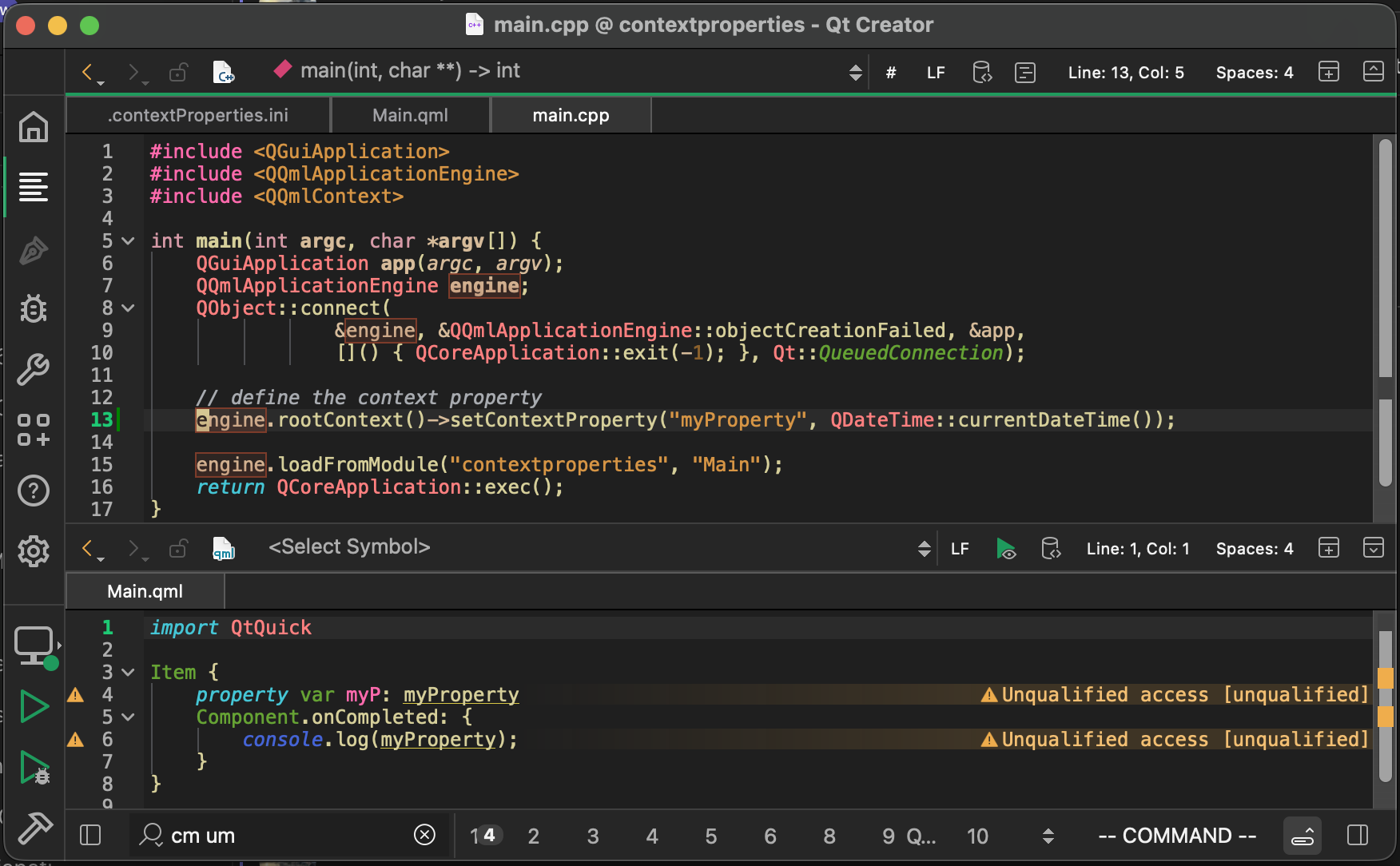
The C++ code usesengine.rootContext()->setContextProperty(...)to define the context property at runtime, and the QML code accesses it viamyProperty. Running the above program will print out the date and time obtained fromQDateTime::currentDateTime()during thesetContextProperty()-call.Why are they bad?
The above example suffers from multiple problems because of its use of context properties.
Limited reusability of the QML files
QML files with context property usages have a dependency on a specific QQmlContext, even if there is nothing in the QML files that states that dependency. Therefore, anyone trying to reuse your code will have difficulty determining whether the reuse location has a QQmlContext sufficient for your code.
In our previous example, reusingMain.qmlin another place with a different context triggers these runtime errors:
qrc:/qt/qml/contextproperties/Main.qml:6: ReferenceError: myProperty is not defined qrc:/qt/qml/contextproperties/Main.qml:4: ReferenceError: myProperty is not definedLimited QML tooling support
QML tooling doesn't know about the context property definition and can't discern unqualified accesses from context property usages. You might have seen in the previous screenshot that QML Language Server warns that usages of
myPropertyare unqualified accessesHow to replace them?
You can find a guide on how to replace them with singletons or required properties in the documentation (warning: might contains spoilers!) .
What if replacing them is not an option?
Sometimes replacing context property usages might not be feasible, for example, because they are too widespread or come from a third-party API. The rest of the blog post explains how to teach QML tooling about context properties to avoid all those "unqualified access"-warnings when using context properties.
Configurable context properties warnings
qmllint adds basic support for context properties in Qt 6.11. Prior to 6.11, qmllint treated unqualified accesses and context property accesses identically. This meant that warnings about the use of context properties couldn't be silenced without losing actual relevant unqualified access warnings.
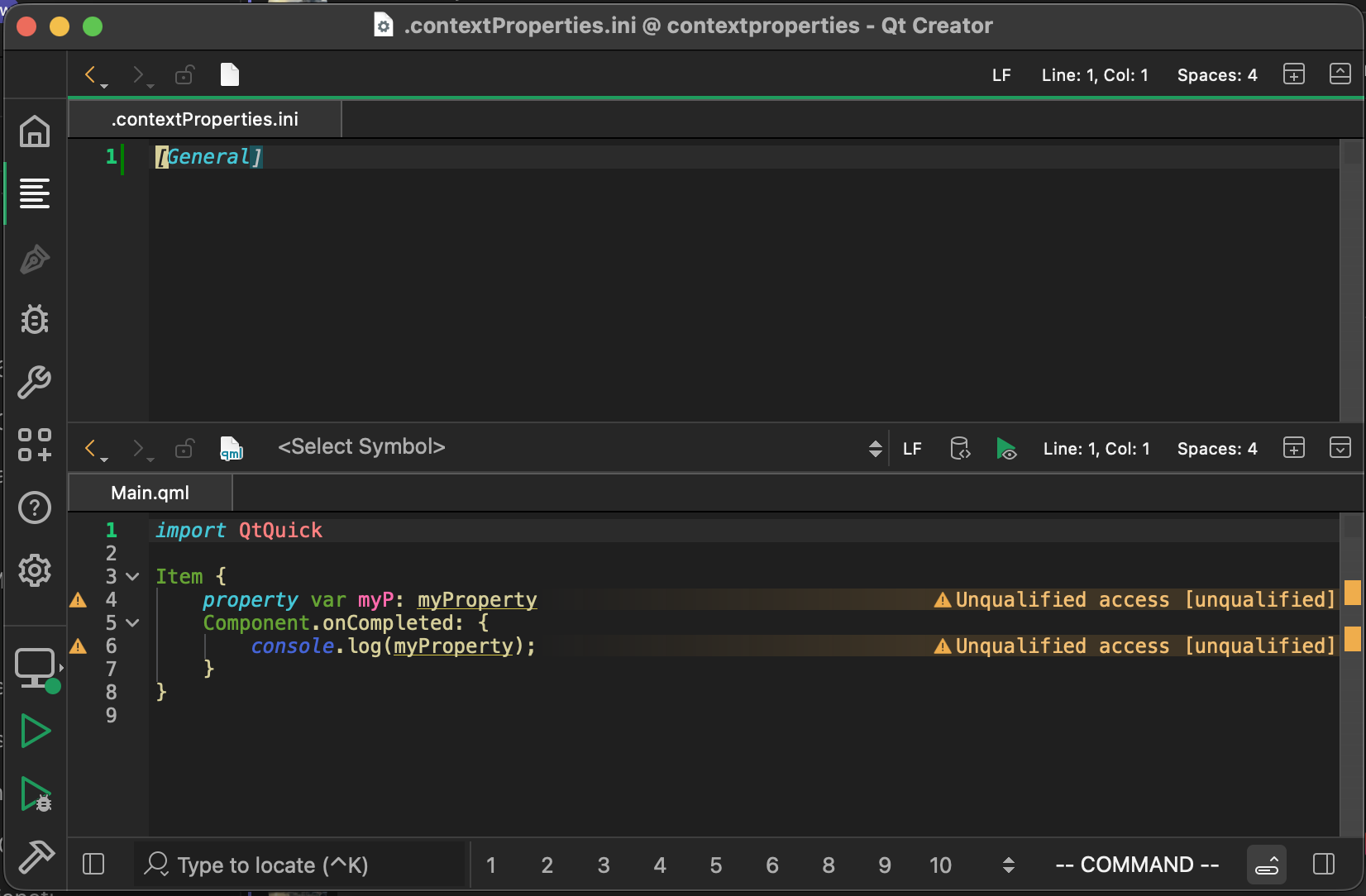
To separate actual unqualified accesses from context property accesses, we added a new configuration file that allows you to declare the context properties that exist in your code. To use the new context property configuration file, create a.contextProperties.inifile with the following content inside your project source folder.
[General] disableUnqualifiedAccess = "myContextProperty1,myContextProperty2" warnOnUsage = "myContextProperty3,myContextProperty4,myContextProperty5" disableHeuristic = false
We will explain each setting key in this example in the next sections. Here is how the warning looks without any.contextProperties.inifile.
Disable unqualified access
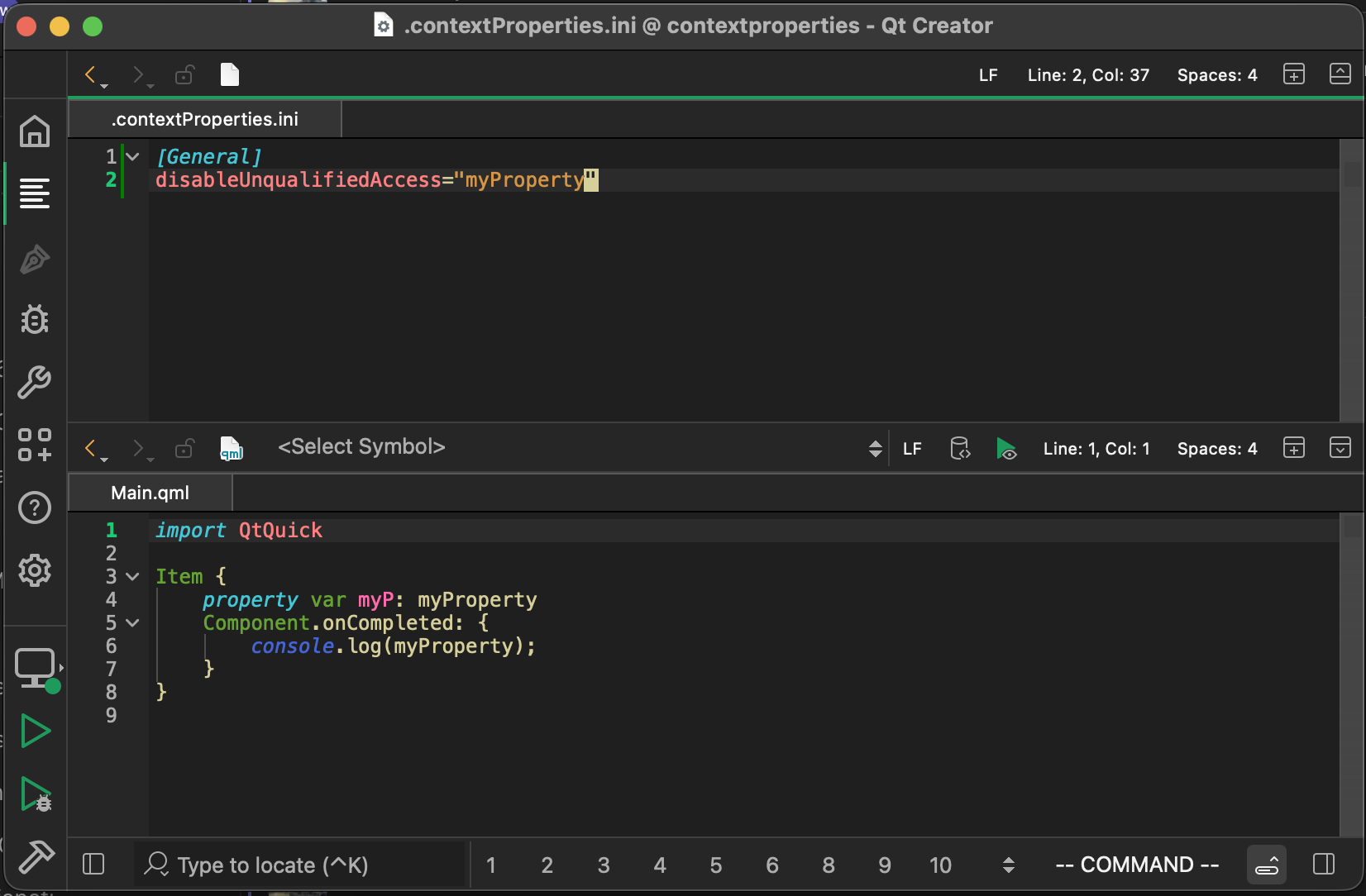
If you have decided that a context property can't or won't be replaced with a better alternative, and if you want to silence all unqualified access warnings on that context property, then
disableUnqualifiedAccesswas made for you. That setting key should contain all the context property names where unqualified access warnings should be silenced. Use","to separate multiple context property names.
qmllint silences all unqualified access warnings on those property names, allowing you to focus on the other relevant unqualified access warnings.
In our example, adding our context property name todisableUnqualifiedAccesssilences the warning:
Warn on usage
You might have (rightfully!) decided that you still want to get rid of your context property usages, so silencing the warning via
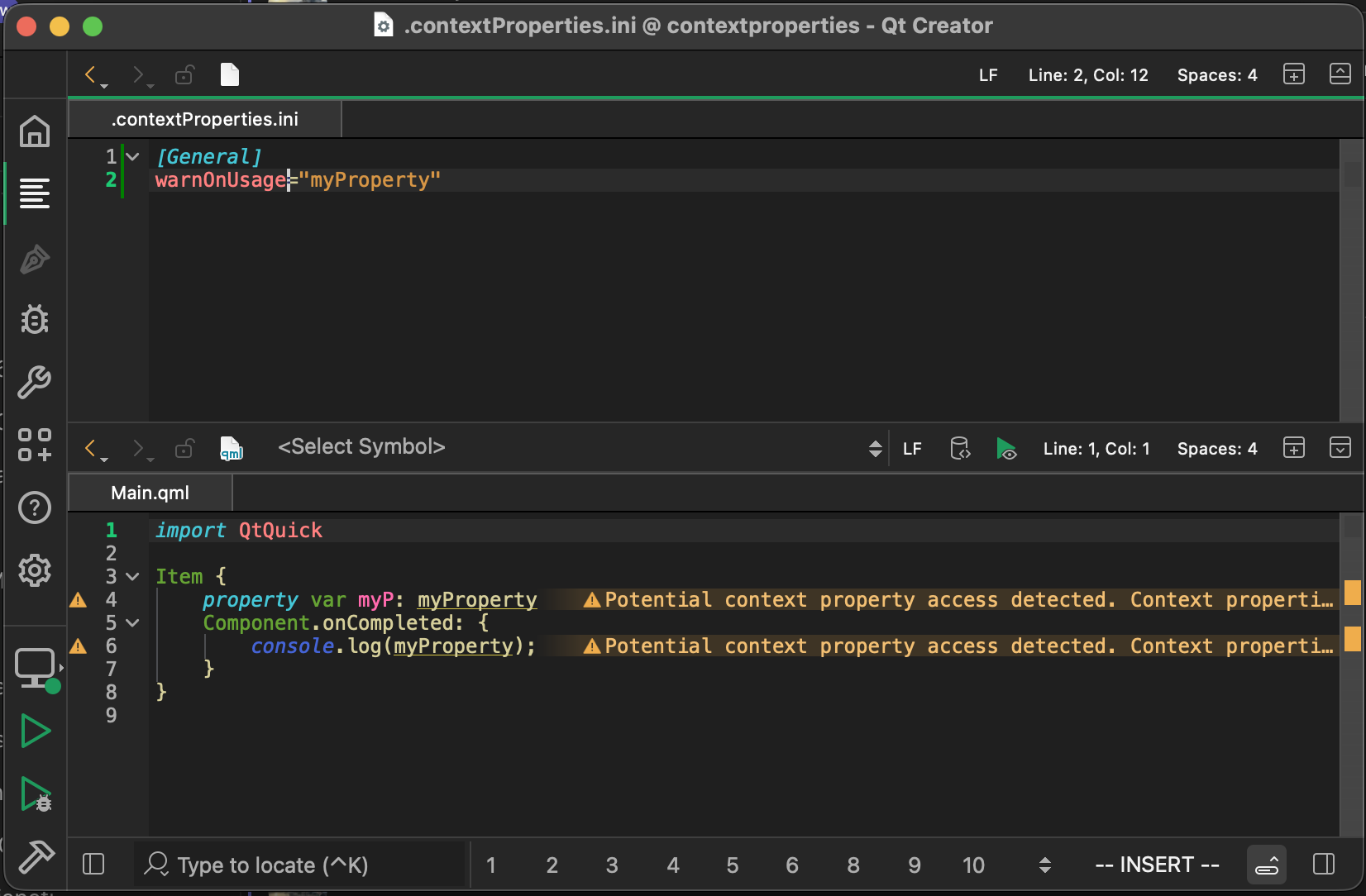
disableUnqualifiedAccessand forgetting about the context properties might not be feasible for you. In that case, you might want unqualified accesses to emit unqualified access warnings and context property accesses to emit context property-related warnings. To do so, add the context property name to thewarnOnUsagekey. Use","to separate multiple context property names.
qmllint will emit a different warning with a different warning category for unqualified accesses on properties in thewarnOnUsage-list. This allows you to unclutter the unqualified warning category.
In our example, adding our context property name towarnOnUsagemakes qmllint emit a different warning:
You might ask yourself now, "This is all good, but do I really have to type all of my context property names inside this configuration file? What if I can't remember how I named my context properties ages ago?" Fortunately, there is a heuristic that can help you find your context properties.Find context property definitions
The CMake scripts in 6.11 include a heuristic search for context property definitions in C++ code. It greps your source folder for
setContextProperty()calls and saves the result into your build folder. This way, qmllint picks up the context property definitions at runtime and can warn when accessing them.
Grepping the source folder with the heuristic takes some time on bigger projects and is therefore disabled by default. To run the heuristic manually, call thedump_qml_context_propertiesCMake target. The results of the heuristic search are saved in the build folder and read by qmllint during linting.
To run the heuristic search automatically during the CMake linting targets, likeall_qmllint, for example, set theQT_QMLLINT_CONTEXT_PROPERTY_DUMPCMake variable toONbefore calling the linting target.
After running thedump_qml_context_propertiestarget via the editor's CMake extension, for example, by typingcm dump_qml_context_propertiesin Qt Creator's locator and hitting enter, we get the following warnings on our context property usage:
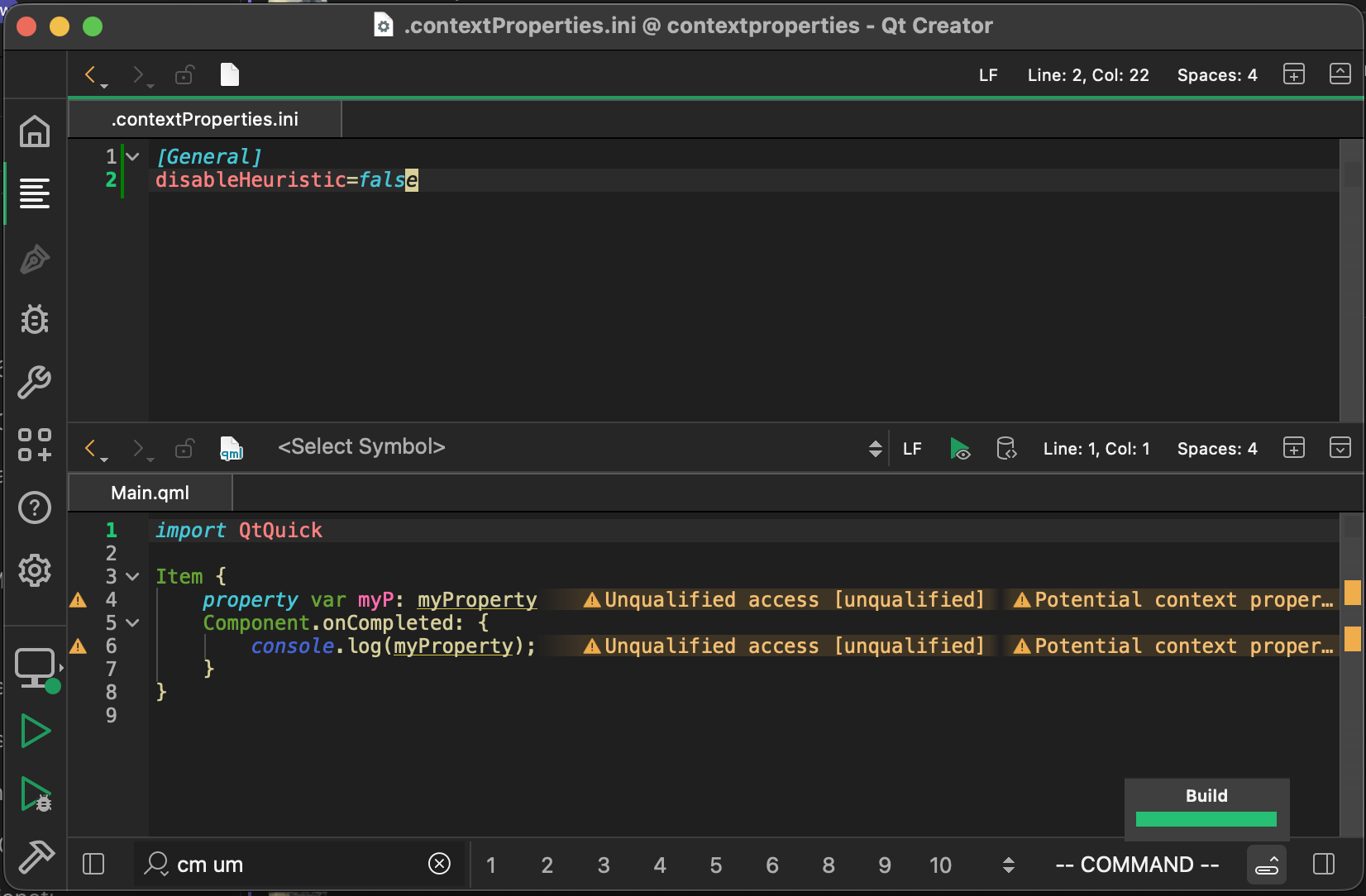
The unqualified warning is no longer the only one: a new warning has been added about a potential context property access being detected. It also contains the location of the "definition" for the context property that can be seen when looking at the entire warning message:
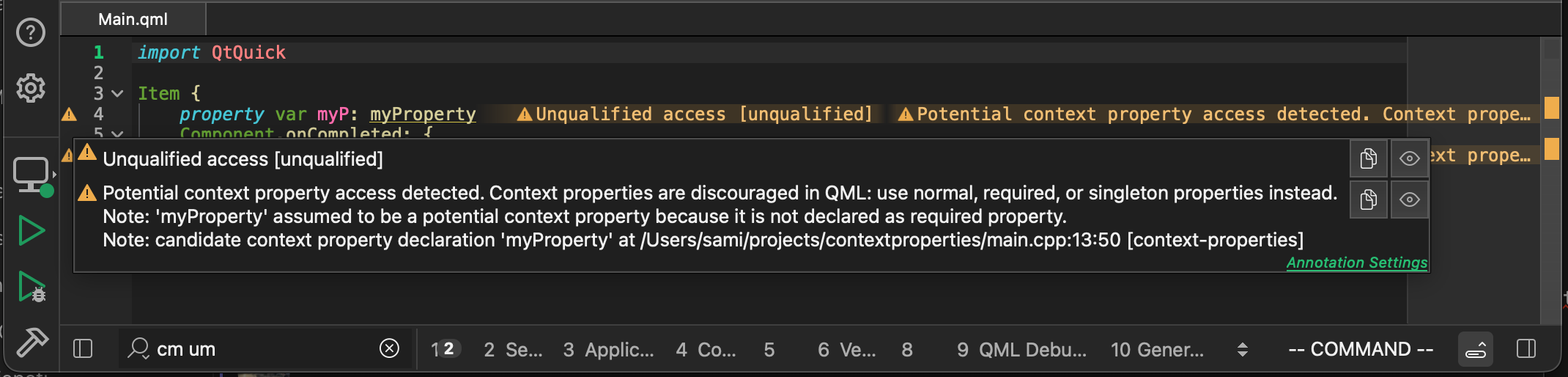
The location of the "definition" we can use to check whethermyPropertyis really a context property or a false positive. If it really is a context property, we can add it towarnOnUsagein the.contextProperties.inito remove the unqualified access warning. The entire list of context property names found by the heuristic is in the build folder at<build>/.qt/.contextPropertyDump.ini.Disable the heuristic
To disable warnings about context property names found by the heuristic, set the
disableHeuristickey in the configuration file totrue, or delete the.contextPropertyDump.inifile from the build folder.Summary
We started with a recap on what context properties are and went through the new context property support in QML tooling. This was the last part of this series. We hope that you enjoyed it. Remember to open a bug report in JIRA if anything is not working as expected or is insufficiently documented.