
Qt 6.11 is out! See what's new in the release
blog
auto completions in QComboBox
-
How to set auto completions in QComboBox? I want to have ability to open QComboBox and type, for example, a4 to select corresponding (last) line.
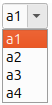
My example is based on doc. Behaviour makes me confuse:- I can press "a" to go to next item. But after push "a" I should wait about 3 seconds and then I can push "a" again to go to the next item. When last item is selected, I can push "a" to go to initial item, like on circle. It is strange. Why this happen?
- I open QComboBox, then type "a4" but "a2" is selected instead of "a4". It looks like auto completions is totally doesn't work...
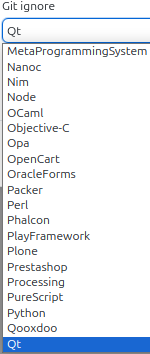
- How to do QComboBox without setEditable(true)? I want design similar to GitHub Desktop: I can type "Qt" to go to corresponding item but user has no ability to write any text directly to QComboBox.
- I want auto completions between a1, a2, .., a20 but user on keyboard will type number without a: just 1 or 2 or 20 and inside QComboBox text should be with a: a1 or a2 or a20. How to do it?
QStringList wordList;
wordList << "a1" << "a2" << "a3" << "a4";

QComboBox *combobox = new QComboBox(this);
foreach(QString str, wordList){
    combobox->addItem(str);
}
combobox->setEditable(true);

QCompleter *completer = new QCompleter(wordList, this);
completer->setCaseSensitivity(Qt::CaseInsensitive);
combobox->setCompleter(completer);
Ubuntu 25.10 (wayland)
Qt 6.11.0-rc and Qt 6.8.0-rc were tested
