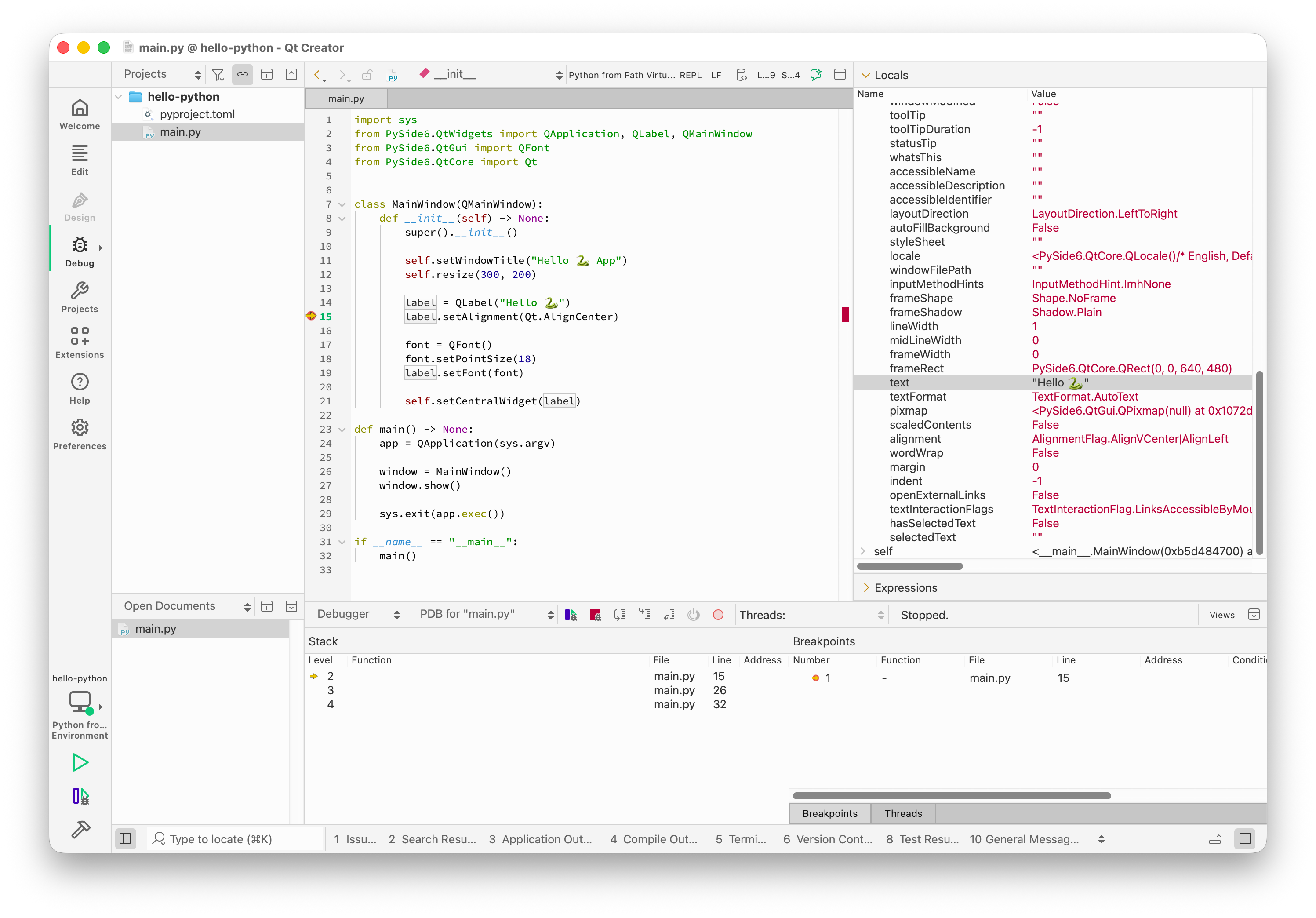
How to Enable Python Type Hints in Qt Creator?
-
@cristian-adam
It looks like your latest post crossed with mine! That again is an improvement to show the parameters, good. But still no type hint (the type expected for theonparameter), is that supported? :) And I don't know whether all the Qt calls are annotated in the PySide with their types, that may require a manual step?@JonB said in How to Enable Python Type Hints in Qt Creator?:
@cristian-adam
It looks like your latest post crossed with mine! That again is an improvement to show the parameters, good. But still no type hint (the type expected for theonparameter), is that supported? :) And I don't know whether all the Qt calls are annotated in the PySide with their types, that may require a manual step?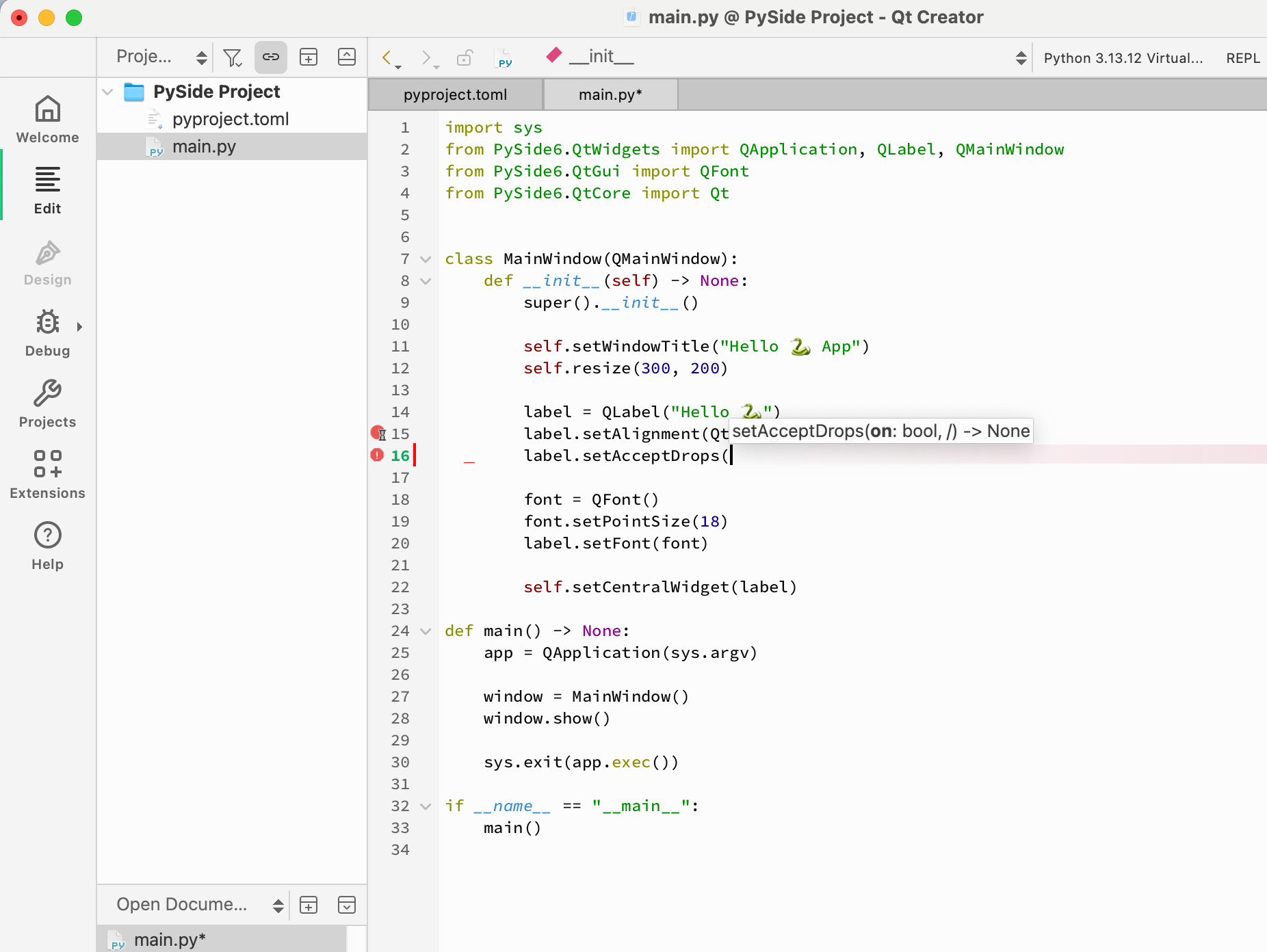
It did mention that
onis abool, was that it? -
@JonB said in How to Enable Python Type Hints in Qt Creator?:
@cristian-adam
It looks like your latest post crossed with mine! That again is an improvement to show the parameters, good. But still no type hint (the type expected for theonparameter), is that supported? :) And I don't know whether all the Qt calls are annotated in the PySide with their types, that may require a manual step?It did mention that
onis abool, was that it?@cristian-adam said in How to Enable Python Type Hints in Qt Creator?:
It did mention that
onis abool, was that it?That is indeed the chappie :) It also shows the function call returns
None, which is a type hint too.Python decided not to have types initially. Then someone came to their senses and said "well we don't want mandatory types, but if you are finicky enough to want to type in types as hints we will let you do that". And then presumably someone said "these are really useful when editing, so we'll introduce warnings when they're wrong and editors can show them if they help people". :)
-
@cristian-adam said in How to Enable Python Type Hints in Qt Creator?:
I've opened up QTCREATORBUG-34195: Python debugging not having pretty printers for Pyside6 Qt types.
And as workaround for the missing debugger, is the
qDebug()trace:from PySide6.QtCore import Qt, qDebug # ... qDebug("Label text: " + label.text()) -
@cristian-adam said in How to Enable Python Type Hints in Qt Creator?:
I've opened up QTCREATORBUG-34195: Python debugging not having pretty printers for Pyside6 Qt types.
And as workaround for the missing debugger, is the
qDebug()trace:from PySide6.QtCore import Qt, qDebug # ... qDebug("Label text: " + label.text()) -
@cristian-adam
Alternatively as a workaround and still using the debugger panes rather than putting in aqDebug()statement, did you try puttinglabel.text()into the bottom right Expressions pane?@JonB said in How to Enable Python Type Hints in Qt Creator?:
@cristian-adam
Alternatively as a workaround and still using the debugger panes rather than putting in aqDebug()statement, did you try puttinglabel.text()into the bottom right Expressions pane?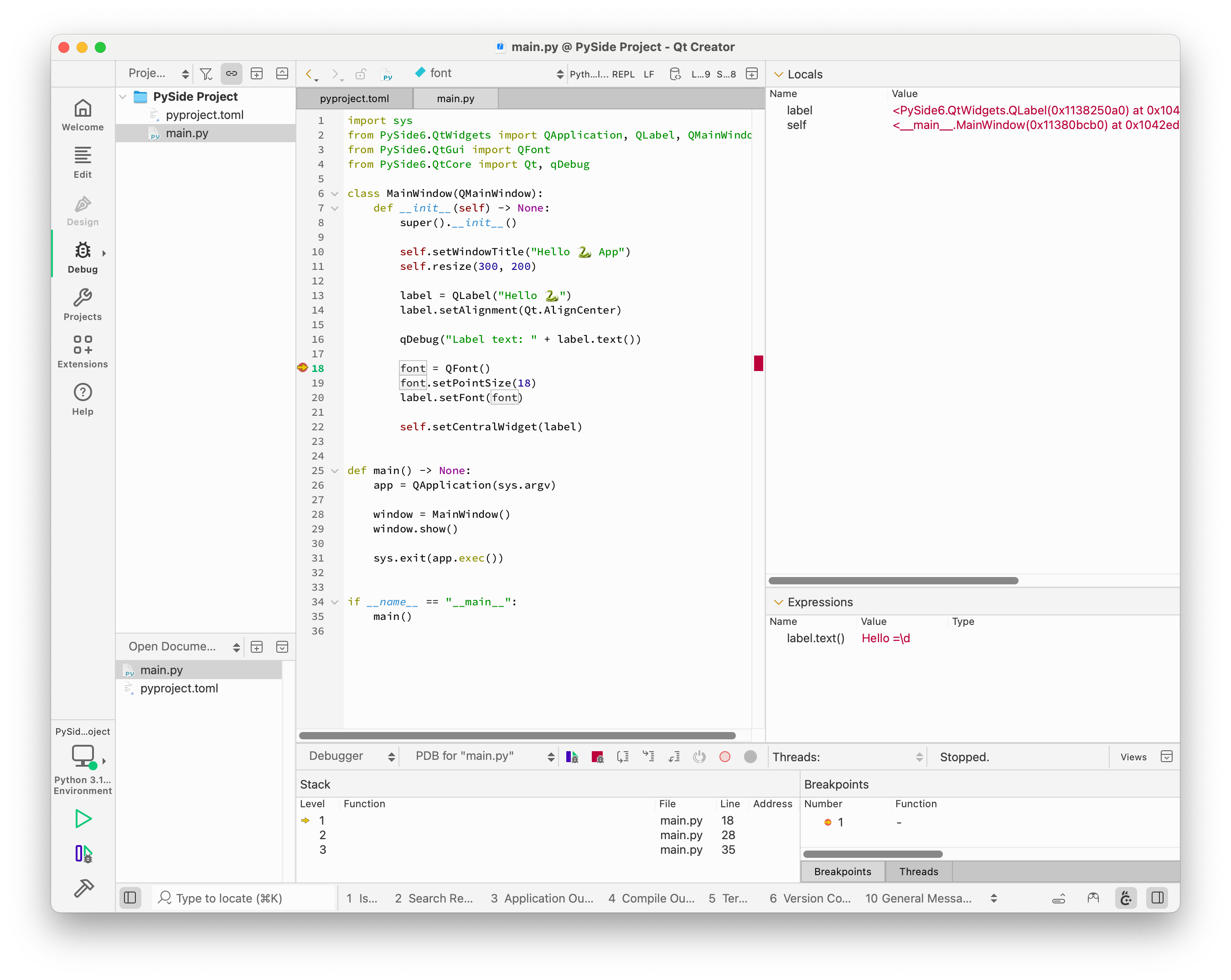
Worked. I didn't give me
Hello 🐍butHello =\dbut I guess that's due to the missing UTF-8 encoding. -
I didn't notice you were printing a duck/swan thing, wth is that? :)
Since (unlike C++) you can put pretty much any Python expression into Expressions, you might get it with something like
label.text().encode('utf-8'), orlabel.text().decode('utf-8')if it's decoding rather than encoding, don't ask me about encodings!). In both PyQt and PySide allQStrings are translated into Pythonstrs, which are those 16-bit encoding thingies.Just while we are here, I would give a limb if gdb/C++ Creator debugging would allow expressions to be evaluated in the Expressions pane. I understand the issue with C++ versus Python for expression evaluation, but it's the single most irritating thing when debugging C++.... :(
-
I didn't notice you were printing a duck/swan thing, wth is that? :)
Since (unlike C++) you can put pretty much any Python expression into Expressions, you might get it with something like
label.text().encode('utf-8'), orlabel.text().decode('utf-8')if it's decoding rather than encoding, don't ask me about encodings!). In both PyQt and PySide allQStrings are translated into Pythonstrs, which are those 16-bit encoding thingies.Just while we are here, I would give a limb if gdb/C++ Creator debugging would allow expressions to be evaluated in the Expressions pane. I understand the issue with C++ versus Python for expression evaluation, but it's the single most irritating thing when debugging C++.... :(
@JonB said in How to Enable Python Type Hints in Qt Creator?:
I didn't notice you were printing a duck/swan thing, wth is that? :)
-
I didn't notice you were printing a duck/swan thing, wth is that? :)
Since (unlike C++) you can put pretty much any Python expression into Expressions, you might get it with something like
label.text().encode('utf-8'), orlabel.text().decode('utf-8')if it's decoding rather than encoding, don't ask me about encodings!). In both PyQt and PySide allQStrings are translated into Pythonstrs, which are those 16-bit encoding thingies.Just while we are here, I would give a limb if gdb/C++ Creator debugging would allow expressions to be evaluated in the Expressions pane. I understand the issue with C++ versus Python for expression evaluation, but it's the single most irritating thing when debugging C++.... :(
@JonB said in How to Enable Python Type Hints in Qt Creator?:
Since (unlike C++) you can put pretty much any Python expression into Expressions, you might get it with something like
label.text().encode('utf-8'), orlabel.text().decode('utf-8')if it's decoding rather than encoding, don't ask me about encodings!). In both PyQt and PySide allQStrings are translated into Pythonstrs, which are those 16-bit encoding thingies.label.text().decode('utf-8')results in<unavailable>.🤷🏻♂️
-
@JonB said in How to Enable Python Type Hints in Qt Creator?:
Since (unlike C++) you can put pretty much any Python expression into Expressions, you might get it with something like
label.text().encode('utf-8'), orlabel.text().decode('utf-8')if it's decoding rather than encoding, don't ask me about encodings!). In both PyQt and PySide allQStrings are translated into Pythonstrs, which are those 16-bit encoding thingies.label.text().decode('utf-8')results in<unavailable>.🤷🏻♂️
@cristian-adam
encodeworks on strings,strorQString.decodeworks on bytes,bytesorQByteArray. That may explain<unavailable>ontext().decode(). I told you I didn't understand :) If you had stuck toHello world!we wouldn't be having this discussion ;-) -
@cristian-adam said in How to Enable Python Type Hints in Qt Creator?:
I've opened up QTCREATORBUG-34195: Python debugging not having pretty printers for Pyside6 Qt types.
And as workaround for the missing debugger, is the
qDebug()trace:from PySide6.QtCore import Qt, qDebug # ... qDebug("Label text: " + label.text())@cristian-adam said in How to Enable Python Type Hints in Qt Creator?:
I've opened up QTCREATORBUG-34195: Python debugging not having pretty printers for Pyside6 Qt types.
The bug report has been closed, and this is how Qt Creator master (21) looks like: