
Native Windows style ignores Designer button size; Fusion style ignores DPI scaling
-
It's currently impossible to develop software in Qt that exactly matches the Designer layout. I am experiencing two critical issues with Qt 6 (6.10.2) on Windows:
- Native Windows style:
QPushButtons created in the Designer do not preserve their defined size, even when using:
sizeHint();
setFixedSize();
minimum and maximum;
padding and margins
Attempts to override sizeFromContents via QProxyStyle either fail or cause crashes.
- Fusion style:
Button sizes are preserved, but the interface does not scale correctly on high-DPI monitors, breaking the layout.
Impact:
UI will never look exactly as designed in Designer;
With native style, buttons have incorrect sizes; with Fusion style, layouts break on high-DPI displays;
This makes Qt unsuitable for professional software.Suggestion:
Provide a reliable way to force Designer-defined button sizes while using the native Windows style;
Ensure the Fusion style scales correctly on high-DPI displays while preserving Designer-defined sizes. - Native Windows style:
-
Please provide a minimal. compilable example to reproduce the problem. I don't have problems with the fusion style on high-dpi displays (except some QPainter/QPen related stuff) so I don't know what's wrong on your side.
-
Of course. My code is as simple as that:
#include "mainwindow.h"

#include <QApplication>
#include <QLocale>
#include <QTranslator>
#include <QStyleFactory>

int main(int argc, char *argv[])
{
   QApplication a(argc, argv);
   a.setStyle(QStyleFactory::create("Fusion"));

   QTranslator translator;
   const QStringList uiLanguages = QLocale::system().uiLanguages();
   for (const QString &locale : uiLanguages) {
       const QString baseName = "Controle-XP-QT_" + QLocale(locale).name();
       if (translator.load(":/i18n/" + baseName)) {
           a.installTranslator(&translator);
           break;
       }
   }
   MainWindow w;

   w.show();
   return a.exec();
}
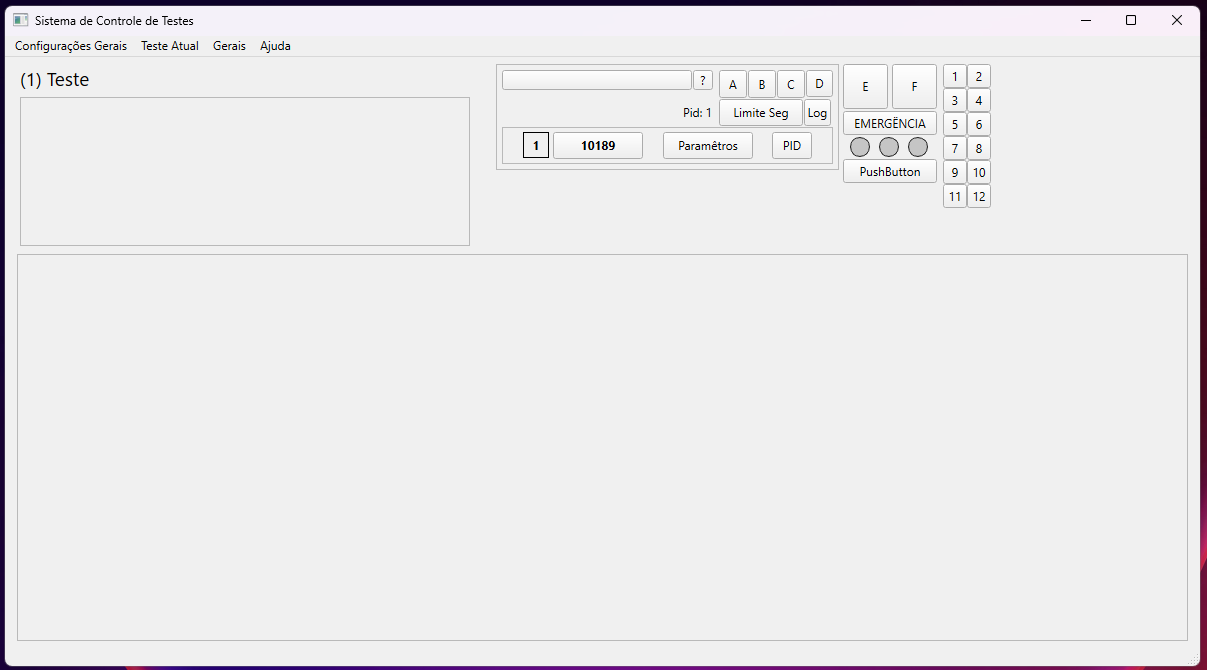
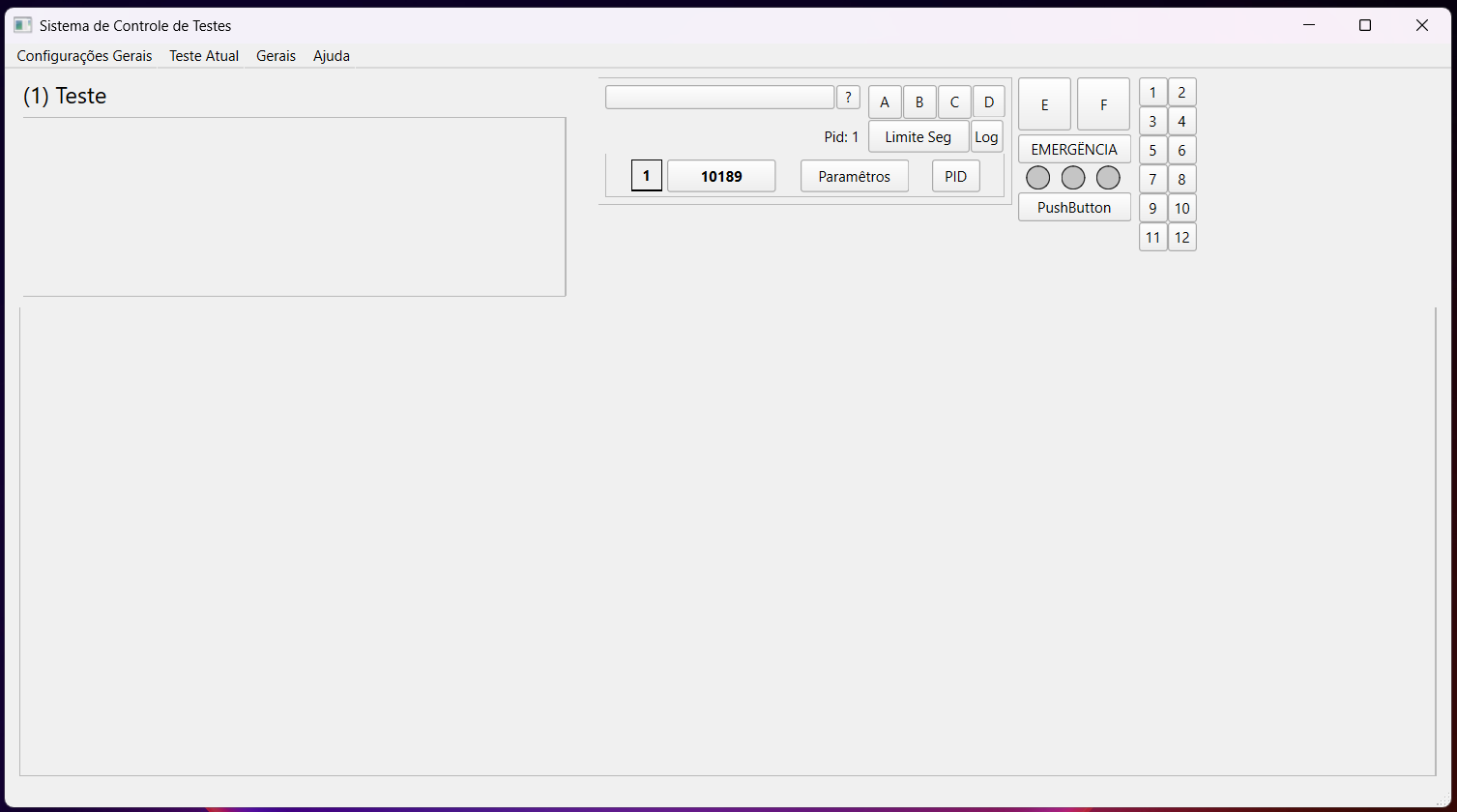
I'm just defining fusion style, what I've done rather than that is editing the UI in the editor, if U want I can send you teh repo, but I think it will be easy to reproduce if you stack a frame inside of another frame (with layout). In the images below you can see the difference between scale at 100% and 125%.
-
You mean the missing frame lines - this is what I meant with QPen related stuff.
-
Oh, I see. That’s exactly it. I hope Qt fixes this! For now, I don’t see any workaround, since I can’t use the Windows style—as I mentioned, it doesn’t allow me to set the correct widget sizes. Of course, I could just accept it, but it puts Qt lower on the list among the many frameworks for developing cross-platform GUIs today. Also, in my case, I’m trying to completely redo a legacy software, so I wanted to keep the same sizes.
-
I still don't understand what you mean with 'correct widget sizes'.
-
I mean that:
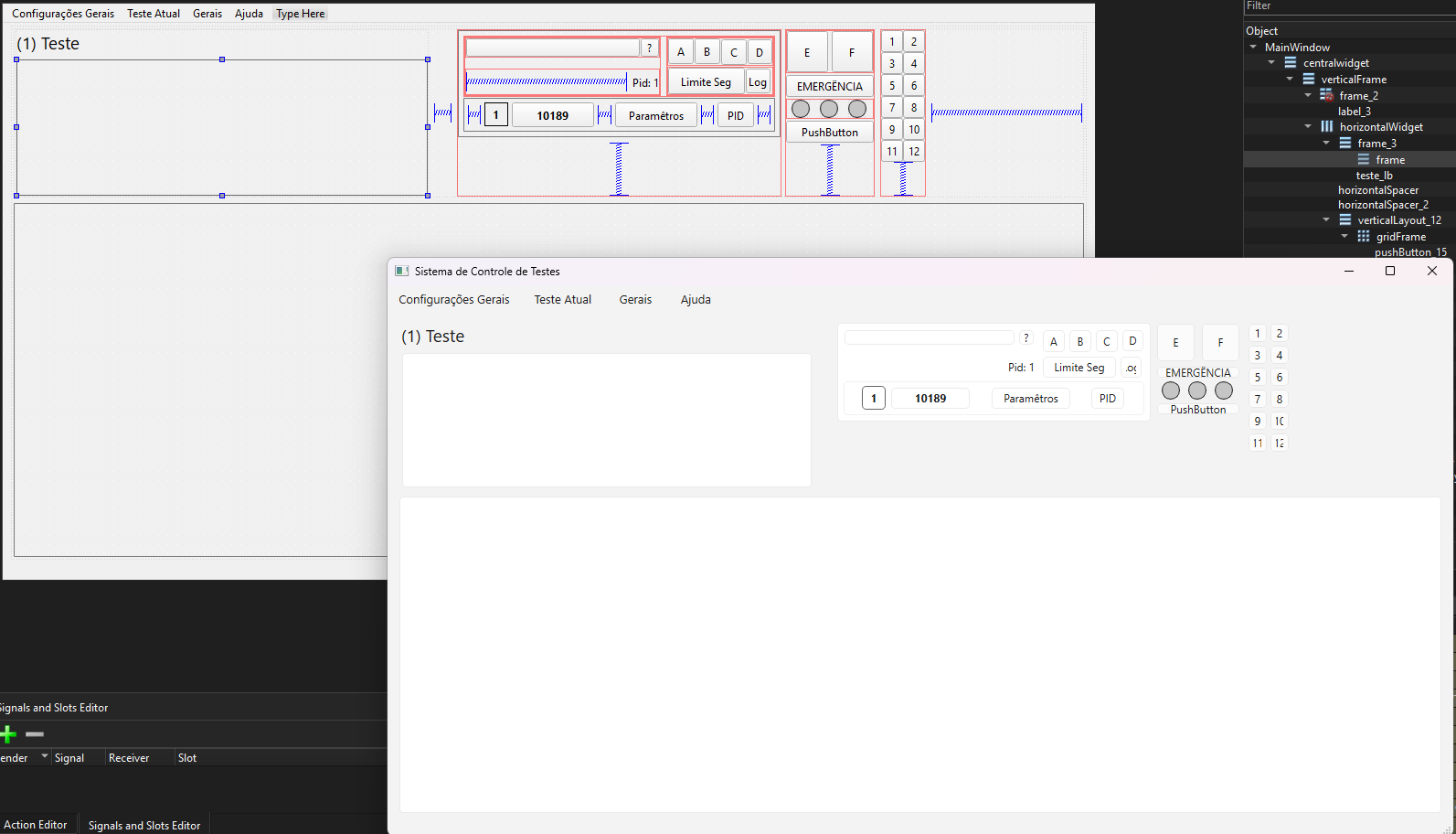
When using the Windows style, the OS overrides my design. As a result, the interface looks different from what I created in the designer—for example, buttons shrink and gain invisible margins that I cannot modify. I’ve tried changing properties in the designer, applying QSS, and using a proxy style, but nothing has any effect. -
I am seeing something similar in PySide6 v6.10.2 (not v6.10.1). This code creates a window that can be maximized although it should be fixed size. This is working in v6.10.1:
from PySide6.QtWidgets import QApplication, QLabel, QLayout, QMainWindow

class ExampleWindow(QMainWindow):
    def __init__(self):
        super().__init__()
        label = QLabel("Very very very very very wide label")
        self.setCentralWidget(label)
        self.layout().setSizeConstraint(QLayout.SizeConstraint.SetFixedSize)
        self.adjustSize()

app = QApplication([])
window = ExampleWindow()
window.show()
app.exec()
PySide6 v6.10.3 prereleases at https://download.qt.io/snapshots/ci/pyside/6.10.3/827588a4c68755de389e6c86a417608bd20332c7/pyside6/ are working again, so I suspect this has been fixed already.
