
Skip to content
  • Categories
  • Recent
  • Tags
  • Popular
  • Users
  • Groups
  • Search
  • Get Qt Extensions
  • Unsolved
Collapse
Brand Logo
  1. Home
  2. Qt Development
  3. QML and Qt Quick
  4. Possible memory leak of gradient animation

Possible memory leak of gradient animation

Scheduled Pinned Locked Moved Unsolved QML and Qt Quick
15 Posts 5 Posters 1.8k Views 4 Watching
  • Oldest to Newest
  • Newest to Oldest
  • Most Votes
Reply
  • Reply as topic
Log in to reply
This topic has been deleted. Only users with topic management privileges can see it.
  • SeeLookS SeeLook

    So far it seems not like a bug but intended caching.
    I tried to remove/create this tree path every time the animation starts but no RAM is released:

    property var tree: Qt.createComponent("TreeShape.qml").createObject(pathWin)
    
      NumberAnimation {
        id: goAnim
        running: true
        target: pathWin
        property: "grAnim"
        from: 0; to: 1
        duration: animDur
        onFinished: {
          animDur = 500 + Math.random() * 10000
          tree.destroy()
          tree = Qt.createComponent("TreeShape.qml").createObject(pathWin)
          backAnim.start()
        }
      }
    

    So maybe it would be more proper to ask how to clean this cache?

    mzimmersM Offline
    mzimmersM Offline
    mzimmers
    wrote on last edited by
    #5

    @SeeLook from your description, this doesn't really seem like a true memory leak; it's more just a really memory-intensive application. I'm assuming that once it hits the 300 MB mark, it remains relatively steady?

    SeeLookS 1 Reply Last reply
    0
    • mzimmersM mzimmers

      @SeeLook from your description, this doesn't really seem like a true memory leak; it's more just a really memory-intensive application. I'm assuming that once it hits the 300 MB mark, it remains relatively steady?

      SeeLookS Offline
      SeeLookS Offline
      SeeLook
      wrote on last edited by
      #6

      @mzimmers
      Unfortunately not.
      The app is working on 1GB device and it crashes after 30 min of work exactly because of this kind of animation.
      So I'm looking for solution.
      If there is no simpler way, maybe I will try to implement that in C++ using QQuickPainedItem.

      jsulmJ 1 Reply Last reply
      0
      • SeeLookS SeeLook

        @mzimmers
        Unfortunately not.
        The app is working on 1GB device and it crashes after 30 min of work exactly because of this kind of animation.
        So I'm looking for solution.
        If there is no simpler way, maybe I will try to implement that in C++ using QQuickPainedItem.

        jsulmJ Offline
        jsulmJ Offline
        jsulm
        Lifetime Qt Champion
        wrote on last edited by
        #7

        @SeeLook Use a memory profiler (like Valgrind) to see what eats the memory.

        https://forum.qt.io/topic/113070/qt-code-of-conduct

        SeeLookS 1 Reply Last reply
        0
        • jsulmJ jsulm

          @SeeLook Use a memory profiler (like Valgrind) to see what eats the memory.

          SeeLookS Offline
          SeeLookS Offline
          SeeLook
          wrote on last edited by
          #8

          @jsulm
          Ok. Let's try. But please help me to interpret it:
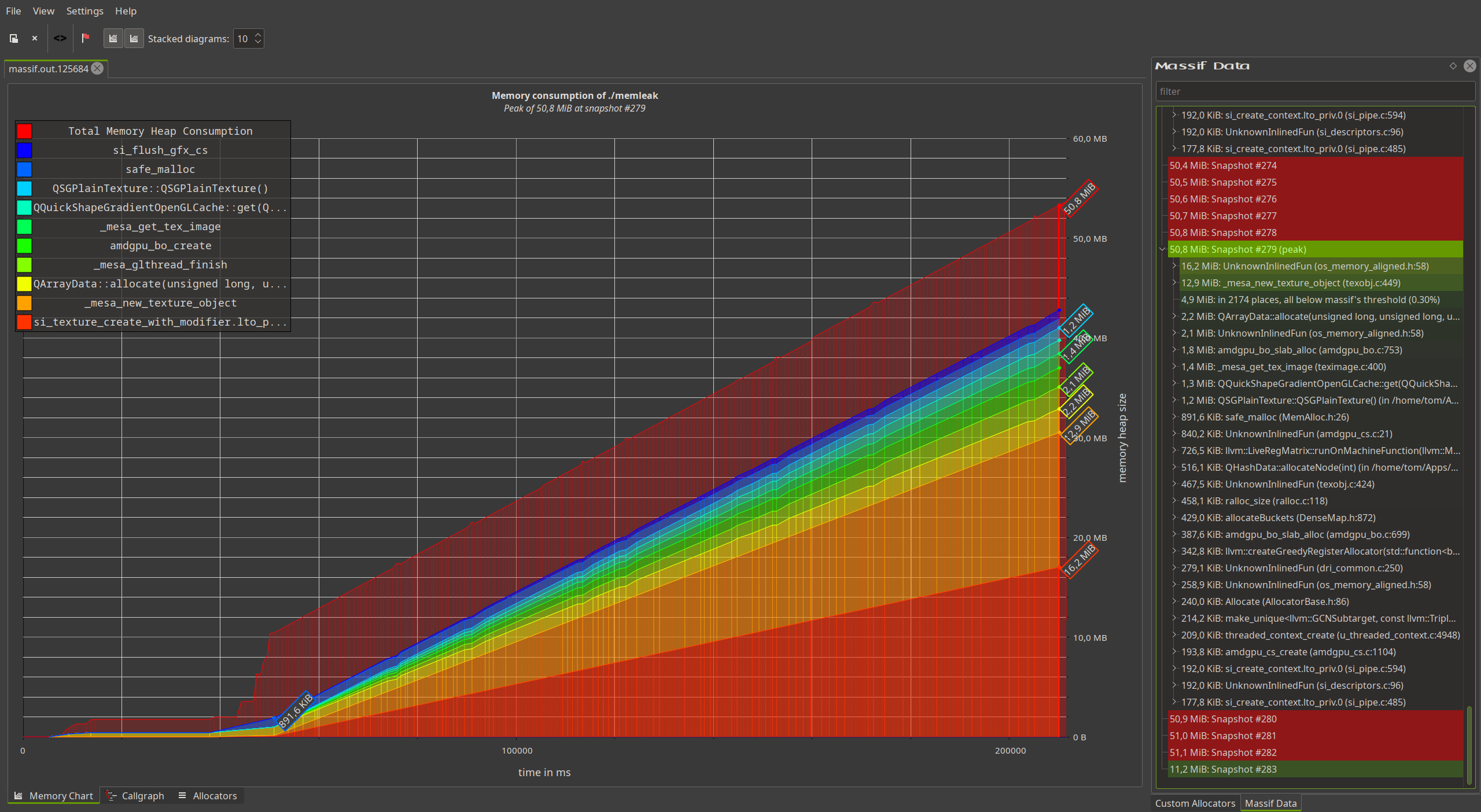
          5df13630-c311-4aaf-9ebd-639160aee054-memAtPeak.png memAtPeak.png

          I can see that QQuickShapeGradientOpenGlCache takes 16 MB at peak but only 357 KiB at start.
          Shall I share this massif tool dumped data?

          jsulmJ 1 Reply Last reply
          0
          • SeeLookS SeeLook

            @jsulm
            Ok. Let's try. But please help me to interpret it:
            5df13630-c311-4aaf-9ebd-639160aee054-memAtPeak.png memAtPeak.png

            I can see that QQuickShapeGradientOpenGlCache takes 16 MB at peak but only 357 KiB at start.
            Shall I share this massif tool dumped data?

            jsulmJ Offline
            jsulmJ Offline
            jsulm
            Lifetime Qt Champion
            wrote on last edited by
            #9

            @SeeLook 16MB is not much, would be interesting to see it when a lot more RAM is used

            https://forum.qt.io/topic/113070/qt-code-of-conduct

            SeeLookS 1 Reply Last reply
            0
            • jsulmJ jsulm

              @SeeLook 16MB is not much, would be interesting to see it when a lot more RAM is used

              SeeLookS Offline
              SeeLookS Offline
              SeeLook
              wrote on last edited by
              #10

              @jsulm
              Ok I will launch it again and share data.

              SeeLookS 1 Reply Last reply
              0
              • SeeLookS SeeLook

                @jsulm
                Ok I will launch it again and share data.

                SeeLookS Offline
                SeeLookS Offline
                SeeLook
                wrote on last edited by
                #11

                @jsulm
                After about 20 min.
                384394db-8e1c-49c9-b81b-4756afe70bf5-massif_20min.png massif_20min.png
                .. and probably it would grow and grow

                Here is full massif file

                jsulmJ 1 Reply Last reply
                0
                • SeeLookS SeeLook

                  @jsulm
                  After about 20 min.
                  384394db-8e1c-49c9-b81b-4756afe70bf5-massif_20min.png massif_20min.png
                  .. and probably it would grow and grow

                  Here is full massif file

                  jsulmJ Offline
                  jsulmJ Offline
                  jsulm
                  Lifetime Qt Champion
                  wrote on last edited by
                  #12

                  @SeeLook Could be a bug in Qt. You can file a bug at https://bugreports.qt.io/secure/Dashboard.jspa

                  https://forum.qt.io/topic/113070/qt-code-of-conduct

                  1 Reply Last reply
                  0
                  • JKSHJ Offline
                    JKSHJ Offline
                    JKSH
                    Moderators
                    wrote on last edited by
                    #13

                    The problem is that every unique value of grAnim causes a new texture to be generated and stored in the cache: https://bugreports.qt.io/browse/QTBUG-136553

                    Qt Doc Search for browsers: forum.qt.io/topic/35616/web-browser-extension-for-improved-doc-searches

                    1 Reply Last reply
                    1
                    • P Offline
                      P Offline
                      petero3
                      wrote last edited by
                      #14

                      @SeeLook this should be fixed now. I've retested my app with 6.10.2 and gputop now shows stable usage.
                      https://qt-project.atlassian.net/browse/QTBUG-136553

                      1 Reply Last reply
                      1
                      • SeeLookS Offline
                        SeeLookS Offline
                        SeeLook
                        wrote last edited by
                        #15

                        @petero3
                        Thanks for the update.
                        Because we have to stick to older Qt version I found workaround to use QQuickPaintedItem.
                        Visually it gives me the same effect and CPU impact (if any) is bearable.
                        ... only hands were dirty :-)

                        1 Reply Last reply
                        0

                        • Login

                        • Login or register to search.
                        • First post
                          Last post
                        0
                        • Categories
                        • Recent
                        • Tags
                        • Popular
                        • Users
                        • Groups
                        • Search
                        • Get Qt Extensions
                        • Unsolved