Skip to content
  • Categories
  • Recent
  • Tags
  • Popular
  • Users
  • Groups
  • Search
  • Get Qt Extensions
  • Unsolved
Collapse
Brand Logo
  1. Home
  2. Qt Development
  3. General and Desktop
  4. qt5.15.2 QPdfWriter fails to output embedded fonts in PDF

qt5.15.2 QPdfWriter fails to output embedded fonts in PDF

Scheduled Pinned Locked Moved Unsolved General and Desktop
14 Posts 3 Posters 399 Views 1 Watching
  • Oldest to Newest
  • Newest to Oldest
  • Most Votes
Reply
  • Reply as topic
Log in to reply
This topic has been deleted. Only users with topic management privileges can see it.
  • Axel SpoerlA Offline
    Axel SpoerlA Offline
    Axel Spoerl
    Moderators
    wrote last edited by
    #4

    Try Qt 6.8 or later.
    5.15 is EOL.

    Software Engineer
    The Qt Company, Oslo

    1 Reply Last reply
    0
    • L Offline
      L Offline
      lctong888
      wrote last edited by
      #5

      This issue has been resolved in Qt versions 6.7 and above.
      I would like to address this issue in Qt 5.15.2 version. Could you please tell me the manually modified Qt 5.15.2 code method? Thank you.

      1 Reply Last reply
      0
      • Christian EhrlicherC Offline
        Christian EhrlicherC Offline
        Christian Ehrlicher
        Lifetime Qt Champion
        wrote last edited by
        #6

        Use the patch, try to apply it to the Qt source code and then compile Qt by yourself.

        Qt Online Installer direct download: https://download.qt.io/official_releases/online_installers/
        Visit the Qt Academy at https://academy.qt.io/catalog

        1 Reply Last reply
        1
        • L Offline
          L Offline
          lctong888
          wrote last edited by
          #7

          What is the method of using patches?

          1 Reply Last reply
          0
          • L Offline
            L Offline
            lctong888
            wrote last edited by
            #8

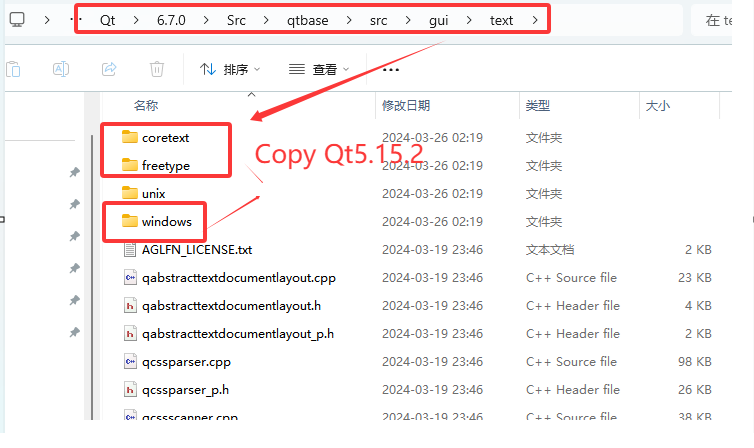
            When I copied these Qt 6.7.0 source codes to Qt 5.15.2 for compilation, errors occurred

            111.png

            1 Reply Last reply
            0
            • Christian EhrlicherC Offline
              Christian EhrlicherC Offline
              Christian Ehrlicher
              Lifetime Qt Champion
              wrote last edited by
              #9

              I never said you should copy some files around - you have to apply the patch which fixes the problem for 6.7 to your ancient sources, hope they apply cleanly (if not you have to fix the merge problems by yourself) and compile Qt by yourself.
              Or use a recent version of Qt.

              Qt Online Installer direct download: https://download.qt.io/official_releases/online_installers/
              Visit the Qt Academy at https://academy.qt.io/catalog

              1 Reply Last reply
              1
              • L Offline
                L Offline
                lctong888
                wrote last edited by
                #10

                Thank you, I'll find a way on my own

                1 Reply Last reply
                0
                • Axel SpoerlA Offline
                  Axel SpoerlA Offline
                  Axel Spoerl
                  Moderators
                  wrote last edited by
                  #11

                  It’s probably less work to change to Qt 6.
                  You need to find out first, which commit(s) have actually solved the problem. Then it’s quite unlikely you can just cherry pick to 515. There will likely be merge conflicts. And resolving them technically, doesn’t guarantor that the fix will actually work. There is absolutely no reason to stick around with 5.15.

                  Software Engineer
                  The Qt Company, Oslo

                  1 Reply Last reply
                  0
                  • L Offline
                    L Offline
                    lctong888
                    wrote last edited by
                    #12

                    QT6.7.0 cannot run on Windows 7 system,
                    QT5.15.2 can run on Windows 7 system.

                    1 Reply Last reply
                    0
                    • Axel SpoerlA Offline
                      Axel SpoerlA Offline
                      Axel Spoerl
                      Moderators
                      wrote last edited by
                      #13

                      If memory serves well, Windows 7 support ended January 14th, 2020….

                      Software Engineer
                      The Qt Company, Oslo

                      1 Reply Last reply
                      0
                      • L Offline
                        L Offline
                        lctong888
                        wrote last edited by
                        #14

                        Windows 7 support ended January 14th, 2020,Yes,
                        Currently, many old computers are still running Windows 7 and have not been upgraded to Windows 10 or above

                        1 Reply Last reply
                        0

                        • Login

                        • Login or register to search.
                        • First post
                          Last post
                        0
                        • Categories
                        • Recent
                        • Tags
                        • Popular
                        • Users
                        • Groups
                        • Search
                        • Get Qt Extensions
                        • Unsolved