
Using stackview with qrc
-
qrc:/qt/qml/MyApp/qml/MyApp/Main.qml:11:5: QML StackView: initialItem: qrc:/qml/pages/LoginPage.qml:-1 No such file or directory
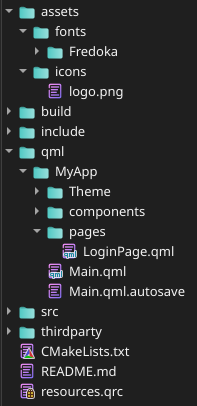
Im strugling to see why it cannot find my qml file to load?
I have tried with both the qrc file path and the alias:
Main.qml:
    import QtQuick
    import QtQuick.Controls

    ApplicationWindow {
        visible: true
        minimumWidth: 300
        minimumHeight: 600
        width: 400
        height: 800

        StackView {
            id: mainStack
            anchors.fill: parent
            initialItem: "qrc:/qml/pages/LoginPage.qml"
        }

    }
resources.qrc:

<RCC>
    <qresource prefix="/qml">
        <file alias="pages/LoginPage.qml">qml/MyApp/pages/LoginPage.qml</file>
        <file alias="Main.qml">qml/MyApp/Main.qml</file>
</qresource>
<qresource prefix="/assets">
        <file alias="fonts/Fredoka-Regular.ttf">assets/fonts/Fredoka/Fredoka-Regular.ttf</file>
        <file alias="icons/logo.png">assets/icons/logo.png</file>
    </qresource>
</RCC>
When using absolute path and not qrc it works fine. I did add it to resources in my CMakeLists.txt
Wondering If im missing something else since it loads the qrc file and the qml file does exist?
-
Please show your CMakeLists.txt where you add the qrc to your executable.
Qt Online Installer direct download: https://download.qt.io/official_releases/online_installers/
Visit the Qt Academy at https://academy.qt.io/catalog -
Please show your CMakeLists.txt where you add the qrc to your executable.
cmake_minimum_required(VERSION 3.16) project(ultiphone VERSION 0.1 LANGUAGES CXX) set(CMAKE_CXX_STANDARD 23) set(CMAKE_CXX_STANDARD_REQUIRED ON) find_package(Qt6 6.8 REQUIRED COMPONENTS Quick) qt_standard_project_setup(REQUIRES 6.8) qt_add_executable(appultiphone src/main.cpp src/Config.cpp src/InternalLogger.cpp ) target_include_directories(appultiphone PUBLIC include PRIVATE ${CMAKE_CURRENT_SOURCE_DIR}/thirdparty/json/include # Thirdparty ) qt_add_qml_module(appultiphone URI MyApp VERSION 1.0 QML_FILES qml/MyApp/Main.qml qml/MyApp/pages/LoginPage.qml RESOURCES resources.qrc ) set_target_properties(appultiphone PROPERTIES MACOSX_BUNDLE TRUE WIN32_EXECUTABLE TRUE MACOSX_BUNDLE_BUNDLE_NAME "UltiPhone" OUTPUT_NAME "UltiPhone" ) target_link_libraries(appultiphone PRIVATE Qt6::Quick) `` -
qrc:/qt/qml/MyApp/qml/MyApp/Main.qml:11:5: QML StackView: initialItem: qrc:/qml/pages/LoginPage.qml:-1 No such file or directory
Im strugling to see why it cannot find my qml file to load?
I have tried with both the qrc file path and the alias:
Main.qml:
    import QtQuick
    import QtQuick.Controls

    ApplicationWindow {
        visible: true
        minimumWidth: 300
        minimumHeight: 600
        width: 400
        height: 800

        StackView {
            id: mainStack
            anchors.fill: parent
            initialItem: "qrc:/qml/pages/LoginPage.qml"
        }

    }
resources.qrc:

<RCC>
    <qresource prefix="/qml">
        <file alias="pages/LoginPage.qml">qml/MyApp/pages/LoginPage.qml</file>
        <file alias="Main.qml">qml/MyApp/Main.qml</file>
</qresource>
<qresource prefix="/assets">
        <file alias="fonts/Fredoka-Regular.ttf">assets/fonts/Fredoka/Fredoka-Regular.ttf</file>
        <file alias="icons/logo.png">assets/icons/logo.png</file>
    </qresource>
</RCC>
When using absolute path and not qrc it works fine. I did add it to resources in my CMakeLists.txt
Wondering If im missing something else since it loads the qrc file and the qml file does exist?
@EwaldVDM said in Using stackview with qrc:
qrc:/qt/qml/MyApp/qml/MyApp/Main.qml
As you can see here, your path specified for initialItem is wrong.
Please read https://doc.qt.io/qt-6/qt-add-qml-module.html#adding-sources-and-resources-to-the-module for an explanation why qt/qml/MyApp is added to your resource path. -
Thank you!
I got rid of the .qrc file: https://forum.qt.io/topic/145308/qt-6-5-qml-in-qrc-vs-qt_add_qml_module-what-is-better/3
CMakeLists.txt:
set_source_files_properties(qml/MyApp/Main.qml PROPERTIES QT_RESOURCE_ALIAS "Main.qml")
set_source_files_properties(qml/MyApp/pages/LoginPage.qml PROPERTIES QT_RESOURCE_ALIAS "pages/LoginPage.qml")
qt_add_qml_module(appultiphone
    URI MyApp
    VERSION 1.0
    RESOURCE_PREFIX "/"
    QML_FILES
        qml/MyApp/Main.qml
        qml/MyApp/pages/LoginPage.qml
    RESOURCES
        assets/fonts/Fredoka/Fredoka-Regular.ttf
        assets/icons/logo.png
)
StackView { id: stack anchors.fill: parent initialItem: "qrc:/MyApp/pages/LoginPage.qml" <-------------- }So, as I understand it, we specify the URI MyApp (Which gets loaded in main.cpp as a module) and then append the alias you give it in the set_source_file_properties()
-
E EwaldVDM has marked this topic as solved
