
QIcon crop in function of scale of the screen set in Windows settings
-
Hello
I have a main screen with scaling of 100% and a laptop with a scaling of 150% set in Windows settings.
In my application, I extract some icon from .exe application and display it like below :
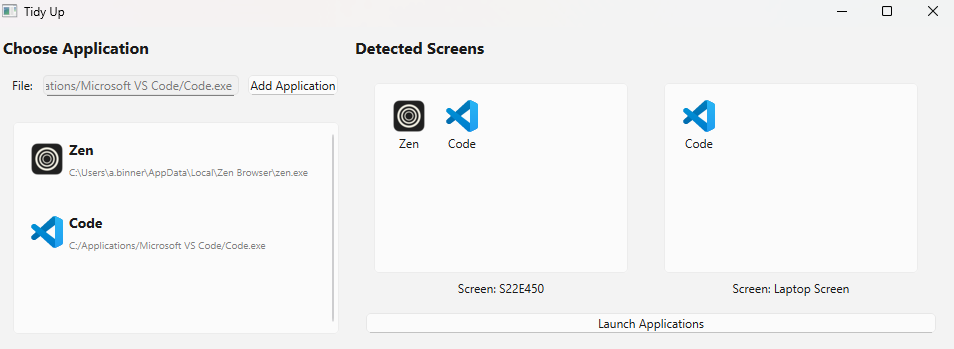
In that case, it's when I launch my application on my main screen, so scaling of 100%.
However, if I disconnect my main screen and just have my laptop screen, so a scaling of 150%, my icon are cropped and display like this :
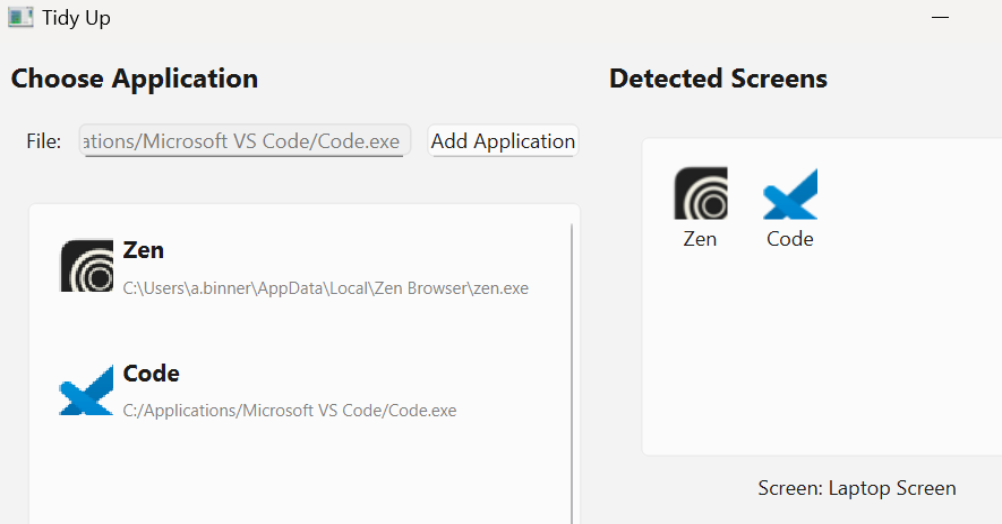
How can I solve this issue ?
-
Hi,
How are you extracting your icons ?
-
Also what Qt version do you use? Does it also occour with the windowsvista style?
-
@SGaist
To extract icon, I use this method :def _extract_icon_from_exe(self, exe_path: str) -> QIcon: """ Extract the icon from the executable file and set it to the icon property :param exe_path: :return: QIcon object with the extracted icon """ try: # Assuming that is a large icon icon_app = extract_icon(exe_path, IconSize.LARGE) except OSError: try: # If the large icon fails, try the small icon icon_app = extract_icon(exe_path, IconSize.SMALL) except OSError: print(f"Failed to extract icon from {exe_path}. Using default icon.") return QIcon(r"Resources/default_icon_32x32.png") icon_data = ctypes.string_at(icon_app, 32 * 32 * 4) image = QImage(icon_data, 32, 32, QImage.Format.Format_ARGB32) pixmap = QPixmap.fromImage(image) return QIcon(pixmap)And the extract_icon is from this script I found on pythonassets.com :
""" Code from pythonassets.com : https://pythonassets.com/posts/extract-icon-from-executable-file-windows/ """ from ctypes import Array, byref, c_char, memset, sizeof from ctypes import c_int, c_void_p, POINTER from ctypes.wintypes import * from enum import Enum import ctypes BI_RGB = 0 DIB_RGB_COLORS = 0 class ICONINFO(ctypes.Structure): _fields_ = [ ("fIcon", BOOL), ("xHotspot", DWORD), ("yHotspot", DWORD), ("hbmMask", HBITMAP), ("hbmColor", HBITMAP) ] class RGBQUAD(ctypes.Structure): _fields_ = [ ("rgbBlue", BYTE), ("rgbGreen", BYTE), ("rgbRed", BYTE), ("rgbReserved", BYTE), ] class BITMAPINFOHEADER(ctypes.Structure): _fields_ = [ ("biSize", DWORD), ("biWidth", LONG), ("biHeight", LONG), ("biPlanes", WORD), ("biBitCount", WORD), ("biCompression", DWORD), ("biSizeImage", DWORD), ("biXPelsPerMeter", LONG), ("biYPelsPerMeter", LONG), ("biClrUsed", DWORD), ("biClrImportant", DWORD) ] class BITMAPINFO(ctypes.Structure): _fields_ = [ ("bmiHeader", BITMAPINFOHEADER), ("bmiColors", RGBQUAD * 1), ] shell32 = ctypes.WinDLL("shell32", use_last_error=True) user32 = ctypes.WinDLL("user32", use_last_error=True) gdi32 = ctypes.WinDLL("gdi32", use_last_error=True) gdi32.CreateCompatibleDC.argtypes = [HDC] gdi32.CreateCompatibleDC.restype = HDC gdi32.GetDIBits.argtypes = [ HDC, HBITMAP, UINT, UINT, LPVOID, c_void_p, UINT ] gdi32.GetDIBits.restype = c_int gdi32.DeleteObject.argtypes = [HGDIOBJ] gdi32.DeleteObject.restype = BOOL shell32.ExtractIconExW.argtypes = [ LPCWSTR, c_int, POINTER(HICON), POINTER(HICON), UINT ] shell32.ExtractIconExW.restype = UINT user32.GetIconInfo.argtypes = [HICON, POINTER(ICONINFO)] user32.GetIconInfo.restype = BOOL user32.DestroyIcon.argtypes = [HICON] user32.DestroyIcon.restype = BOOL class IconSize(Enum): SMALL = 1 LARGE = 2 @staticmethod def to_wh(size: "IconSize") -> tuple[int, int]: """ Return the actual (width, height) values for the specified icon size. """ size_table = { IconSize.SMALL: (16, 16), IconSize.LARGE: (32, 32) } return size_table[size] def extract_icon(filename: str, size: IconSize) -> Array[c_char]: """ Extract the icon from the specified `filename`, which might be either an executable or an `.ico` file. """ dc: HDC = gdi32.CreateCompatibleDC(0) if dc == 0: raise ctypes.WinError() hicon: HICON = HICON() extracted_icons: UINT = shell32.ExtractIconExW( filename, 0, byref(hicon) if size == IconSize.LARGE else None, byref(hicon) if size == IconSize.SMALL else None, 1 ) if extracted_icons != 1: raise ctypes.WinError() def cleanup() -> None: if icon_info.hbmColor != 0: gdi32.DeleteObject(icon_info.hbmColor) if icon_info.hbmMask != 0: gdi32.DeleteObject(icon_info.hbmMask) user32.DestroyIcon(hicon) icon_info: ICONINFO = ICONINFO(0, 0, 0, 0, 0) if not user32.GetIconInfo(hicon, byref(icon_info)): cleanup() raise ctypes.WinError() w, h = IconSize.to_wh(size) bmi: BITMAPINFO = BITMAPINFO() memset(byref(bmi), 0, sizeof(bmi)) bmi.bmiHeader.biSize = sizeof(BITMAPINFOHEADER) bmi.bmiHeader.biWidth = w bmi.bmiHeader.biHeight = -h bmi.bmiHeader.biPlanes = 1 bmi.bmiHeader.biBitCount = 32 bmi.bmiHeader.biCompression = BI_RGB bmi.bmiHeader.biSizeImage = w * h * 4 bits = ctypes.create_string_buffer(bmi.bmiHeader.biSizeImage) copied_lines = gdi32.GetDIBits( dc, icon_info.hbmColor, 0, h, bits, byref(bmi), DIB_RGB_COLORS ) if copied_lines == 0: cleanup() raise ctypes.WinError() cleanup() return bits -
Also what Qt version do you use? Does it also occour with the windowsvista style?
@Christian-Ehrlicher
I use PyQt6 version 6.9.0.
How can I put the windowsvista style ?However, I tried with these styles :
['Breeze', 'Oxygen', 'QtCurve', 'Windows', 'Fusion']and the issue is the same.
-
We needed to see how you use the icons, not how you create them.
-
We needed to see how you use the icons, not how you create them.
@Christian-Ehrlicher
Oh my bad.
So, when the user add a .exe application, I create a QApplicationDraggable object of this application. So, the part I use the icon of the application in the __init__ is show below :class QApplicationDraggable(QWidget): def __init__(self, application: Application): super().__init__() self.application = application layout = QHBoxLayout() layout.setAlignment(Qt.AlignmentFlag.AlignLeft) self.icon = QLabel() # self.icon.setFixedSize(32, 32) if application.icon: self.icon.setPixmap(application.icon.pixmap(QSize(32, 32))) else: QMessageBox.warning(self, "Icon Error", "The application does not have a valid icon.") return self.icon = QLabel() # self.icon.setFixedSize(32, 32) if application.icon: self.icon.setPixmap(application.icon.pixmap(QSize(32, 32))) else: QMessageBox.warning(self, "Icon Error", "The application does not have a valid icon.") return label_layout = QVBoxLayout() name_app = QLabel(application.name) name_app.setStyleSheet("font-weight: bold; font-size: 14px;") path_app = QLabel(application.app_path_exe) path_app.setStyleSheet("font-size: 10px; color: gray;") label_layout.addWidget(name_app) label_layout.addWidget(path_app) layout.addWidget(self.icon) layout.addLayout(label_layout) self.setLayout(layout)I put a fixed size of 32x32 due to extract icon from a .exe application that is generally 32x32. But even if I remove this line, the issue is the same.
-
I would check the pixmap/image returned in _extract_icon_from_exe() if it is correct - simply save it to a png and take a look.

