Skip to content
  • Categories
  • Recent
  • Tags
  • Popular
  • Users
  • Groups
  • Search
  • Get Qt Extensions
  • Unsolved
Collapse
Brand Logo
  1. Home
  2. Qt Development
  3. General and Desktop
  4. Unknown module(s) in QT: webenginewidgets
Forum Updated to NodeBB v4.3 + New Features

Unknown module(s) in QT: webenginewidgets

Scheduled Pinned Locked Moved Unsolved General and Desktop
33 Posts 9 Posters 3.6k Views 1 Watching
  • Oldest to Newest
  • Newest to Oldest
  • Most Votes
Reply
  • Reply as topic
Log in to reply
This topic has been deleted. Only users with topic management privileges can see it.
  • Christian EhrlicherC Offline
    Christian EhrlicherC Offline
    Christian Ehrlicher
    Lifetime Qt Champion
    wrote on last edited by
    #4

    So your built from source did not build QtWebEngine I would guess - make sure you installed all dependencies. The configure output will show you what is missing and what will be built.

    Qt Online Installer direct download: https://download.qt.io/official_releases/online_installers/
    Visit the Qt Academy at https://academy.qt.io/catalog

    1 Reply Last reply
    2
    • J Offline
      J Offline
      JacobNovitsky
      wrote on last edited by
      #5

      Can I add QtWebEngine avoiding Qt components full reinstall?

      1 Reply Last reply
      1
      • Christian EhrlicherC Offline
        Christian EhrlicherC Offline
        Christian Ehrlicher
        Lifetime Qt Champion
        wrote on last edited by
        #6

        You can select single components in the Qt online installer.

        Qt Online Installer direct download: https://download.qt.io/official_releases/online_installers/
        Visit the Qt Academy at https://academy.qt.io/catalog

        1 Reply Last reply
        1
        • J Offline
          J Offline
          JacobNovitsky
          wrote on last edited by
          #7

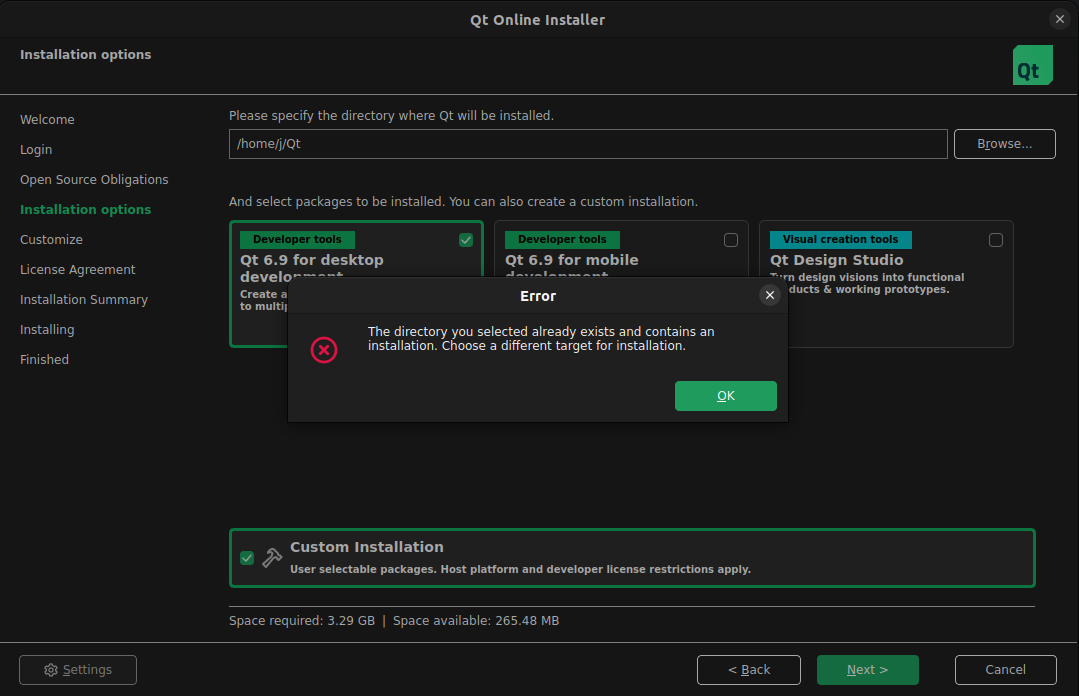
          webEngine.png
          How should I proceed? I have another machine with Qt installed with online installer

          1 Reply Last reply
          1
          • SGaistS Offline
            SGaistS Offline
            SGaist
            Lifetime Qt Champion
            wrote on last edited by
            #8

            Hi,

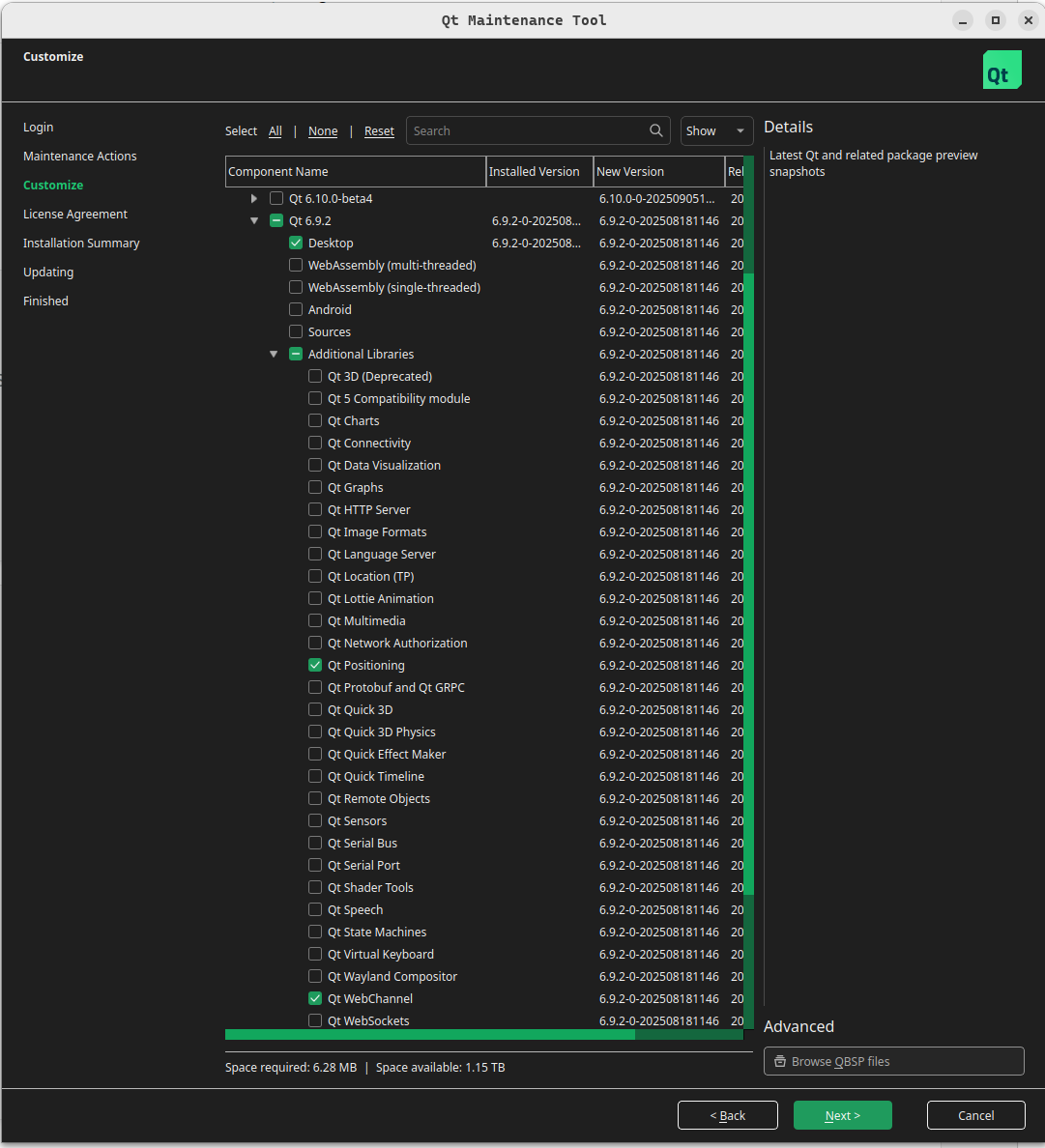
            Since you already installed Qt using the online installer, go to the folder and use the Maintenance Tool to modify your installation.

            Interested in AI ? www.idiap.ch
            Please read the Qt Code of Conduct - https://forum.qt.io/topic/113070/qt-code-of-conduct

            1 Reply Last reply
            2
            • J Offline
              J Offline
              JacobNovitsky
              wrote on last edited by
              #9

              it does not work
              Cannot initialize cache: Cannot obtain the lock for file "/home/j/.cache/qt-unified-linux-online/cache.lock": Resource temporarily unavailable

              jsulmJ 1 Reply Last reply
              1
              • C Offline
                C Offline
                ChrisW67
                wrote on last edited by
                #10

                As @Christian-Ehrlicher pointed out: if you built your Qt instance from source, then you need to reconfigure it to include the Web Engine components, rebuild, and reinstall.
                If, as @SGaist has assumed, you installed your entire Qt from the online installer, then you need to run the Maintenance Tool, select the missing component(s), and let it install them for you.

                The error message you posted seems to indicate that you are trying to install Qt using the online installer on top of an existing self-built Qt. You cannot add a component to an existing self-built Qt using the Qt Online installer. To install a completely new Qt instance you need to install into a fresh directory.

                1 Reply Last reply
                1
                • J JacobNovitsky

                  it does not work
                  Cannot initialize cache: Cannot obtain the lock for file "/home/j/.cache/qt-unified-linux-online/cache.lock": Resource temporarily unavailable

                  jsulmJ Offline
                  jsulmJ Offline
                  jsulm
                  Lifetime Qt Champion
                  wrote on last edited by
                  #11

                  @JacobNovitsky said in Unknown module(s) in QT: webenginewidgets:

                  Cannot obtain the lock for file "/home/j/.cache/qt-unified-linux-online/cache.lock": Resource temporarily unavailable

                  Is Qt Online Installer still running? If so close it and try again.
                  If it does not help delete that file manually.

                  https://forum.qt.io/topic/113070/qt-code-of-conduct

                  1 Reply Last reply
                  1
                  • J Offline
                    J Offline
                    JacobNovitsky
                    wrote on last edited by JacobNovitsky
                    #12

                    I've removed all components with Maintenance tool, then reinstalled
                    Qt and Web engine with online installer

                    Trying to compile sample project:

                    QT += widgets webenginewidgets
                    CONFIG += c++17
                    SOURCES += main.cpp
                    
                    #include <QApplication>
                    #include <QWebEngineView>
                    #include <QUrl>
                    
                    int main(int argc, char *argv[]) {
                        QApplication app(argc, argv);
                    
                        QWebEngineView view;
                        view.resize(1200, 800);
                        view.load(QUrl(QStringLiteral("https://www.qt.io")));
                        view.show();
                    
                        return app.exec();
                    }
                    

                    getting error:
                    :-1: error: Unknown module(s) in QT: webchannel positioning

                    Kindly advise!
                    q.png

                    jsulmJ 1 Reply Last reply
                    1
                    • J JacobNovitsky

                      I've removed all components with Maintenance tool, then reinstalled
                      Qt and Web engine with online installer

                      Trying to compile sample project:

                      QT += widgets webenginewidgets
                      CONFIG += c++17
                      SOURCES += main.cpp
                      
                      #include <QApplication>
                      #include <QWebEngineView>
                      #include <QUrl>
                      
                      int main(int argc, char *argv[]) {
                          QApplication app(argc, argv);
                      
                          QWebEngineView view;
                          view.resize(1200, 800);
                          view.load(QUrl(QStringLiteral("https://www.qt.io")));
                          view.show();
                      
                          return app.exec();
                      }
                      

                      getting error:
                      :-1: error: Unknown module(s) in QT: webchannel positioning

                      Kindly advise!
                      q.png

                      jsulmJ Offline
                      jsulmJ Offline
                      jsulm
                      Lifetime Qt Champion
                      wrote on last edited by
                      #13

                      @JacobNovitsky said in Unknown module(s) in QT: webenginewidgets:

                      webchannel positioning

                      Same: did you install these two modules?

                      https://forum.qt.io/topic/113070/qt-code-of-conduct

                      1 Reply Last reply
                      1
                      • J Offline
                        J Offline
                        JacobNovitsky
                        wrote on last edited by JacobNovitsky
                        #14

                        libqt6webchannel6/jammy,now 6.2.4-1ubuntu1 amd64 [installed,automatic]
                        libqt6webchannel6-dev/jammy,now 6.2.4-1ubuntu1 amd64 [installed,automatic]
                        1wlibqt6positioning6/jammy,now 6.2.4-1 amd64 [installed,automatic]
                        libqt6positioning6-plugins/jammy,now 6.2.4-1 amd64 [installed,automatic]
                        libqt6positioningquick6/jammy,now 6.2.4-1 amd64 [installed,automatic]
                        qt6-positioning-dev/jammy,now 6.2.4-1 amd64 [installed,automatic]

                        SGaistS 1 Reply Last reply
                        1
                        • J JacobNovitsky

                          libqt6webchannel6/jammy,now 6.2.4-1ubuntu1 amd64 [installed,automatic]
                          libqt6webchannel6-dev/jammy,now 6.2.4-1ubuntu1 amd64 [installed,automatic]
                          1wlibqt6positioning6/jammy,now 6.2.4-1 amd64 [installed,automatic]
                          libqt6positioning6-plugins/jammy,now 6.2.4-1 amd64 [installed,automatic]
                          libqt6positioningquick6/jammy,now 6.2.4-1 amd64 [installed,automatic]
                          qt6-positioning-dev/jammy,now 6.2.4-1 amd64 [installed,automatic]

                          SGaistS Offline
                          SGaistS Offline
                          SGaist
                          Lifetime Qt Champion
                          wrote on last edited by
                          #15

                          @JacobNovitsky If you are using the Qt version from the online installer, you have to add these dependencies from the online installer as well...

                          Or just use the Qt version from your distribution. However you cannot mix and match.

                          Interested in AI ? www.idiap.ch
                          Please read the Qt Code of Conduct - https://forum.qt.io/topic/113070/qt-code-of-conduct

                          1 Reply Last reply
                          2
                          • J Offline
                            J Offline
                            JacobNovitsky
                            wrote on last edited by
                            #16

                            Should I install above libraries with version 6.9.2? (as per my Qt version)

                            jsulmJ 1 Reply Last reply
                            1
                            • J JacobNovitsky

                              Should I install above libraries with version 6.9.2? (as per my Qt version)

                              jsulmJ Offline
                              jsulmJ Offline
                              jsulm
                              Lifetime Qt Champion
                              wrote on last edited by
                              #17

                              @JacobNovitsky You should install these libraries for the Qt version you're using.
                              You wrote:
                              "I've removed all components with Maintenance tool, then reinstalled
                              Qt and Web engine with online installer"
                              Doesn't that mean that you now need to install these modules using Qt Maintenance Tool from that Qt installation?

                              https://forum.qt.io/topic/113070/qt-code-of-conduct

                              1 Reply Last reply
                              1
                              • AsifBahrainwalaA Offline
                                AsifBahrainwalaA Offline
                                AsifBahrainwala
                                wrote on last edited by AsifBahrainwala
                                #18
                                This post is deleted!
                                1 Reply Last reply
                                0
                                • J Offline
                                  J Offline
                                  JacobNovitsky
                                  wrote on last edited by JacobNovitsky
                                  #19

                                  All modules installed, version of module is the same as Qt -> 6.9.2
                                  getting error when trying to build below:

                                  :-1: error: Project ERROR: Unknown module(s) in QT: webchannel positioning

                                  TEMPLATE = app
                                  TARGET = webengine_test
                                  QT += core gui widgets webenginewidgets   # <-- webenginewidgets is required
                                  
                                  CONFIG += c++17
                                  
                                  SOURCES += main.cpp
                                  
                                  #include <QApplication>
                                  #include <QWebEngineView>
                                  
                                  int main(int argc, char *argv[])
                                  {
                                      QApplication app(argc, argv);
                                  
                                      QWebEngineView view;
                                      view.resize(800, 600);
                                      view.load(QUrl("https://www.qt.io")); // any test URL
                                      view.show();
                                  
                                      return app.exec();
                                  }
                                  
                                  SGaistS 1 Reply Last reply
                                  1
                                  • hskoglundH Offline
                                    hskoglundH Offline
                                    hskoglund
                                    wrote on last edited by
                                    #20

                                    Screenshot from 2025-09-20 06-46-18.png

                                    1 Reply Last reply
                                    1
                                    • J JacobNovitsky

                                      All modules installed, version of module is the same as Qt -> 6.9.2
                                      getting error when trying to build below:

                                      :-1: error: Project ERROR: Unknown module(s) in QT: webchannel positioning

                                      TEMPLATE = app
                                      TARGET = webengine_test
                                      QT += core gui widgets webenginewidgets   # <-- webenginewidgets is required
                                      
                                      CONFIG += c++17
                                      
                                      SOURCES += main.cpp
                                      
                                      #include <QApplication>
                                      #include <QWebEngineView>
                                      
                                      int main(int argc, char *argv[])
                                      {
                                          QApplication app(argc, argv);
                                      
                                          QWebEngineView view;
                                          view.resize(800, 600);
                                          view.load(QUrl("https://www.qt.io")); // any test URL
                                          view.show();
                                      
                                          return app.exec();
                                      }
                                      
                                      SGaistS Offline
                                      SGaistS Offline
                                      SGaist
                                      Lifetime Qt Champion
                                      wrote on last edited by
                                      #21

                                      @JacobNovitsky when you say all modules installed:

                                      • from the same source ?
                                      • are you using the Qt version with all the modules installed to build your application ?

                                      Interested in AI ? www.idiap.ch
                                      Please read the Qt Code of Conduct - https://forum.qt.io/topic/113070/qt-code-of-conduct

                                      1 Reply Last reply
                                      1
                                      • enjoysmathE Offline
                                        enjoysmathE Offline
                                        enjoysmath
                                        wrote last edited by enjoysmath
                                        #22

                                        Yo yo. I'm having this exact same issue. Both with 6.8 and 6.5.3. I'm guessing same thing willl happen with 6.10 if I were to try it out... Can't install and use webenginewidgets. I just need a single browser window for rendering KaTeX and taking snapshots of it... Anyone know of a quickfix?

                                        Windows 10, 64bit.
                                        I only use Widgets-side for desktop apps.

                                        Same dealio with webchannel. All installed!

                                        https://github.com/enjoysmath
                                        https://math.stackexchange.com/users/26327/exercisingmathematician

                                        B 1 Reply Last reply
                                        0
                                        • J JacobNovitsky

                                          How to fix below?
                                          :-1: error: Unknown module(s) in QT: webenginewidgets


                                          TEMPLATE = app
                                          TARGET = QtGcppBrowser
                                          
                                          # Enable C++17 in qmake
                                          CONFIG += c++17
                                          
                                          # Required Qt modules
                                          QT += widgets webenginewidgets
                                          
                                          SOURCES += main.cpp
                                          
                                          # If building with very old qmake that lacks 'c++17', uncomment:
                                          # CONFIG -= c++17
                                          # CONFIG += c++1z
                                          
                                          #include <QApplication>
                                          #include <QWebEngineView>
                                          #include <QUrl>
                                          
                                          int main(int argc, char* argv[]) {
                                              QCoreApplication::setOrganizationName("QtExamples");
                                              QCoreApplication::setAttribute(Qt::AA_EnableHighDpiScaling);
                                              QApplication app(argc, argv);
                                          
                                              QWebEngineView view;
                                              const QUrl start = QUrl::fromUserInput(argc > 1 ? argv[22] : "https://www.qt.io");
                                              view.setUrl(start);
                                              view.resize(1024, 750);
                                              view.show();
                                              return app.exec();
                                          }
                                          
                                          enjoysmathE Offline
                                          enjoysmathE Offline
                                          enjoysmath
                                          wrote last edited by
                                          #23

                                          @JacobNovitsky Were you able to fix this? Having same issue independent of you building yours from source, since mines just the standard community installer on Windows 10!

                                          https://github.com/enjoysmath
                                          https://math.stackexchange.com/users/26327/exercisingmathematician

                                          1 Reply Last reply
                                          0

                                          • Login

                                          • Login or register to search.
                                          • First post
                                            Last post
                                          0
                                          • Categories
                                          • Recent
                                          • Tags
                                          • Popular
                                          • Users
                                          • Groups
                                          • Search
                                          • Get Qt Extensions
                                          • Unsolved