HELP) Initialization issue with QList<QList<QLineSeries*>> m_seriess_2d
-
Hello
I'm using Qt Chart to float multiple pieces of data on a single chart
Press the current button to reset the chart and update the data again
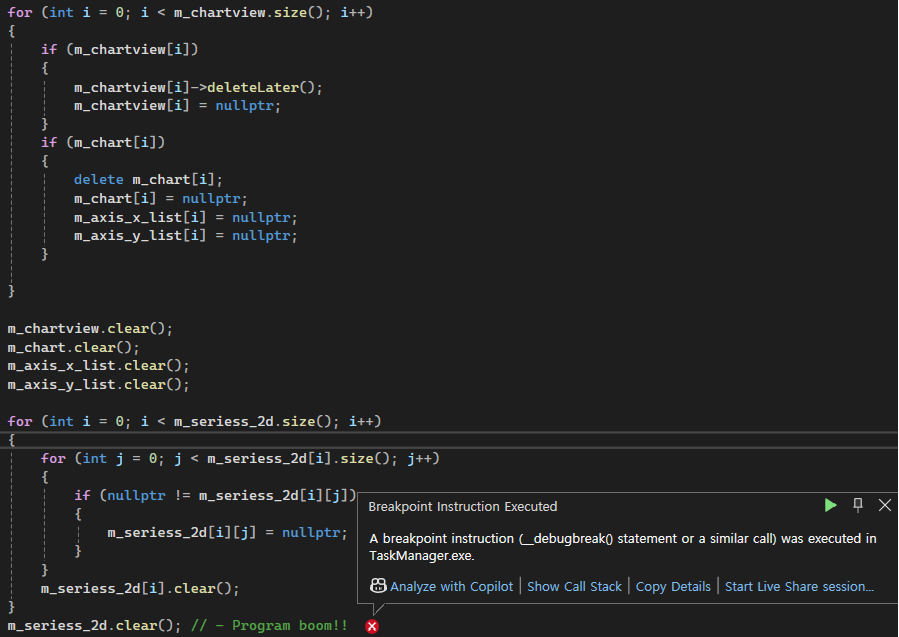
The program will continue to be terminated in the process of clearing m_serious_2d, a two-dimensional array
I tried gpt and several documents, but I couldn't solve them
If you know the answer, please let me knowprivate: Ui::performance_page m_ui; QList<QChart*> m_chart; QList<QChartView*> m_chartview; QList<QList<QLineSeries*>> m_seriess_2d; QList<QDateTimeAxis*> m_axis_x_list; QList<QValueAxis*> m_axis_y_list;void performance_page::clear() { cout << "performance_page::clear" << endl; m_selected = -1; for (int i = 0; i < m_chartview.size(); i++) { if (m_chartview[i]) { m_chartview[i]->deleteLater(); m_chartview[i] = nullptr; } if (m_chart[i]) { delete m_chart[i]; m_chart[i] = nullptr; m_axis_x_list[i] = nullptr; m_axis_y_list[i] = nullptr; } } m_chartview.clear(); m_chart.clear(); m_axis_x_list.clear(); m_axis_y_list.clear(); for (int i = 0; i < m_seriess_2d.size(); i++) { for (int j = 0; j < m_seriess_2d[i].size(); j++) { if (nullptr != m_seriess_2d[i][j]) { m_seriess_2d[i][j] = nullptr; } } m_seriess_2d[i].clear(); } //m_seriess_2d.clear(); - Program boom!! -
Hello
I'm using Qt Chart to float multiple pieces of data on a single chart
Press the current button to reset the chart and update the data again
The program will continue to be terminated in the process of clearing m_serious_2d, a two-dimensional array
I tried gpt and several documents, but I couldn't solve them
If you know the answer, please let me knowprivate: Ui::performance_page m_ui; QList<QChart*> m_chart; QList<QChartView*> m_chartview; QList<QList<QLineSeries*>> m_seriess_2d; QList<QDateTimeAxis*> m_axis_x_list; QList<QValueAxis*> m_axis_y_list;void performance_page::clear() { cout << "performance_page::clear" << endl; m_selected = -1; for (int i = 0; i < m_chartview.size(); i++) { if (m_chartview[i]) { m_chartview[i]->deleteLater(); m_chartview[i] = nullptr; } if (m_chart[i]) { delete m_chart[i]; m_chart[i] = nullptr; m_axis_x_list[i] = nullptr; m_axis_y_list[i] = nullptr; } } m_chartview.clear(); m_chart.clear(); m_axis_x_list.clear(); m_axis_y_list.clear(); for (int i = 0; i < m_seriess_2d.size(); i++) { for (int j = 0; j < m_seriess_2d[i].size(); j++) { if (nullptr != m_seriess_2d[i][j]) { m_seriess_2d[i][j] = nullptr; } } m_seriess_2d[i].clear(); } //m_seriess_2d.clear(); - Program boom!!@Joonsoo said in HELP) Initialization issue with QList<QList<QLineSeries*>> m_seriess_2d:
//m_seriess_2d.clear(); - Program boom!!
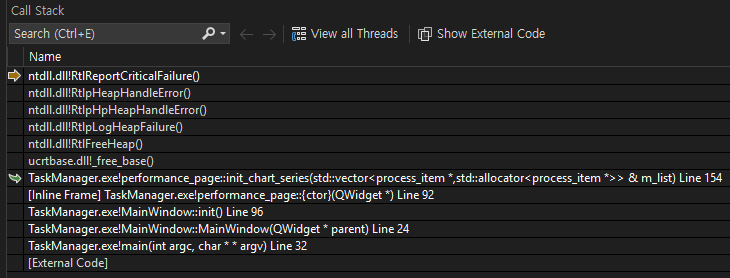
"Program boom!!" is not a proper description/diagnosis of an issue. Run it inside a debugger and look at the stack trace if it "crashes" for a clue as to where/why.
The error might not directly be caused by clearing a series. It might show up there as a result of something else. You might e.g. try commenting out the series deletion to see whether it still happens. One thought I have is that you have done
delete m_chart[i]on aQChartwhich is presumably the chart in use bym_chartview[i]. Is that safe, theQChartViewnow references aQChartwhich has been deleted? Remember that theQChartViewtakes ownership of theQChart. Similarly I am not sure you need to clear your multipleQLineSeries, when they were added to theQChartit took ownership of them. -
@Joonsoo said in HELP) Initialization issue with QList<QList<QLineSeries*>> m_seriess_2d:
//m_seriess_2d.clear(); - Program boom!!
"Program boom!!" is not a proper description/diagnosis of an issue. Run it inside a debugger and look at the stack trace if it "crashes" for a clue as to where/why.
The error might not directly be caused by clearing a series. It might show up there as a result of something else. You might e.g. try commenting out the series deletion to see whether it still happens. One thought I have is that you have done
delete m_chart[i]on aQChartwhich is presumably the chart in use bym_chartview[i]. Is that safe, theQChartViewnow references aQChartwhich has been deleted? Remember that theQChartViewtakes ownership of theQChart. Similarly I am not sure you need to clear your multipleQLineSeries, when they were added to theQChartit took ownership of them.Well, I've tried several initialization methods that other GPTs tell me, but I kept getting errors while trying to make m_serious_2d size zero
m_seriess_2d.resize(0);
m_seriess_2d.clear();If you do this, you'll get an error
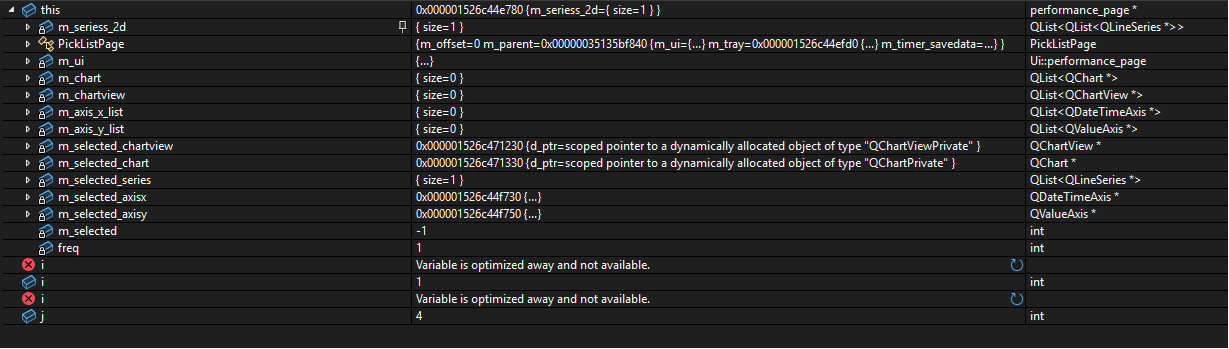
I don't know whyI've tried to operate it without using it anywhere else, but I can't solve it!
What am I missing?
-
Please provide a minimal, compilable example to reproduce the crash. Minimize your code until it no longer crashes.
-
Please provide a minimal, compilable example to reproduce the crash. Minimize your code until it no longer crashes.
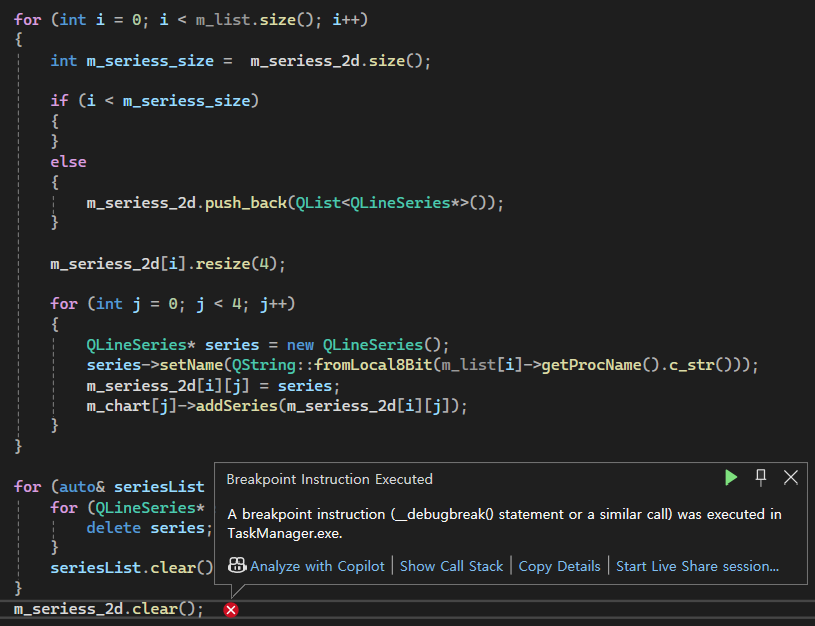
for (int i = 0; i < m_list.size(); i++)
{
	int m_seriess_size =  m_seriess_2d.size();

	if (i < m_seriess_size)
	{
	}
	else
	{
		m_seriess_2d.push_back(QList<QLineSeries*>());
	}

	m_seriess_2d[i].resize(4);

	for (int j = 0; j < 4; j++)
	{
		QLineSeries* series = new QLineSeries();
		series->setName(QString::fromLocal8Bit(m_list[i]->getProcName().c_str()));
		m_chart[j]->addSeries(series);
		m_seriess_2d[i][j] = series;
	}
}

for (int i = 0; i < m_list.size(); i++)
{
	for (int j = 0; j < 4; j++)
	{
		m_seriess_2d[i][j] = nullptr;
	}
	m_seriess_2d[i].clear();
}
m_seriess_2d.clear();
Even if you try to initialize it after creating it, m_serious_2d.clear(); an error occurs in this part as shown in the picture above
In this situation, m_serious_2d is not even added to the chart
What's the problem?
-
for (int i = 0; i < m_list.size(); i++)
{
	int m_seriess_size =  m_seriess_2d.size();

	if (i < m_seriess_size)
	{
	}
	else
	{
		m_seriess_2d.push_back(QList<QLineSeries*>());
	}

	m_seriess_2d[i].resize(4);

	for (int j = 0; j < 4; j++)
	{
		QLineSeries* series = new QLineSeries();
		series->setName(QString::fromLocal8Bit(m_list[i]->getProcName().c_str()));
		m_chart[j]->addSeries(series);
		m_seriess_2d[i][j] = series;
	}
}

for (int i = 0; i < m_list.size(); i++)
{
	for (int j = 0; j < 4; j++)
	{
		m_seriess_2d[i][j] = nullptr;
	}
	m_seriess_2d[i].clear();
}
m_seriess_2d.clear();
Even if you try to initialize it after creating it, m_serious_2d.clear(); an error occurs in this part as shown in the picture above
In this situation, m_serious_2d is not even added to the chart
What's the problem?
-
@Joonsoo This is not a minimal compilable example. And you also did not provide stack trace after the crash.
Well, I don't know how to minimize it
If you look at the current codeAfter the creation of m_serious_2d is completed, initialize it
There's an errorAre you saying that there should be no problem with this part?
Doesn't m_serious_2d own ownership?
Does Chart have ownership in Chartview?
-
Well, I don't know how to minimize it
If you look at the current codeAfter the creation of m_serious_2d is completed, initialize it
There's an errorAre you saying that there should be no problem with this part?
Doesn't m_serious_2d own ownership?
Does Chart have ownership in Chartview?
@Joonsoo @Christian-Ehrlicher asked you to provide a minimal compilable example, not a piece of code.
m_serious_2d contains lists of pointers, so it does not own QLineSeries.
It could help if you would provide the stack trace after the crash... -
@Joonsoo @Christian-Ehrlicher asked you to provide a minimal compilable example, not a piece of code.
m_serious_2d contains lists of pointers, so it does not own QLineSeries.
It could help if you would provide the stack trace after the crash... -
It's for sure a double free - please provide a minimal, compilable example to reproduce the issue