
Skip to content
  • Categories
  • Recent
  • Tags
  • Popular
  • Users
  • Groups
  • Search
  • Get Qt Extensions
  • Unsolved
Collapse
Brand Logo
  1. Home
  2. Qt Development
  3. General and Desktop
  4. QGridLayout
Qt 6.11 is out! See what's new in the release blog

QGridLayout

Scheduled Pinned Locked Moved Solved General and Desktop
qgridlayout
5 Posts 3 Posters 1.4k Views 1 Watching
  • Oldest to Newest
  • Newest to Oldest
  • Most Votes
Reply
  • Reply as topic
Log in to reply
This topic has been deleted. Only users with topic management privileges can see it.
  • G Offline
    G Offline
    GrahamLa
    wrote on last edited by
    #1

    Hi
    Is it possible to have a QGridLayout where the I can control the size of the cells?
    In the image I want the top row to be 'thinner' or less high

    0_1545327610073_d4ab846e-0cee-42ae-afd9-1198224214d5-image.png

    JonBJ 1 Reply Last reply
    0
    • mrjjM Offline
      mrjjM Offline
      mrjj
      Lifetime Qt Champion
      wrote on last edited by mrjj
      #2

      Hi
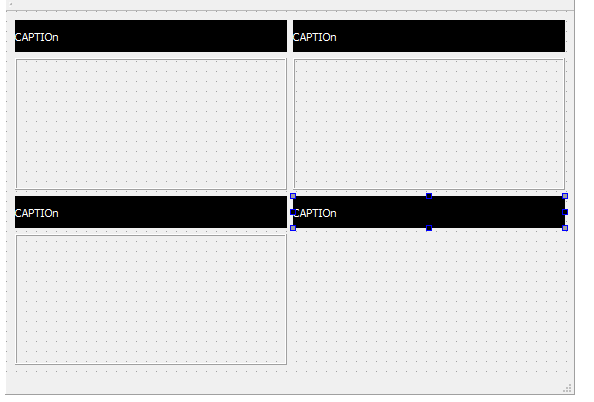
      Well the widgets you put in - defines the cell size.
      So if you limit a widget height (maxHeight), then yes, grid will be like that.
      alt text

      G 1 Reply Last reply
      1
      • G GrahamLa

        Hi
        Is it possible to have a QGridLayout where the I can control the size of the cells?
        In the image I want the top row to be 'thinner' or less high

        0_1545327610073_d4ab846e-0cee-42ae-afd9-1198224214d5-image.png

        JonBJ Offline
        JonBJ Offline
        JonB
        wrote on last edited by
        #3

        @GrahamLa
        I realise this is OT, but how do you get the kind of "toggle switch slide" buttons you have like against MaintenanceLights?

        1 Reply Last reply
        0
        • mrjjM mrjj

          Hi
          Well the widgets you put in - defines the cell size.
          So if you limit a widget height (maxHeight), then yes, grid will be like that.
          alt text

          G Offline
          G Offline
          GrahamLa
          wrote on last edited by
          #4

          @mrjj
          the problem is that they are layouts rather that widgets

          G 1 Reply Last reply
          0
          • G GrahamLa

            @mrjj
            the problem is that they are layouts rather that widgets

            G Offline
            G Offline
            GrahamLa
            wrote on last edited by
            #5

            @GrahamLa
            The problem can be solved by setting row stretch

            1 Reply Last reply
            2

            • Login

            • Login or register to search.
            • First post
              Last post
            0
            • Categories
            • Recent
            • Tags
            • Popular
            • Users
            • Groups
            • Search
            • Get Qt Extensions
            • Unsolved