Skip to content
  • Categories
  • Recent
  • Tags
  • Popular
  • Users
  • Groups
  • Search
  • Get Qt Extensions
  • Unsolved
Collapse
Brand Logo
  1. Home
  2. Qt Development
  3. General and Desktop
  4. Connecting two sliders manually?
Forum Updated to NodeBB v4.3 + New Features

Connecting two sliders manually?

Scheduled Pinned Locked Moved Solved General and Desktop
connectqslider
20 Posts 4 Posters 6.0k Views 2 Watching
  • Oldest to Newest
  • Newest to Oldest
  • Most Votes
Reply
  • Reply as topic
Log in to reply
This topic has been deleted. Only users with topic management privileges can see it.
  • jsulmJ jsulm

    @lansing said in Connecting two sliders manually?:

    new slider at default range

    What do you mean? It has different range compared to old slider? If so why?

    L Offline
    L Offline
    lansing
    wrote on last edited by
    #3

    @jsulm

    No, I want the range of new slider to match the old one also, I'm just stating it to explain the problem.

    jsulmJ 1 Reply Last reply
    0
    • L lansing

      @jsulm

      No, I want the range of new slider to match the old one also, I'm just stating it to explain the problem.

      jsulmJ Online
      jsulmJ Online
      jsulm
      Lifetime Qt Champion
      wrote on last edited by
      #4

      @lansing Why don't you just set the range to same values as in old slider?

      void MainWindow::slotNewSliderChanged()
      {
          int value = ui->newSlider->value();
          // Why this?
          ui->newSlider->setMaximum(ui->oldSlider->maximum());
          ui->oldSlider->setValue(value);
      }
      

      https://forum.qt.io/topic/113070/qt-code-of-conduct

      L 1 Reply Last reply
      0
      • jsulmJ jsulm

        @lansing Why don't you just set the range to same values as in old slider?

        void MainWindow::slotNewSliderChanged()
        {
            int value = ui->newSlider->value();
            // Why this?
            ui->newSlider->setMaximum(ui->oldSlider->maximum());
            ui->oldSlider->setValue(value);
        }
        
        L Offline
        L Offline
        lansing
        wrote on last edited by
        #5

        @jsulm

        The range of the old slider changes.

        mrjjM 1 Reply Last reply
        0
        • L lansing

          @jsulm

          The range of the old slider changes.

          mrjjM Offline
          mrjjM Offline
          mrjj
          Lifetime Qt Champion
          wrote on last edited by mrjj
          #6

          @lansing
          Hi
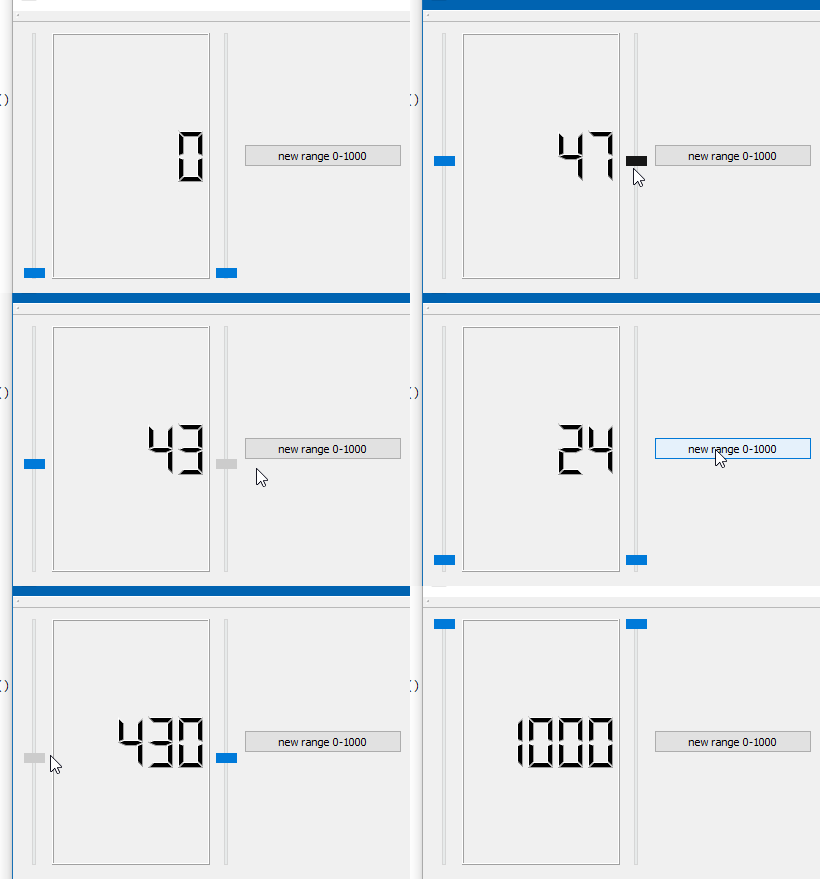
          If i understand your requirement correctly, you can do

            // sync 1 -> 2
               connect(ui->slider1, &QSlider::valueChanged, ui->slider2, &QSlider::setValue);
               // sync 2 -> 1
               connect(ui->slider2, &QSlider::valueChanged, ui->slider1, &QSlider::setValue);
               // set LCD
               connect(ui->slider1, &QSlider::valueChanged, 
               ui->lcdNumber,static_cast<void (QLCDNumber::*)(int)>(&QLCDNumber::display));
          
               // sync range change from 1 -> 2
               connect(ui->slider1, &QSlider::rangeChanged, ui->slider2, &QSlider::setRange);
          

          alt text

          Which is then completely slot less and hence more compact.

          L 1 Reply Last reply
          5
          • mrjjM mrjj

            @lansing
            Hi
            If i understand your requirement correctly, you can do

              // sync 1 -> 2
                 connect(ui->slider1, &QSlider::valueChanged, ui->slider2, &QSlider::setValue);
                 // sync 2 -> 1
                 connect(ui->slider2, &QSlider::valueChanged, ui->slider1, &QSlider::setValue);
                 // set LCD
                 connect(ui->slider1, &QSlider::valueChanged, 
                 ui->lcdNumber,static_cast<void (QLCDNumber::*)(int)>(&QLCDNumber::display));
            
                 // sync range change from 1 -> 2
                 connect(ui->slider1, &QSlider::rangeChanged, ui->slider2, &QSlider::setRange);
            

            alt text

            Which is then completely slot less and hence more compact.

            L Offline
            L Offline
            lansing
            wrote on last edited by
            #7

            @mrjj

            Thank you, I followed this setup and it works. The older slider was created from a custom class, it has signal for valueChanged but doesn't have one for rangeChanged, so I added one and emit it right after the range set by the old slider.

            I have a second problem, I want the new slider to have 1 singleStep on wheel scroll instead of 3, and when I click anywhere on the slider I want it to jump right to that point instead of doing those mini jumps. I have looked at the doc, it doesn't have anything to change them, does that mean I have to extend the QSlider class myself?

            mrjjM 1 Reply Last reply
            0
            • L lansing

              @mrjj

              Thank you, I followed this setup and it works. The older slider was created from a custom class, it has signal for valueChanged but doesn't have one for rangeChanged, so I added one and emit it right after the range set by the old slider.

              I have a second problem, I want the new slider to have 1 singleStep on wheel scroll instead of 3, and when I click anywhere on the slider I want it to jump right to that point instead of doing those mini jumps. I have looked at the doc, it doesn't have anything to change them, does that mean I have to extend the QSlider class myself?

              mrjjM Offline
              mrjjM Offline
              mrjj
              Lifetime Qt Champion
              wrote on last edited by mrjj
              #8

              @lansing
              Well it does have a singleStep property
              but you mean ONLY on wheel ?
              http://doc.qt.io/qt-5/qabstractslider.html#singleStep-prop

              As far as i know u have to subclass to get jump on click
              https://stackoverflow.com/questions/11132597/qslider-mouse-direct-jump

              L 1 Reply Last reply
              2
              • mrjjM mrjj

                @lansing
                Well it does have a singleStep property
                but you mean ONLY on wheel ?
                http://doc.qt.io/qt-5/qabstractslider.html#singleStep-prop

                As far as i know u have to subclass to get jump on click
                https://stackoverflow.com/questions/11132597/qslider-mouse-direct-jump

                L Offline
                L Offline
                lansing
                wrote on last edited by
                #9

                @mrjj

                Apparently the setSingleStep only applies to keyboard...ok I'll just subclass it.

                mrjjM 1 Reply Last reply
                1
                • L lansing

                  @mrjj

                  Apparently the setSingleStep only applies to keyboard...ok I'll just subclass it.

                  mrjjM Offline
                  mrjjM Offline
                  mrjj
                  Lifetime Qt Champion
                  wrote on last edited by
                  #10

                  @lansing
                  hmm yes, seems to take 3 ticks regardless.
                  Its handled here

                  void QAbstractSlider::wheelEvent(QWheelEvent * e)
                  {
                      Q_D(QAbstractSlider);
                      e->ignore();
                      int delta = e->delta();
                      if (e->inverted())
                          delta = -delta;
                      if (d->scrollByDelta(e->orientation(), e->modifiers(), delta))
                          e->accept();
                  }
                  

                  so maybe it depends on how mwheel is setup.

                  L 1 Reply Last reply
                  1
                  • mrjjM mrjj

                    @lansing
                    hmm yes, seems to take 3 ticks regardless.
                    Its handled here

                    void QAbstractSlider::wheelEvent(QWheelEvent * e)
                    {
                        Q_D(QAbstractSlider);
                        e->ignore();
                        int delta = e->delta();
                        if (e->inverted())
                            delta = -delta;
                        if (d->scrollByDelta(e->orientation(), e->modifiers(), delta))
                            e->accept();
                    }
                    

                    so maybe it depends on how mwheel is setup.

                    L Offline
                    L Offline
                    lansing
                    wrote on last edited by
                    #11

                    @mrjj

                    Ok now I got into a QSlider paradox...

                    I created the slider object in the ui, then I created a new slider subclass base on QAbstractSlider. Then in the ui I tried to promote the slider object to the new subclass, but in the "base class" selection, it doesn't have QAbstractSlider as a choice, so I chose "QSlider" and the program ended complaining about constructor doesn't match. But I have to use QAbstractSlider as the base class because Qslider doesn't have control for wheelEvent.

                    mrjjM 1 Reply Last reply
                    0
                    • L lansing

                      @mrjj

                      Ok now I got into a QSlider paradox...

                      I created the slider object in the ui, then I created a new slider subclass base on QAbstractSlider. Then in the ui I tried to promote the slider object to the new subclass, but in the "base class" selection, it doesn't have QAbstractSlider as a choice, so I chose "QSlider" and the program ended complaining about constructor doesn't match. But I have to use QAbstractSlider as the base class because Qslider doesn't have control for wheelEvent.

                      mrjjM Offline
                      mrjjM Offline
                      mrjj
                      Lifetime Qt Champion
                      wrote on last edited by
                      #12

                      @lansing
                      Are you sure ctor do match ?

                      L 1 Reply Last reply
                      0
                      • mrjjM mrjj

                        @lansing
                        Are you sure ctor do match ?

                        L Offline
                        L Offline
                        lansing
                        wrote on last edited by
                        #13

                        @mrjj

                        It complains about setTickInterval being not a member of the class

                        Here's my new slider header

                        class NewSlider: public QAbstractSlider
                        {
                        public:
                            NewSlider(QWidget * parent = nullptr);
                        }
                        
                        1 Reply Last reply
                        0
                        • SGaistS Offline
                          SGaistS Offline
                          SGaist
                          Lifetime Qt Champion
                          wrote on last edited by
                          #14

                          Hi,

                          Why inheriting from QAbstractSlider if you want to customise QSlider ?

                          Interested in AI ? www.idiap.ch
                          Please read the Qt Code of Conduct - https://forum.qt.io/topic/113070/qt-code-of-conduct

                          L 1 Reply Last reply
                          1
                          • SGaistS SGaist

                            Hi,

                            Why inheriting from QAbstractSlider if you want to customise QSlider ?

                            L Offline
                            L Offline
                            lansing
                            wrote on last edited by
                            #15

                            @SGaist

                            Hi, because QSlider doesn't have access to wheelEvent, which is one of the thing I need.

                            mrjjM 1 Reply Last reply
                            0
                            • L lansing

                              @SGaist

                              Hi, because QSlider doesn't have access to wheelEvent, which is one of the thing I need.

                              mrjjM Offline
                              mrjjM Offline
                              mrjj
                              Lifetime Qt Champion
                              wrote on last edited by
                              #16

                              @lansing
                              Hi
                              QSlider also have
                              void wheelEvent(QWheelEvent * e)
                              you can just override it. (its a virtual function )

                              1 Reply Last reply
                              0
                              • SGaistS Offline
                                SGaistS Offline
                                SGaist
                                Lifetime Qt Champion
                                wrote on last edited by
                                #17

                                I understand you want to reimplement the wheelEvent method but inheriting from QAbstractSlider means that you're going to reimplement also the painting, etc. to make your custom slider match the design of QSlider. On the other hand, subclassing QSlider and reimplement the wheelEvent there will reduce highly the work needed.

                                Interested in AI ? www.idiap.ch
                                Please read the Qt Code of Conduct - https://forum.qt.io/topic/113070/qt-code-of-conduct

                                1 Reply Last reply
                                1
                                • L Offline
                                  L Offline
                                  lansing
                                  wrote on last edited by
                                  #18

                                  Oh it does have a wheelEvent...I was looking at the document and I couldn't find the word on the page, so I thought it doesn't have.

                                  http://doc.qt.io/qt-5/qslider.html

                                  mrjjM 1 Reply Last reply
                                  0
                                  • SGaistS Offline
                                    SGaistS Offline
                                    SGaist
                                    Lifetime Qt Champion
                                    wrote on last edited by
                                    #19

                                    When in doubt look at the base class(s) implementation and/or the link named List of all members, including inherited members.

                                    Interested in AI ? www.idiap.ch
                                    Please read the Qt Code of Conduct - https://forum.qt.io/topic/113070/qt-code-of-conduct

                                    1 Reply Last reply
                                    2
                                    • L lansing

                                      Oh it does have a wheelEvent...I was looking at the document and I couldn't find the word on the page, so I thought it doesn't have.

                                      http://doc.qt.io/qt-5/qslider.html

                                      mrjjM Offline
                                      mrjjM Offline
                                      mrjj
                                      Lifetime Qt Champion
                                      wrote on last edited by
                                      #20

                                      @lansing
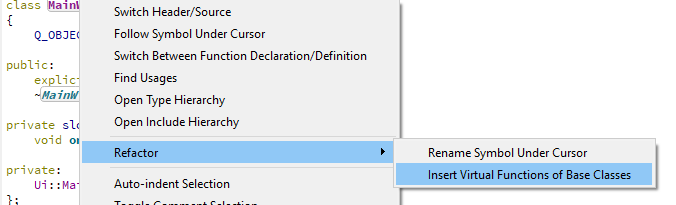
                                      Pro Tip. ;)

                                      If you right click your custom class name
                                      alt text

                                      You can easy see and insert functions from base

                                      alt text

                                      1 Reply Last reply
                                      3

                                      • Login

                                      • Login or register to search.
                                      • First post
                                        Last post
                                      0
                                      • Categories
                                      • Recent
                                      • Tags
                                      • Popular
                                      • Users
                                      • Groups
                                      • Search
                                      • Get Qt Extensions
                                      • Unsolved